6.3. HOW TO LOG DATA FOR PROBLEM DIAGNOSIS
6.3 How to log data for problem diagnosis
If the AsteRx-U does not behave as expected and you need to contact Septentrio Support
Department, it is often useful to send a short SBF data file that captures the anomalous
behaviour.
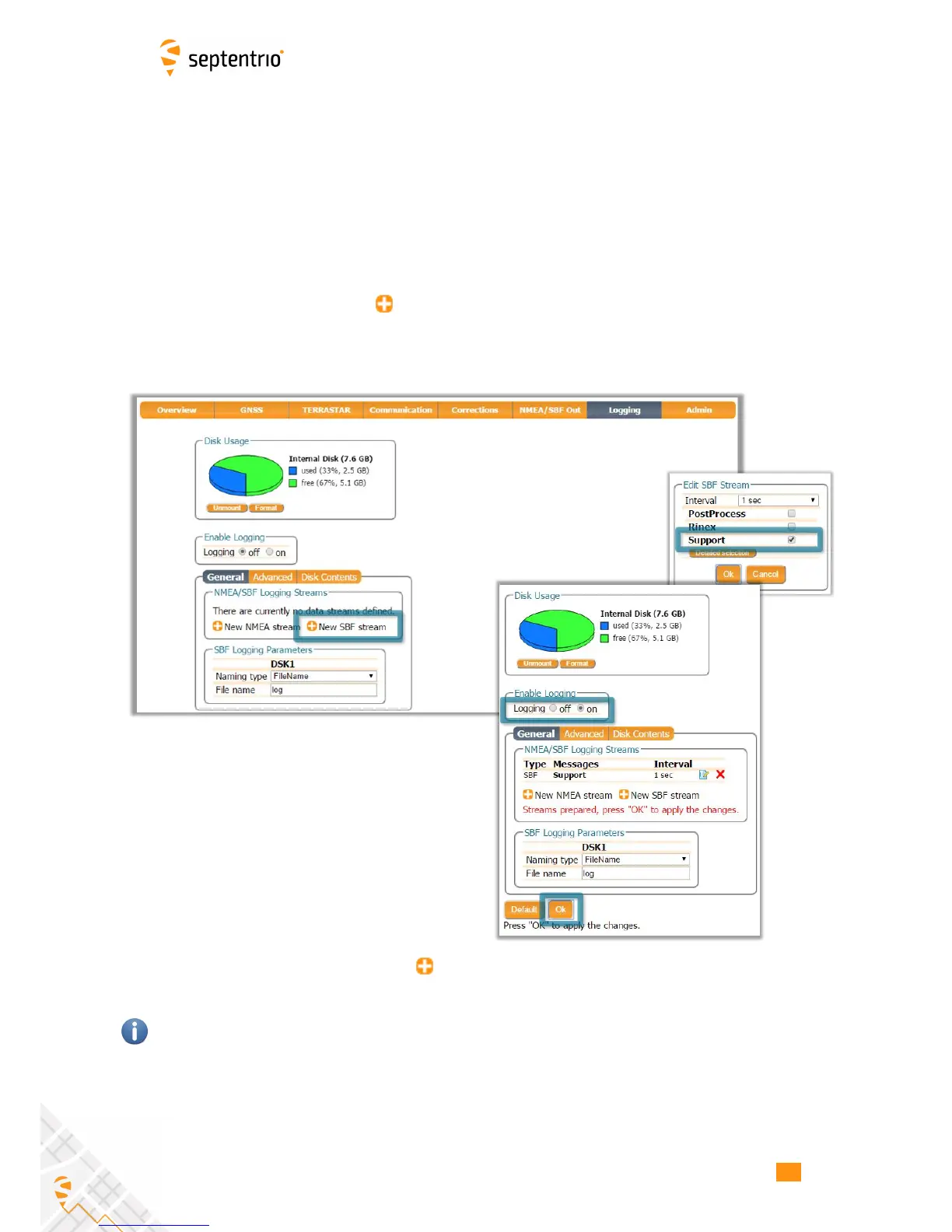
Step 1: Log the Support SBF data blocks
On the Logging page, click on New SBF stream. In the next window, you can select the
SBF blocks you wish to log. By selecting Support as shown in Figure 6-8 the most useful SBF
blocks for problem diagnosis will be automatically selected. Click OK then turn on logging.
Again click OK to start data logging.
Figure 6-8: Click on New SBF stream and select Support
Please note that logging the Support data blocks requires a large throughput of data that
may not be compatible with other CPU-intensive tasks such as data output at higher rates.
When data logging has been correctly configured, the Logging window will show the newly
defined session as active as indicated in Figure 6-9.
66



 To Next Page