4.4. HOW TO OUTPUT A PPS SIGNAL
4.4 How to output a PPS signal
The AsteRx-U can output a PPS (Pulse-per-Second) signal that can be used for example, to
synchronise a secondary device to UTC time.
Step 1: Connect the PPS cable
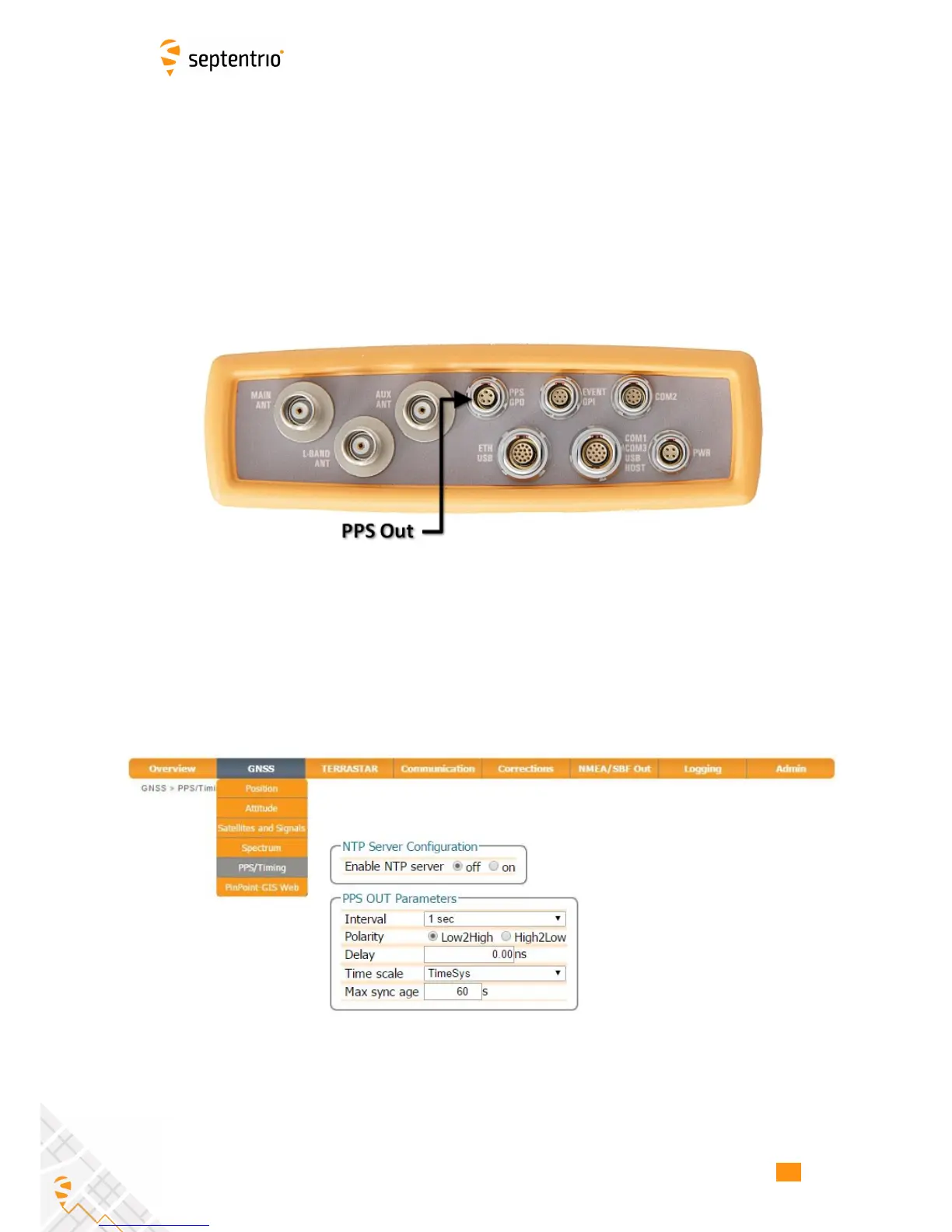
Connect the PPS_OUT cable to the rear-panel connector labelled ‘PPS GPO’ and indicated in
Figure 4-28.
Figure 4-28: PPS connector on rear panel
Step 2: Configure the PPS settings
You can configure the PPS settings on the PPS/Timing window on the GNSS menu as shown
in Figure 4-29.
Figure 4-29: The GNSS, PPS\Timing window
The Interval is the time interval between successive timing pulses and is selectable between
10ms and 10s. The default Polarity of the PPS signal is a low-to-high transition which can be
alternatively configured as high-to-low.
51



 To Next Page