7.5. HOW TO SET THE ASTERX-U TO ITS DEFAULT CONFIGURATION
7.5 How to set the AsteRx-U to its default
configuration
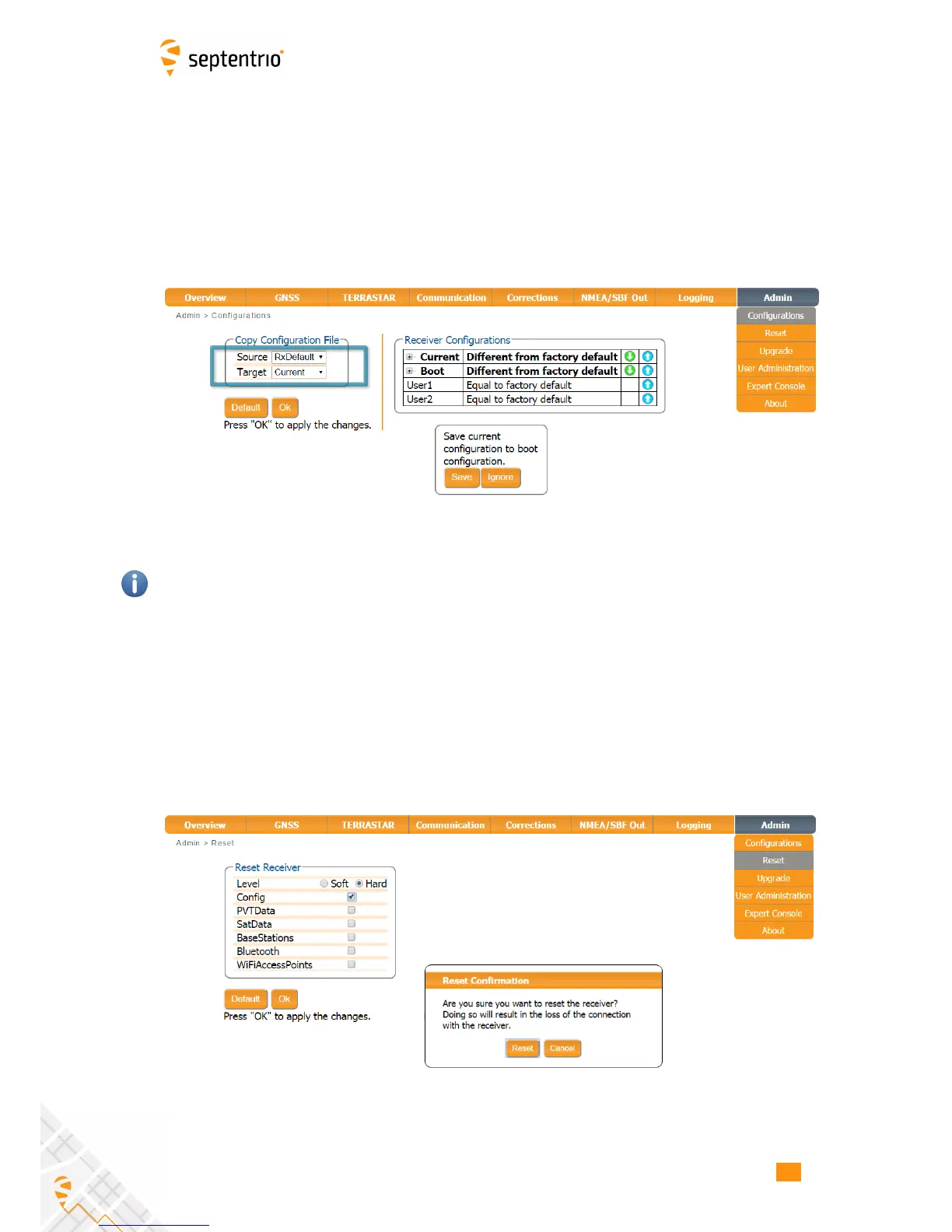
You can set the AsteRx-U configuration to its default settings via the Admin Configurations
tab as shown in Figure 7-8. Select ‘RxDefault’ from the ‘Source’ drop-down list and either
‘Current’ or ‘Boot’ in the ‘Target’ menu. You will then be prompted to Save or Ignore the new
current configuration as the boot configuration.
Figure 7-8: Setting the AsteRx-U to the default configuration
Please note that this procedure will not erase the IP settings of the receiver. This can only be
done on the Ethernet page of the Communication menu.
7.6 How to reset the AsteRx-U
If the AsteRx-U is not operating as expected, a simple reset may resolve matters. The
AsteRx-U can be fully power-cycled using the front-panel power button however, via the
Admin Reset tab as shown in Figure 7-9, different functionalities can be individually reset.
A ‘Soft’ level reset will cause the AsteRx-U to boot up with its current configuration while a
‘hard’ reset will use the configuration stored in the boot file.
Figure 7-9: Resetting the AsteRx-U configuration to its boot configuration
74



 To Next Page