3.4. HOW TO CONFIGURE SBF AND NMEA OUTPUT
3.4.2 Output over Ethernet
SBF and NMEA data can be sent over an Ethernet connection to the AsteRx-U.
Step 1: Configure an IP connection on the AsteRx-U
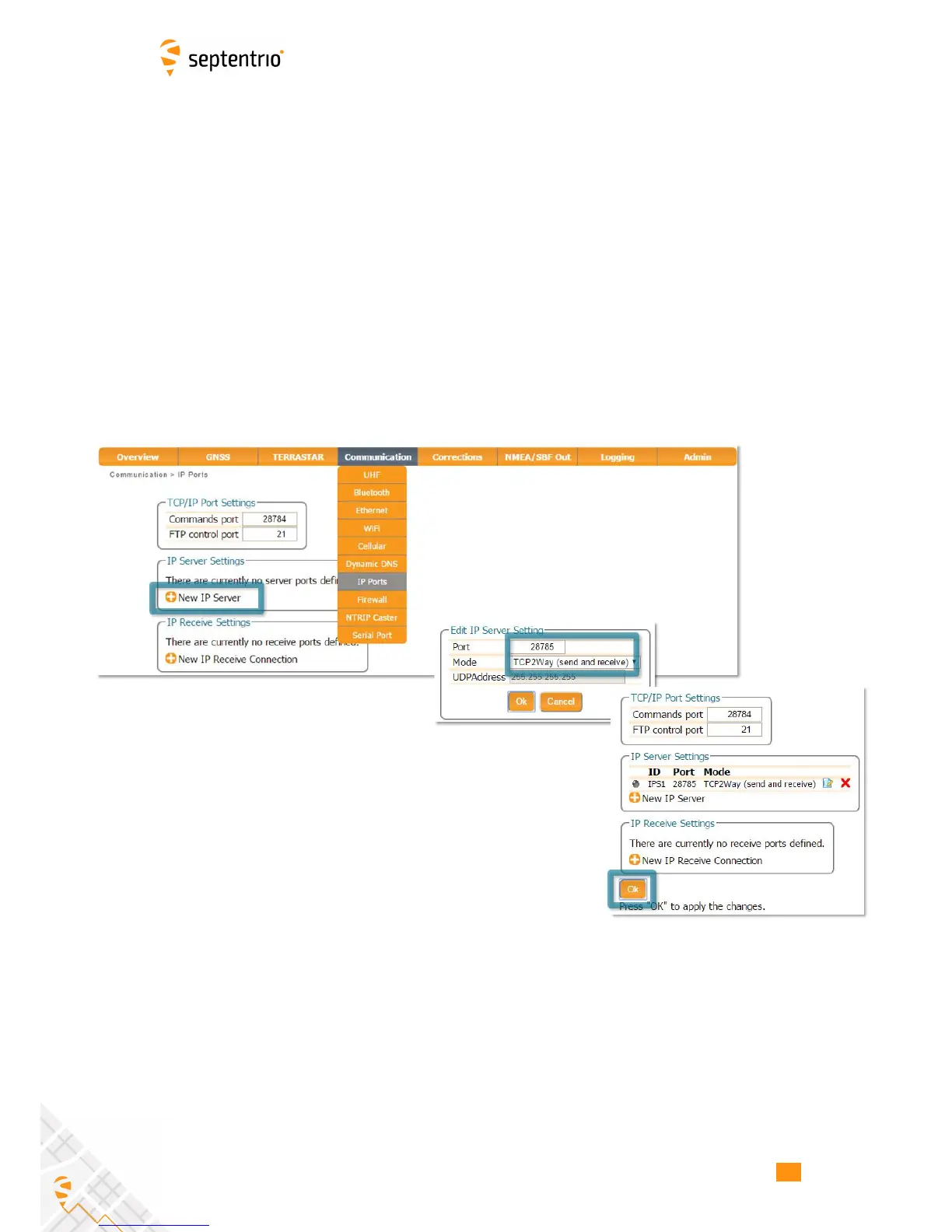
The Ethernet port settings can be configured by selecting ‘IP Ports’ from the
Communication menu. In the example shown in Figure 3-18, port 28785 has been
configured as connection IPS1 in TCP2Way mode so data can be received as well as
transmitted over the connection. It is advisable to select a higher-range port to avoid those
reserved for other purposes such as the webserver and FTP. Also, port 28784 is reserved by
default on the AsteRx-U for commands.
Note that a new IP port can also be configured by followings the sequence of settings for
NMEA output described in Step 2.
Figure 3-18: Configure the TCP/IP server port setting for data output
25



 To Next Page