4.1. HOW TO CONFIGURE THE ASTERX-U FOR RTK
Step 2: Configure the UHF radio
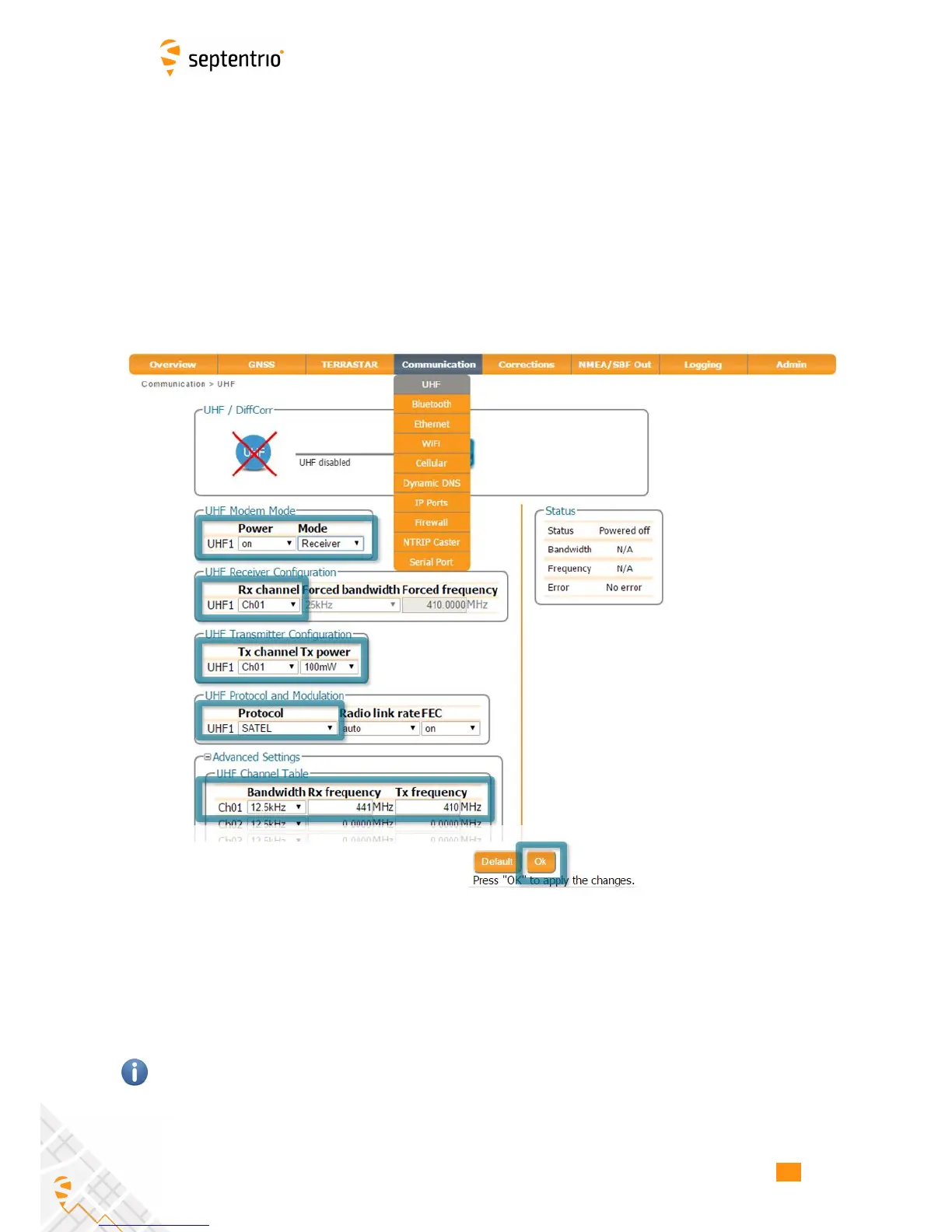
To configure the AsteRx-U to receive differential correction data from a remote base station,
the internal UHF radio should first be powered on as shown in in Figure 4-2.
To configure the remaining settings, you will need to know the following four parameters
from the base station transmitter:
• bandwidth (sometimes referred to as channel spacing) of the transmitter
• frequency of the transmitted signal
• protocol of the transmitted data
• error correction method (FEC) of the transmitted data
Figure 4-2: Configuring the built-in UHF radio for rover operation
After changing the settings click on OK to finalise the settings. Each time the configuration
is changed, a pop-up in the lower right-hand corner will prompt you to save the new
configuration as the boot configuration. Clicking on ‘Save’ will cause the AsteRx-U to boot
with the new configuration after a power cycle.
The frequency and bandwidth are configured via the Advanced Settings menu. Note that,
the baud rate of the connection depends on the Protocol and Bandwidth settings as given
in Appendix 9.2.
33



 To Next Page