5.2. CONFIGURING THE ASTERX-U NTRIP CASTER
5.2 Configuring the AsteRx-U NTRIP Caster
The AsteRx-U includes a built-in NTRIP Caster that makes correction data from the AsteRx-U
available to up to 10 NTRIP clients (or rovers) over the internet. The caster supports up to
three mount points and can also broadcast correction data from a remote NTRIP server.
All settings relating to the AsteRx-U NTRIP Caster can be configured on the NTRIP Caster
window from the Communication menu.
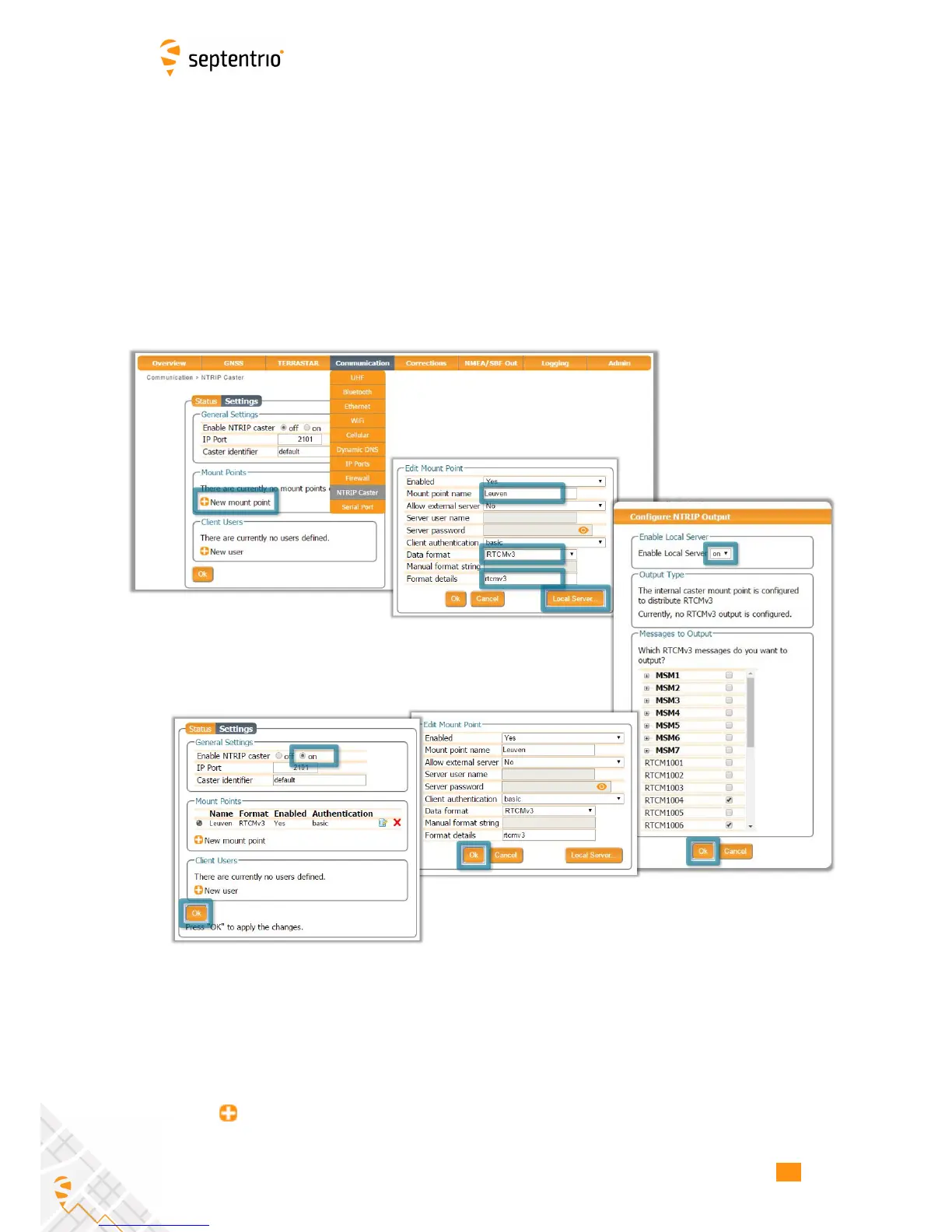
Step 1: Define a new mount point
Figure 5-6: The configuration sequence for defining a new mount point
In the NTRIP Caster window, click on the Settings tab.
In the General Settings field, enable the NTRIP Caster and select the IP port over which you
wish to send correction data: the default port is 2101.
Click on New mount point as indicated in Figure 5-6. Select ‘Yes’ to enable the mount
point and give it a name. This is the name that will appear in the caster source table. Up to
57



 To Next Page