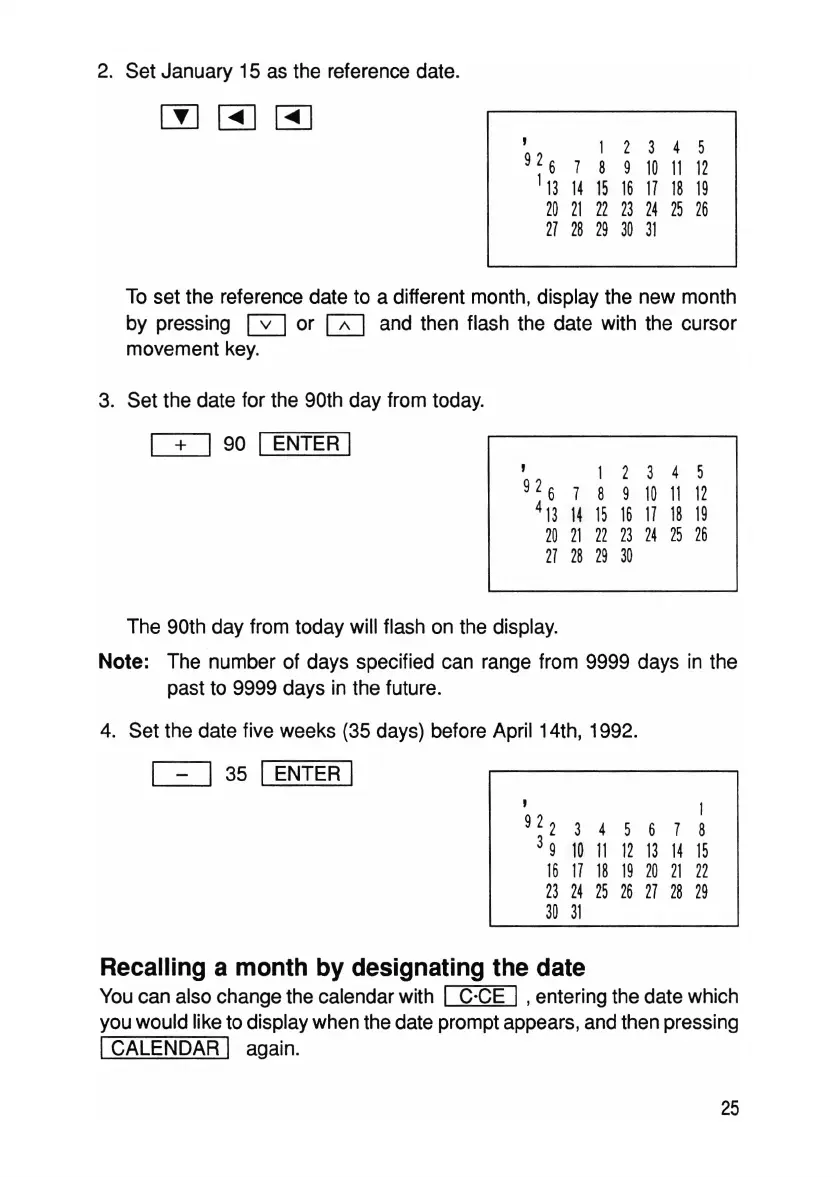
2. Set January 15 as the reference date.
, 1 2 3 4 5
92
6
8 9
10
11
12
1
13
14
15
16
17 18 19
20
21
22
23
24 25 26
27 28 29
30
31
To set the reference date to a different month, display the new month
by pressing 0 or 0 and then flash the date with the cursor
movement key.
3. Set the date for the 90th day from today.
C±::J
90 I ENTER I
, 1 2 3 4 5
92
6
7 8 9
10
11
12
4,314151617
18 19
20
21
22 23 24 25
26
27 28 29
30
The 90th day from today will flash on the display.
Note: The number of days specified can range from 9999 days in the
past to 9999 days in the future.
4. Set the date five weeks (35 days) before April 14th, 1992.
~
35 I ENTER I
, 1
92
2
3 4 5 6 7 8
3
9
10
11
12
13 14
15
16 17 18
19
20
21
22
23
24
25
26
27
28
29
30
31
Recalling a month by designating the date
You can also change the calendar with I C·CE I ,entering the date which
you would like to display when the date prompt appears, and then pressing
ICALENDAR I again.
25



 To Next Page