ShopBot PRS Assembly Manual Page -6
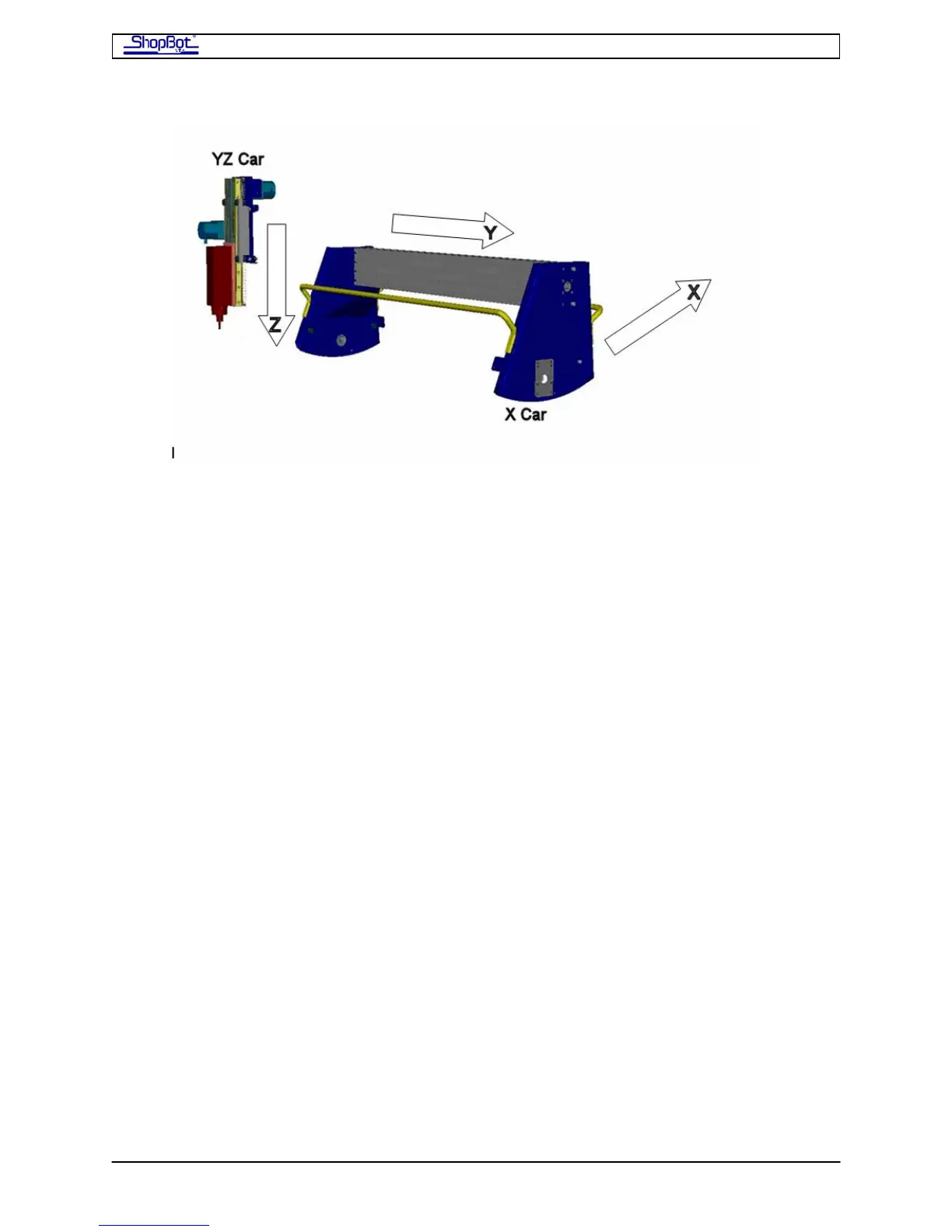
The electrical cabling will be arranged along the back of the tool, so this is the part of the
tool that can be placed nearer a wall, obstruction, or where there will generally be less
action. Note, however, that it is best if you are able to walk around and access your tool
from all sides. The wiring for the Y and Z axes will be attached to a clear plastic Wire Guide.
The Wire Guide arches out from the back right hand corner of the X-Car to the front right of
the YZ-Car, as seen from the little man. Note that the X-Car mounts with the sloped side
(front of car) to the left.
THE X-AXIS. The X-axis is the basis for your tool's right and left moves (as seen by you as
the little man in the front of the diagram) -- it's the long axis on a standard ShopBot. Note
that the distance between the tracks on the X-axis is wide. Because of this span, we power
the X-Car movement with 2 motors, one on each side. The X-Car is driven by a rack and
pinion power transmission system. The gear rack is mounted on the bottom of the long X
rails and engaged by the pinion gear on the motor shaft.
THE Y-AXIS. The Y-axis provides the front to back movement of your ShopBot (the short
axis for a standard ShopBot). Note that the Y-axis rides on the X-axis. The gear rack for the
Y axis is mounted in the face of the X-Car beam.
THE Z-AXIS. The Z-axis is vertical, rides the face of the YZ-Car, and moves the cutting tool
up and down. The drive system for the Z-axis is also rack and pinion. The Z axis is spring-
loaded to counterbalance the weight of your router or spindle.
THE ROLLING GEAR. Throughout your PRS ShopBot, precision motion bearings roll on
hardened stainless steel rails to provide your tool with smooth travel.
THE CONTROLS. Your ShopBot is moved and controlled by a personal computer (running
Windows XP or Vista) that you provide. In the ShopBot Control software, signals are
streamed from the PC's USB port through a USB cable to the ShopBot Control Box. The
Control Box is placed near the tool and provides the driving power to the motors. The
Control Box also receives incoming information from other devices such as your Z-Zero
Plate and Proximity Switches.
PRSAssembly080922.doc Copyright 2007,2008 ShopBot Tools, Inc



 To Next Page