AD.A module
User’s Manual, DU3310103-MRI / rev.3 - 02.05.2019
5-7
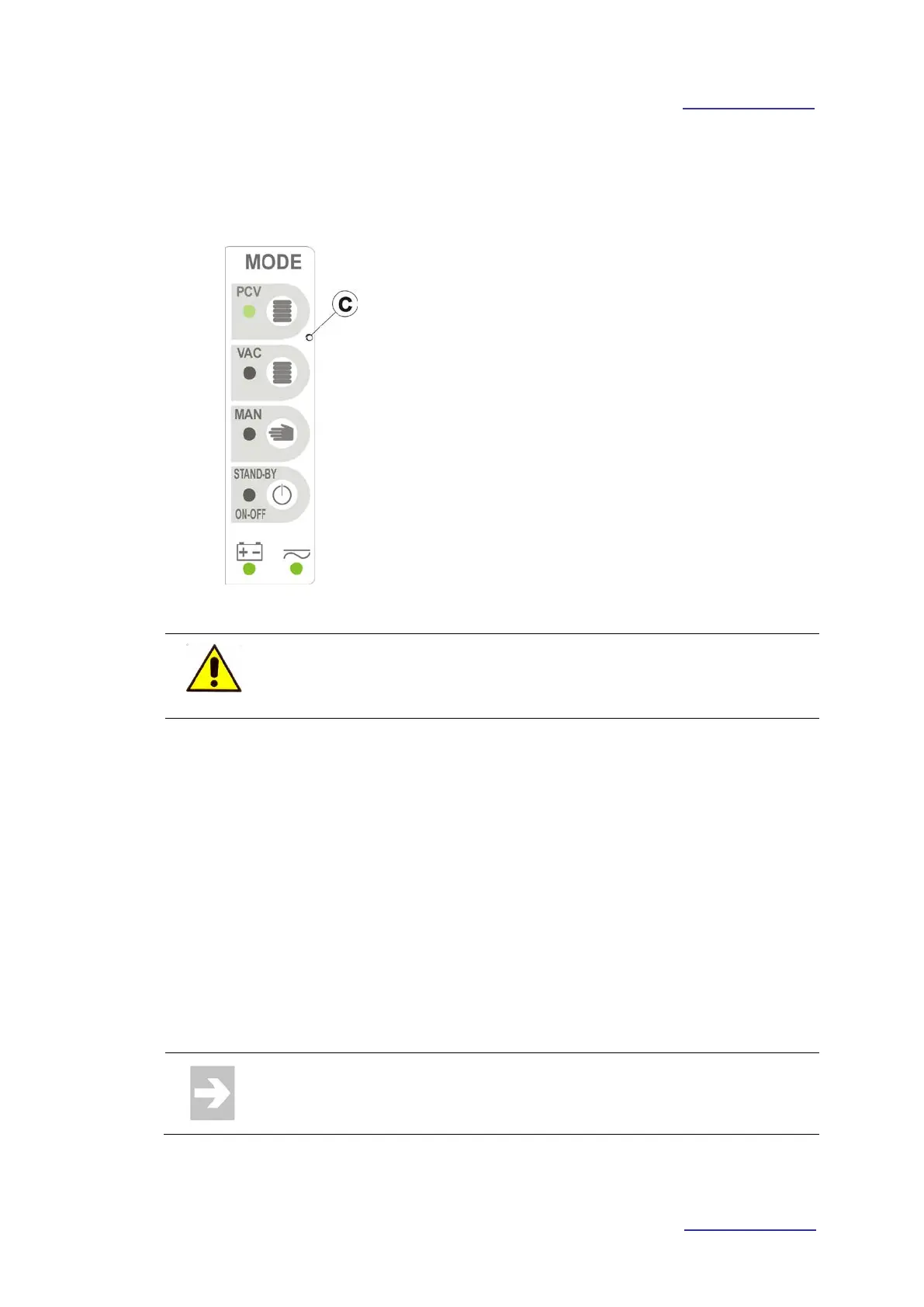
5.2.1 User’s controls area and operative mode selection
To enter the ventilator module, keep pressed for a
few seconds the STAND-BY / ON-OFF key.
• Press the membrane key relevant to the
operative mode to activate (the led relevant to
the membrane key lights on).
• Press the STANDBY / ON-OFF button to
interrupt the ventilation.
• Keep pressed for a few seconds the STAND-
BY / ON-OFF key, to turn off the ventilator
module.
It’s possible to quickly switch from an operative mode to another by
pressing the membrane key relevant to the new operative mode to
activate.
STAND-BY Ventilator condition at start-up or turning off of the same.
PCV Synchronized pressure controlled ventilation.
VAC
Volume controlled ventilation synchronized with the patient if the
inspiratory trigger is active.
Volume Assisted Controlled.
MAN Manual ventilation.
For further information on operating logic and how setting the operating
parameters of Operative Modes, make reference to the relevant
paragraph.



 To Next Page