Image processing
3.4 Options for image acquisition and image processing
SIMATIC MV500
Operating Instructions, 03/2021, C79000-G8976-C494-05
85
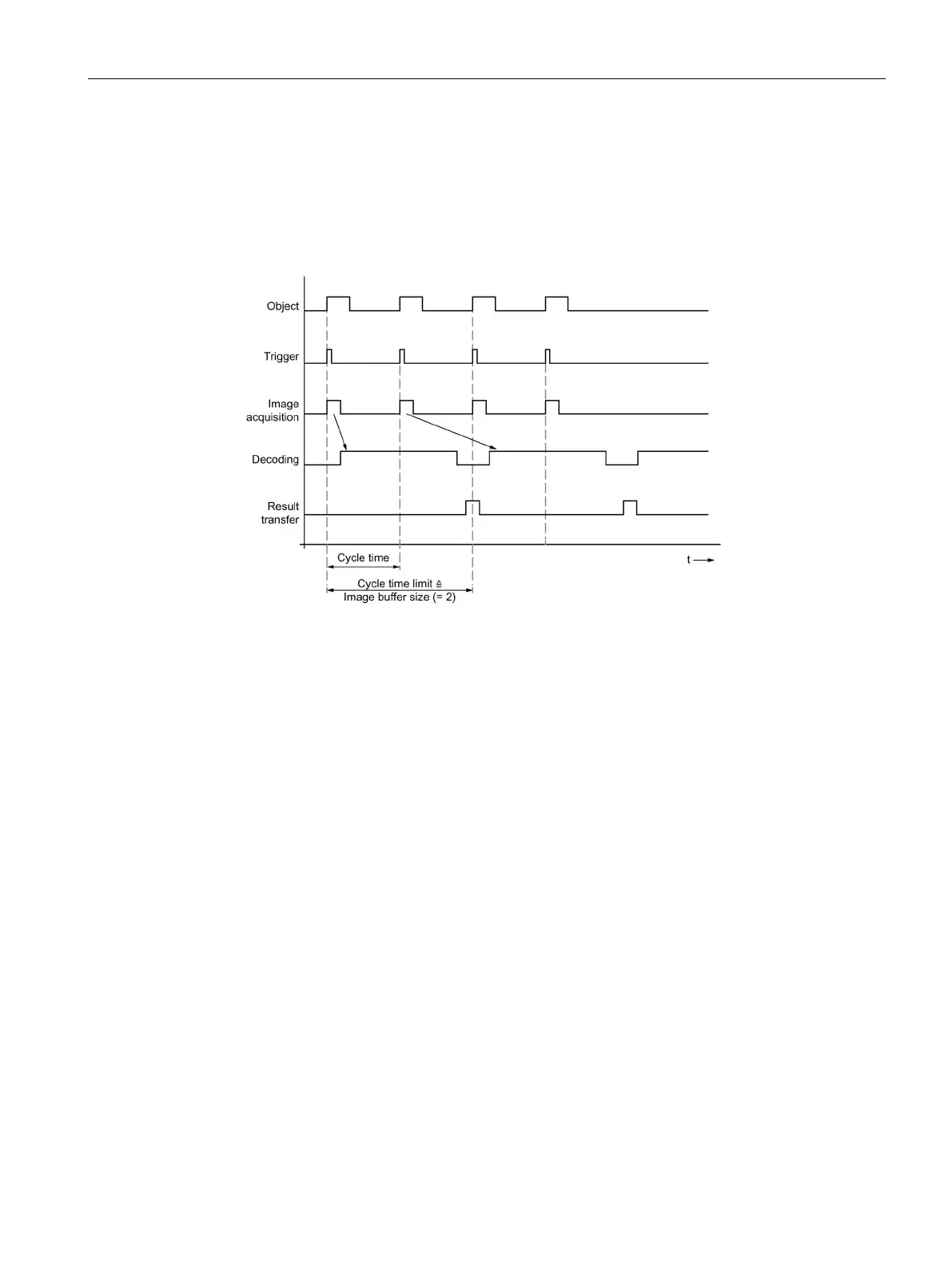
"Image buffer size > 1" setting
With image buffer sizes greater than 1, intermediate buffering takes place between image
acquisition and processing and between processing and result output.
Image acquisition can at times be performed in a faster sequence and processing can also
buffer results briefly prior to transfer. This allows brief periods of peak load to be handled.
Figure 3-18 Time diagram: Individual trigger for image buffer size > 1; in the example: Image buffer
size = 2
3.4.2 Image acquisition option "Auto-trigger"
How it works
With this setting, codes entering the viewing field of the optical reader are read
automatically. In this case, the optical reader does not require any external trigger signals, for
example from a light barrier.
This option is particularly useful for the following objects for which accurate triggering via a
light barrier is difficult.
The "Auto-trigger" option works on a step-for-step basis. The acquired images are decoded in
the same clock cycle. The "Auto-trigger" option can therefore be used continuously without
any time limit.



 To Next Page