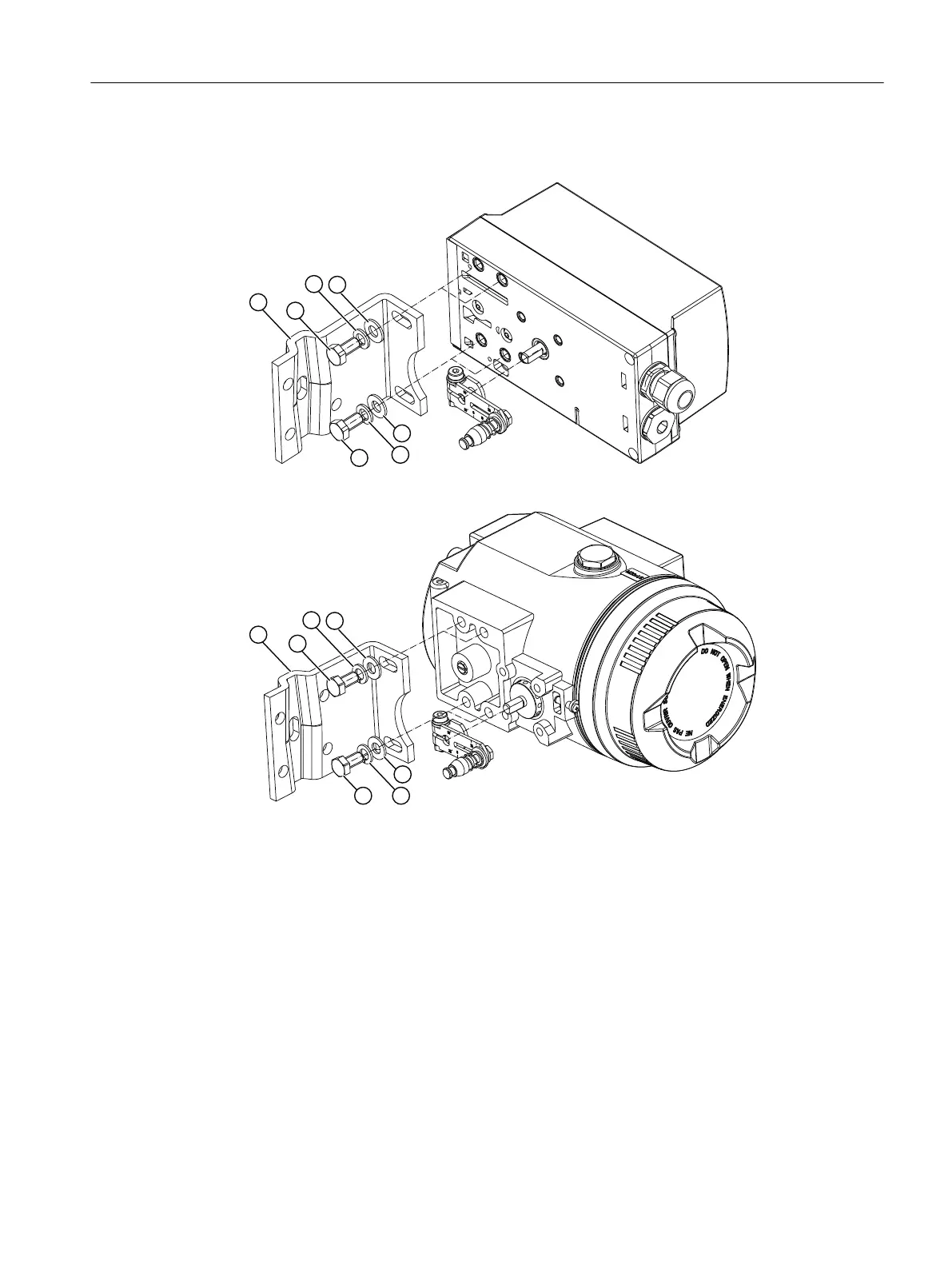
9. Install the mounting bracket ① at the rear side of the positioner. Use 2 hexagon bolts ⑨,
2 spring lock washers ⑩ and 2 flat washers ⑪ for this purpose.
Figure 4-5 Installation with mounting bracket
Figure 4-6 Installation with mounting bracket, flameproof enclosure
10.Select the row of holes. The selection of the row of holes depends on the yoke width of the
actuator. Select the row of holes in such a way that the carrier pin ④ meshes with the pick-
up bracket ② near the spindle.
11.Keep the positioner and the fastening bracket on the actuator. Ensure that the carrier pin ④
for the entire range of stroke of the actuator is guided inside the pick-up bracket ②. Ensure
that the carrier pin ④ does not touch the clamping pieces ③.
Installing/mounting
4.2 Mounting to linear actuator
SIPART PS2 with 4 to 20 mA/HART
Operating Instructions, 11/2019, A5E00074631-AE 43

 To Next Page
 Loading...