SIGLENT
SDS1000CML/CNL/DL Service Manual 27
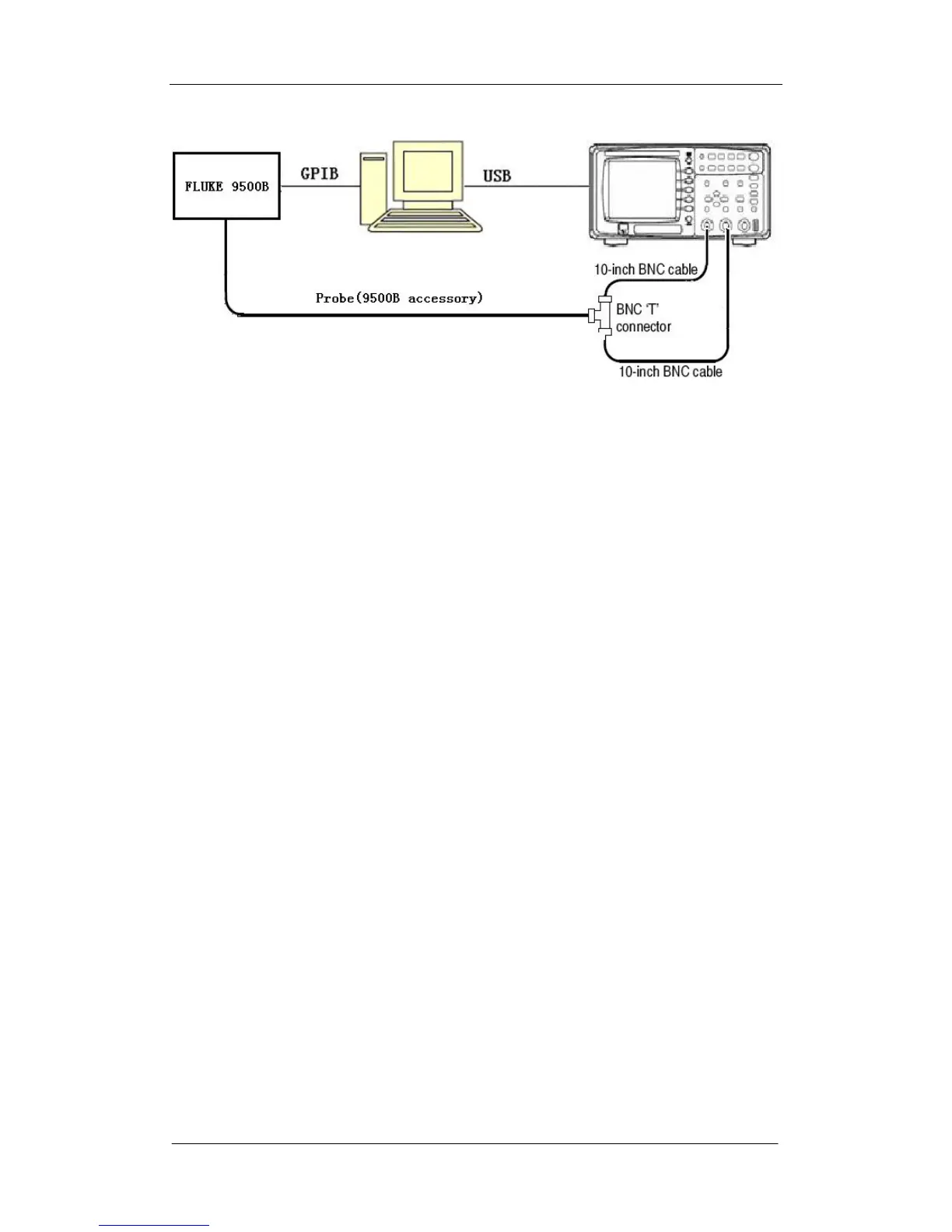
Figure 4-1 Connecting the adjusting devices
3. Turn on FLUKE 9500B, and then set its GPIB address to 22.
4. Turn on the oscilloscope and operate it for about 30 minutes, then perform
the Self-Cal routine.
5. Connect the oscilloscope and FLUKE as figure above using the specified
probe provided as accessory, BNC T connector and BNC cables.
6. Open the EasyTest software.
7. Click “open” under the “file” menu, and then select the corresponding Tcl
script.
8. Click the “test” button to perform the adjusting procedures.
Note: the adjusting procedures include four items as the following:
Debugvolt.tcl : indicates adjusting voltage
Debugtrig.tcl : indicates adjusting trigger
Debughori.tcl : indicates adjusting horizon
Debugtrigpre.tcl : indicates adjusting trigger accuracy









 To Next Page