‘.
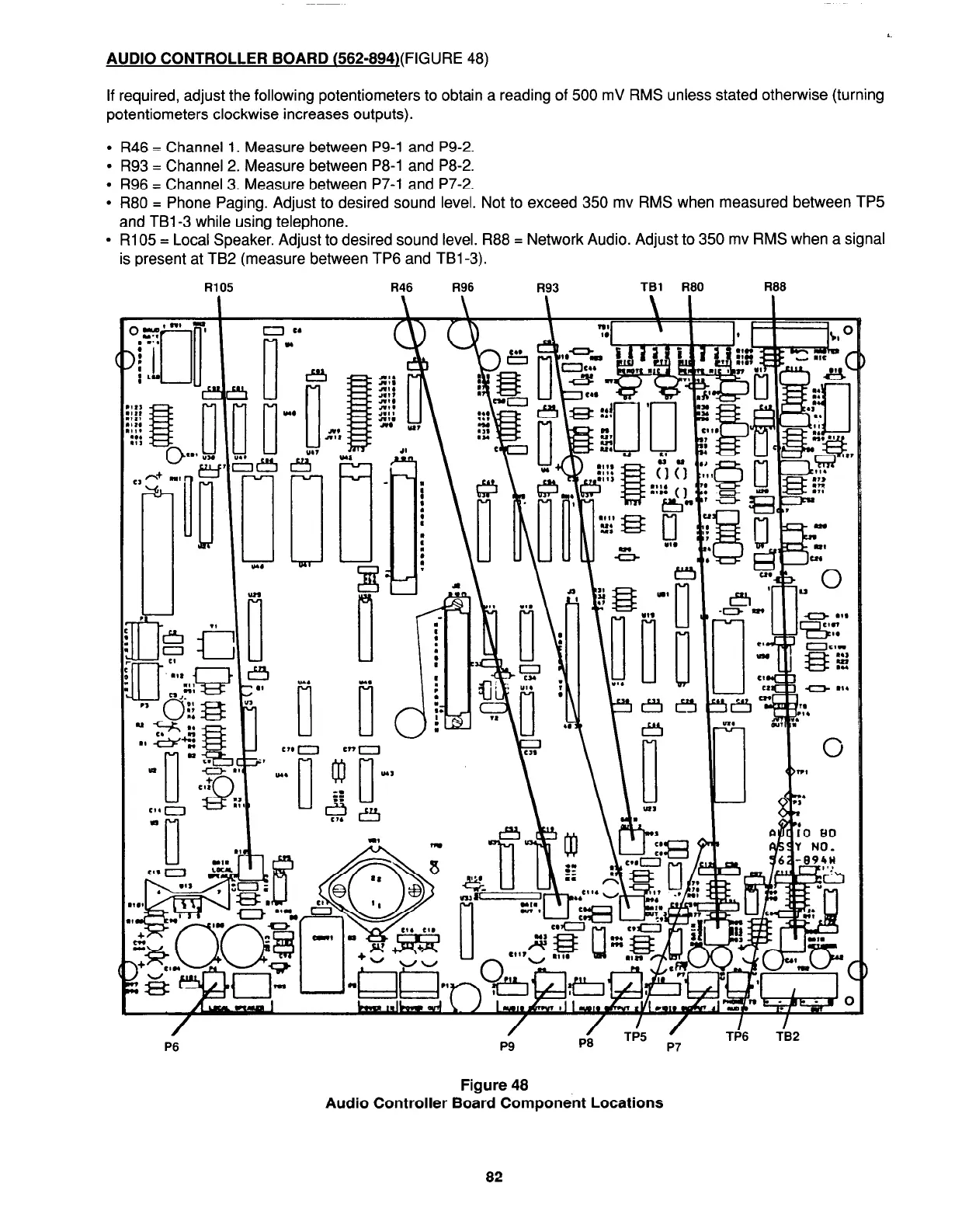
AUDIO CONTROLLER BOARD
(562-894l(FIGURE 48)
If required, adjust the following potentiometers to obtain a reading of 500 mV RMS unless stated otherwise (turning
potentiometers clockwise increases outputs).
l
R46 = Channel 1. Measure between P9-1 and P9-2.
l
R93 = Channel 2. Measure between P8-1 and P8-2.
l
R96 = Channel 3. Measure between P7-1 and P7-2.
l
R80 = Phone Paging. Adjust to desired sound level. Not to exceed 350 mv RMS when measured between TP5
and TBl-3 while using telephone.
l
R105 = Local Speaker. Adjust to desired sound level. R88 = Network Audio. Adjust to 350 mv RMS when a signal
is present at TB2 (measure between TP6 and TBl-3).
R105
R46 R96 R93
TBl R80
R88
\
\
-. -
nr
a.
,
3 m
Y
/
P6
\I = I
q,sdY NO.
TP5 ‘
P7
T@6 TB2
Figure 48
Audio Controller Board Component Locations
82




 To Next Page