Operation
40 / 76 Sintratec S1 BA_S1_en 1.1
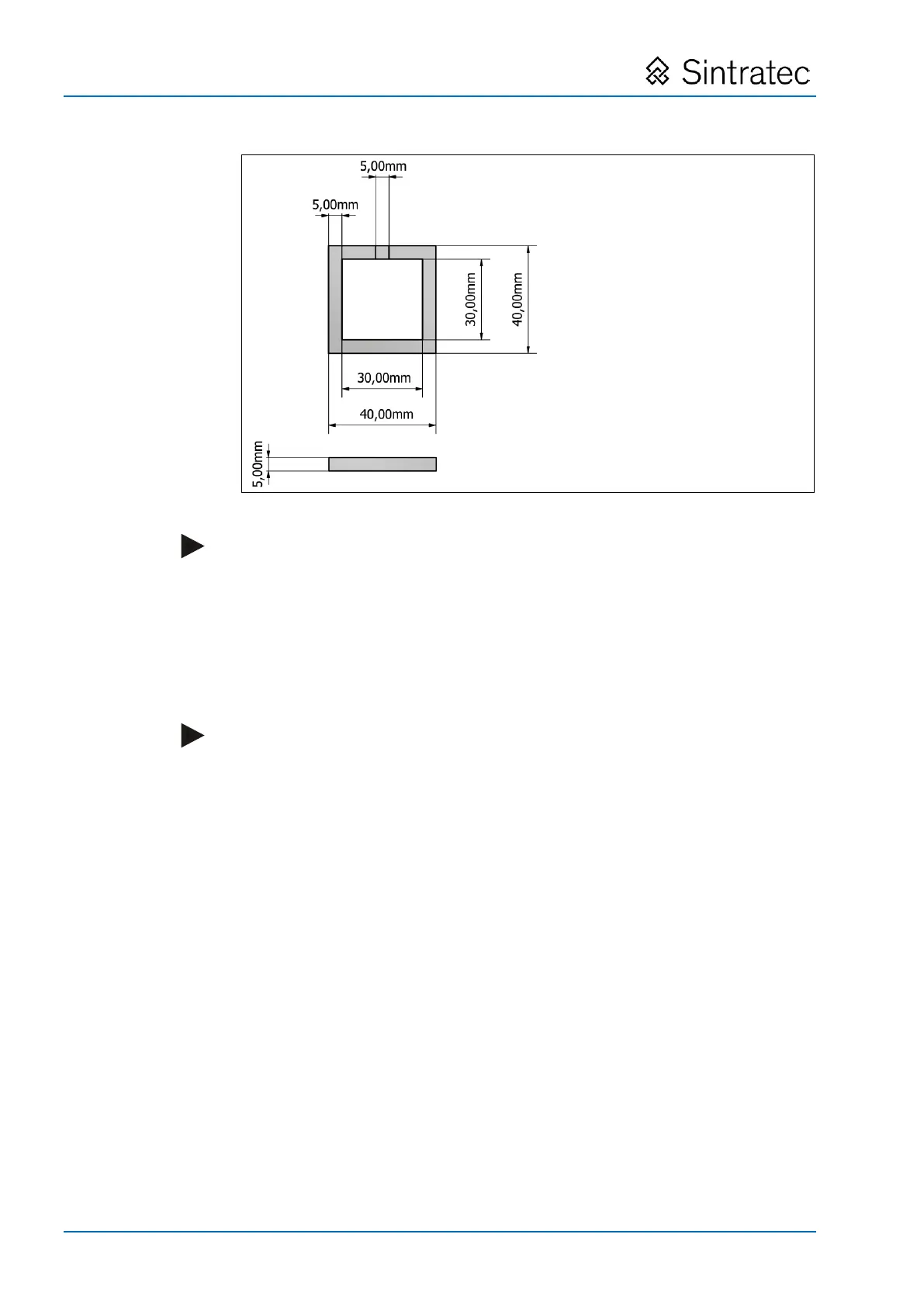
: Target dimensions of sample print object for calibration
Note
We recommend neither shifting, nor rotating, nor scaling up/down the sample
print object.
General procedure for loading print data
1. In "Sintratec Central", select the "1. Place" tab.
2. Perform a "drag and drop" action to place the STL file.
Alternatively, STL files can be imported via the "File" menu.
Note
Placement of the print object is important for ensuring a good result. In this
regard, please read the corresponding information in the Sintratec Academy, in
the "Software" area under the ‘Tab "1. Place"’ section, in particular in the "Best
Position Practice" sub-section.
Please note the maximum permissible dimensions of the print object, according
to the "Technical data" section.
Pos: 142 /Sintratec /+++++++ + Seitenumbruch ++++ ++++ @ 3\ mod_146398 1070991_0.docx @ 7762 @ @ 1


 To Next Page