Cleaning and servicing
52 / 76 Sintratec S1 BA_S1_en 1.1
Pos: 174 /Sintratec /Kap./Reinigu ng & Instandh altung/Laser-A bdeckglas rei nigen - Einleitung @ 3\mod_1 470660784309_6 556.docx @ 10588 @ 3 @ 1
8.2.5 Cleaning of glass cover of laser
Note
During the printing process, residue can settle on the glass cover of the laser and
thus cloud the glass.
The performance of the laser can be impaired if the glass is not cleaned
regularly.
Pos: 175 /Sintratec /Kap./Reinigung & Instandh altung/Laser-A bdeckglas rei nigen - Bild S1 @ 3\mod_14706 60873794_655 6.docx @ 10 593 @ @ 1
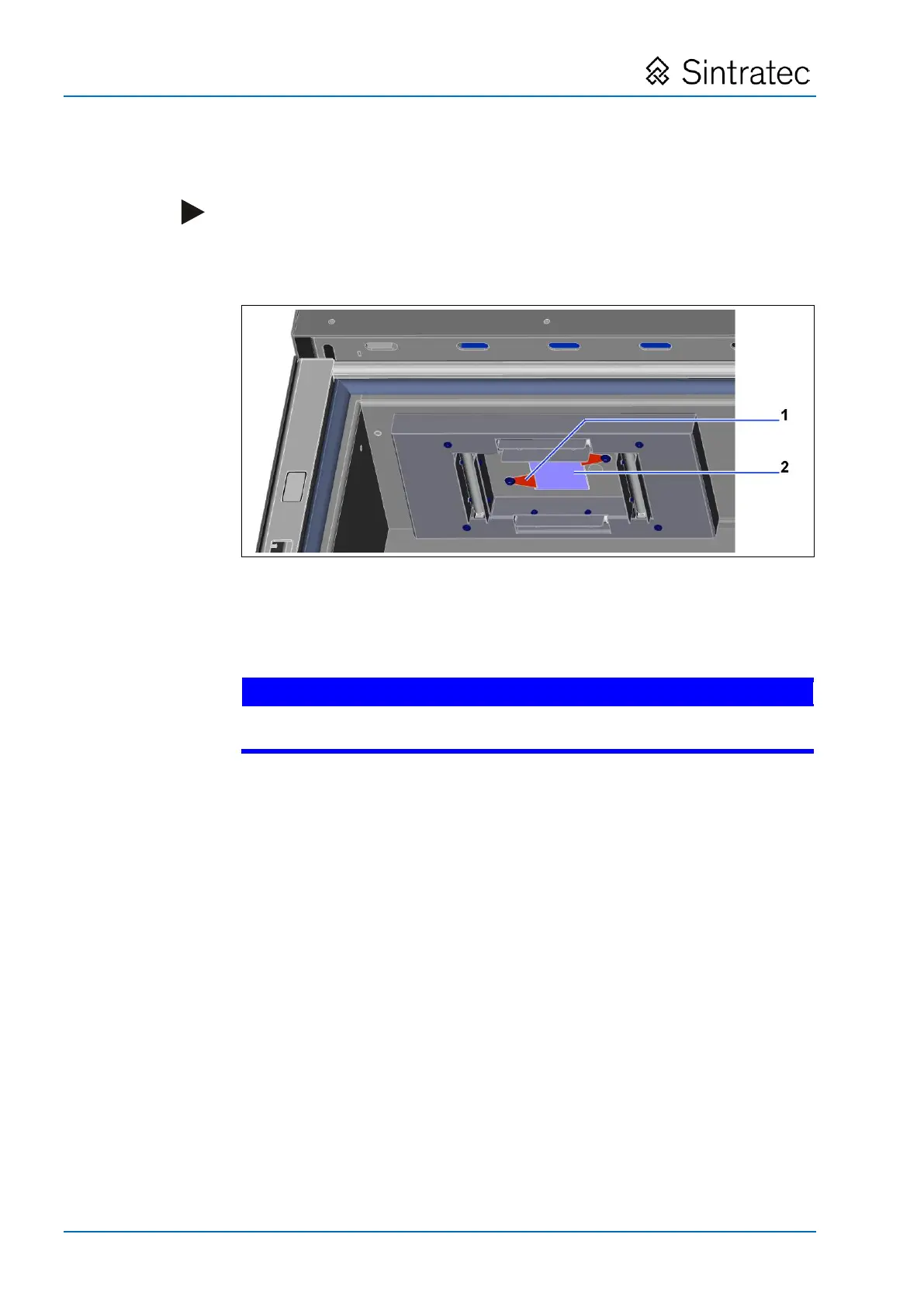
: Cleaning of glass cover of laser
Pos: 176 /Sintratec /Kap./Reinigung & Instandh altung/Laser-A bdeckglas rei nigen - Vorgehen @ 3\mod_14 66057918433_ 6556.docx @ 9 443 @ @ 1
1. Turn away the holder (1) and remove the glass cover of the laser (2).
2. Clean the glass on both sides using a soft cloth and a glass cleaner.
3. Wipe the glass dry.
Avoid touching the glass with a bare hand and thereby soiling it.
• Wear protective gloves.
4. Refit the cover glass of the laser by applying the same procedure but in
reverse.
Pos: 177 /Sintratec /+++++++ + Seitenumbruch ++++ ++++ @ 3\ mod_146398 1070991_0.docx @ 7762 @ @ 1


 To Next Page