Cleaning and servicing
58 / 76 Sintratec S1 BA_S1_en 1.1
Pos: 189 /Sintratec /Kap./Wartung/ Lüfterfilter ers etzen @ 3\m od_146703679 6032_6556.doc x @ 9983 @ 3 @ 1
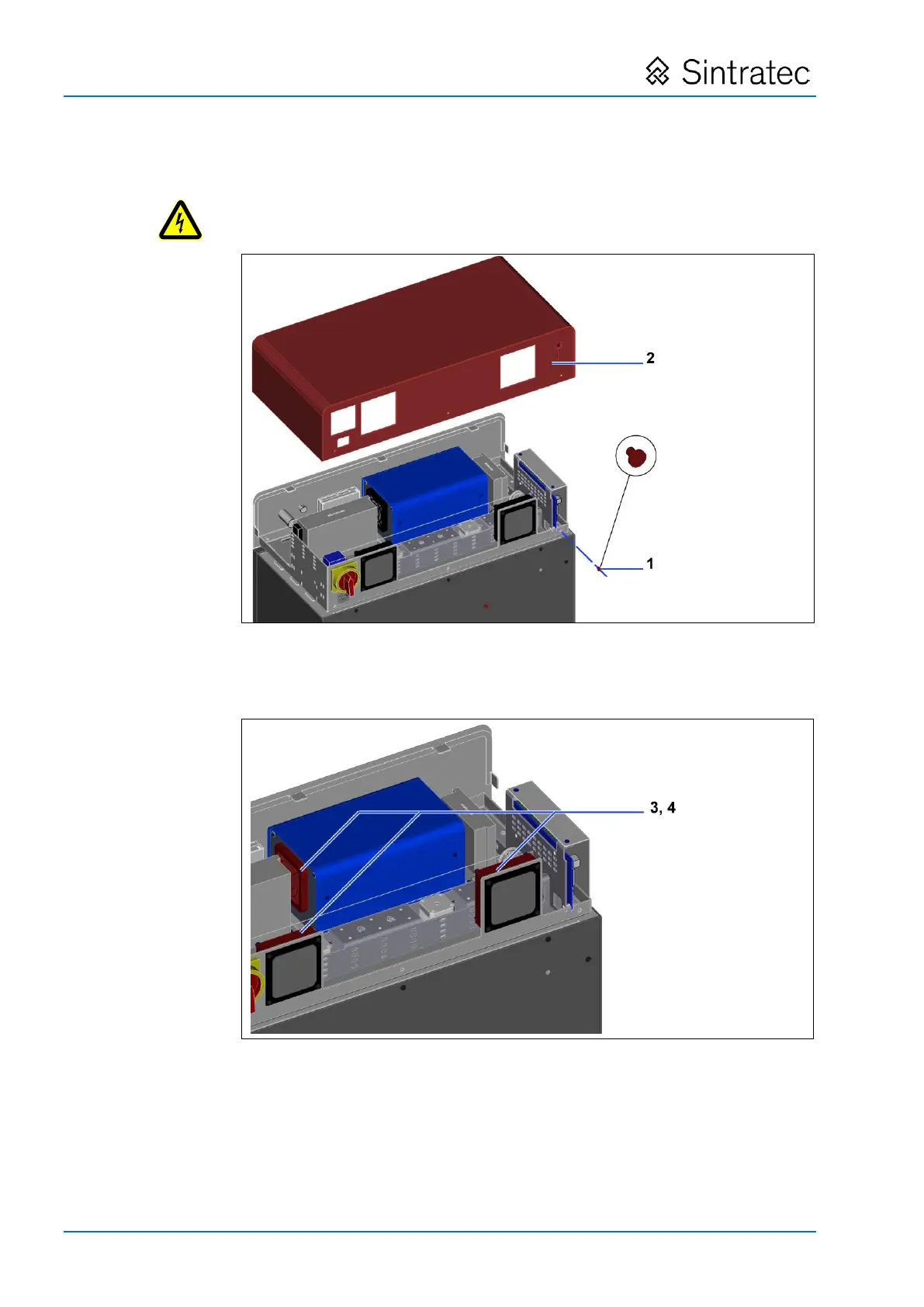
8.3.4 Replacement of fan filters
: Replacement of fan filters
4. Remove the outlet grid (3) at the 3 fans (insert screwdriver behind each grid
and lever off).
5. Remove the filter mats (4) behind the outlet grids.
6. Insert new filter mats and then snap the outlet grids back onto the respective
housings.
7. Refit the cover by applying the same procedure but in reverse.
Pos: 190 /Allge mein/+++++++++ +++ Neues Kapi tel +++++++++ +++ @ 0\ mod_1414754200 269_0.docx @ 6973 @ @ 1


 To Next Page