Operation
Sintratec S1 BA_S1_en 1.1 39 / 76
Pos: 141 /Sintratec /Kap./Betrie b/3D-Modelldate n des Printobj ekts laden @ 3\ mod_14661567 01313_6556.doc x @ 9566 @ 3 @ 1
7.3.3 Loading of 3D model data for print object
Note
3D model data
The "Sintratec Central" print software supports STL files of 3D model data. Each
common CAD application has a function that exports to the STL format.
STL files for all types of objects can be found on the internet and can be used for
testing purposes.
STL files occasionally have errors. Such files should be repaired before they are
used with appropriate software tools.
Detailed information on STL files can be found in the Sintratec Academy.
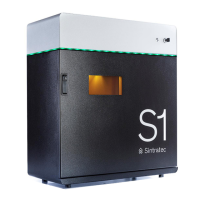
Procedure for loading the sample print object for the calibration
1. In "Sintratec Central", select the "4. Print" tab.
2. Press the "Calibrate" button.
The sample print object is thereby automatically loaded for calibration under
the "1. Place" tab.
Fig.
: "1. Place" tab with sample print object for calibration


 To Next Page