ALC404 LIGHTING TOWER CONTROLLER USER MANUAL
ALC404 Lighting Tower Controller 2018-11-06 Version 1.1 Page 11 of 83
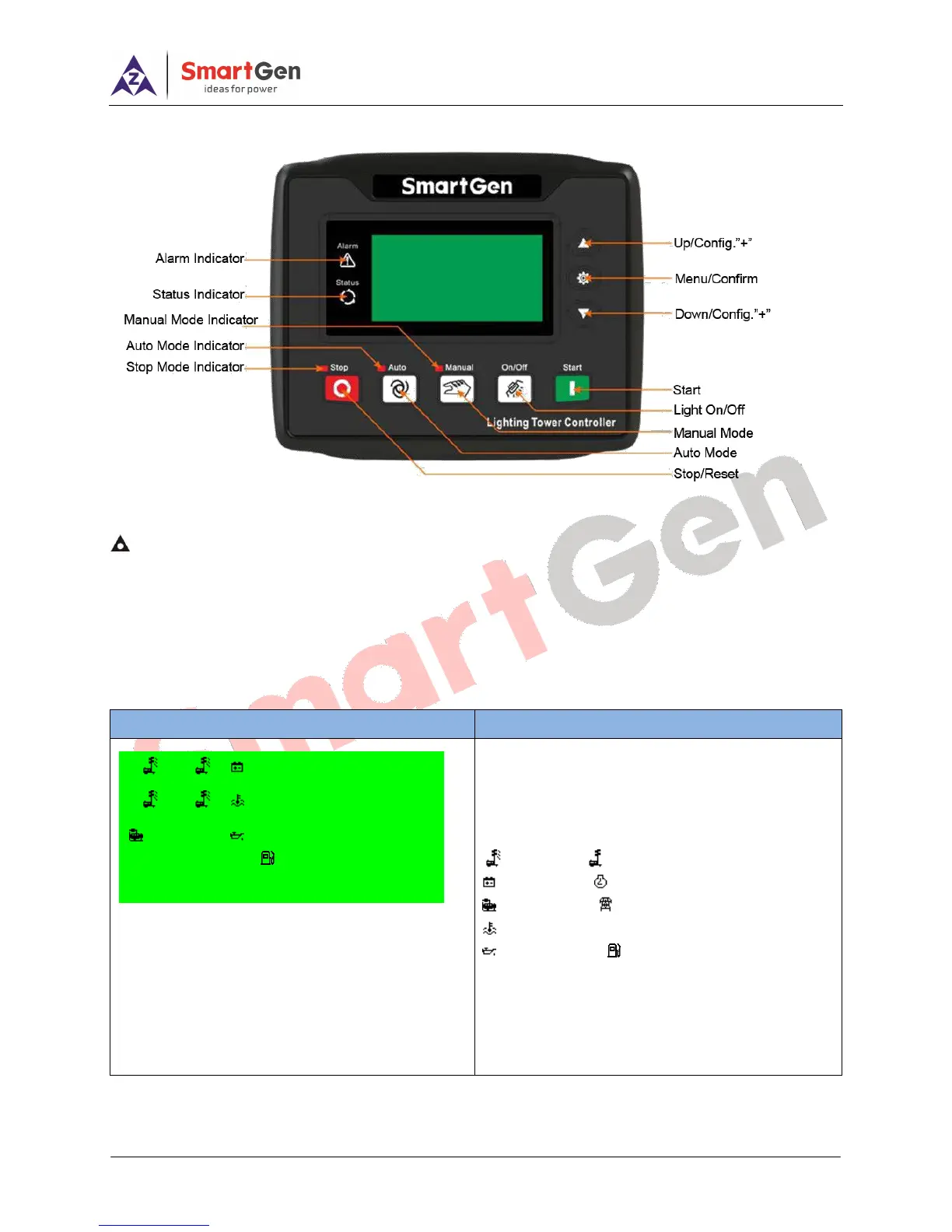
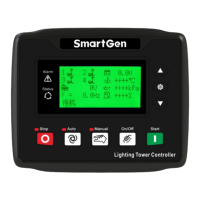
4.2 CONTROLLER PANEL
Fig.1 - ALC404 Front Panel
NOTE: Partial indicators description,
Alarm Indicator: slowly flash when warning alarms occur; fast flash when shutdown alarms occur; not illuminate
if no alarms occur.
Status Indicator: not illuminate while genset is standby; normally illuminate while genset is normal running.
4.3 LCD DISPLAY
Table 5 - Main Screen Display
First screen displays all lights status, average
voltage, generator frequency, generator speed,
water temperature, oil pressure, fuel level, light
tower set running status, and alarm information.
Light On; Light Off;
Battery; Speed;
Generator; Mains;
Coolant Temp.;
Oil Pressure; Fuel Level;
Note: coolant temp., oil pressure, and fuel level its
related data collected by the sensors (if connect
with EFI engine, data of coolant temp. and oil
pressure are provided by ECU)






 To Next Page