ALC404 LIGHTING TOWER CONTROLLER USER MANUAL
ALC404 Lighting Tower Controller 2018-11-06 Version 1.1 Page 17 of 83
other city to re-read configuration, and then return
back to the sunset/sunrise start screen to confirm
that whether the city to be chosen is the one
downloaded a moment ago or not.
Enter into Auto
Timer Mode
detailed setting
navigation
screen
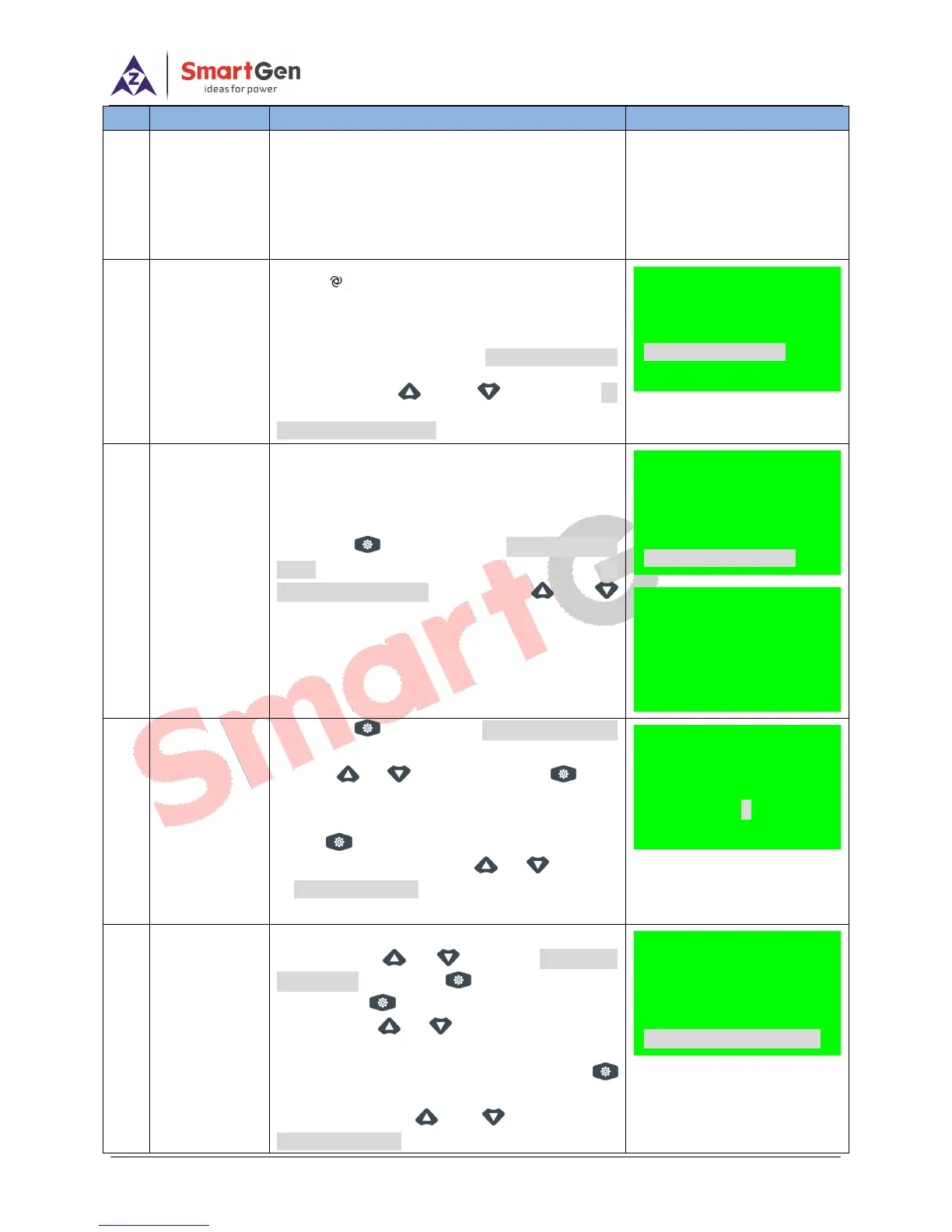
Press , its indicator lights on, and lighting
tower set enters into Timer Mode Select screen.
Meanwhile, the panel display Timer Mode Select
screen; Press and to select 03
Sunrise/Sunset Mode.
Enter into
Sunrise/Sunset
Action detailed
setting
navigition
screen
Press key to enter into Sunrise/Sunset
Mode setiing navigation screen, and select 03
Sunrise/Sunset Mode via pressing and
keys.
Sunset start
time delay
setting
Press to enter into Sunset Time Delay
setting screen, and configure the delay value
through or key after pressing (delay
value can be confured as ―+‖ ahead of preset start
time and ―-― after of preset start time). And then
press key to save the setting into the
controller. Meanwile, press or to return
to Sunrise/set Action setting scrren.
Sunset stop
time delay
setting
In Sunrise/set Action setting navigition
screen, press or to select 04 Sunrise
Time Delay and press to enter the setting
page. Press again and configure the delay
value through or key(delay value can be
confured as ―+‖ ahead of preset stop time and
―-― after preset of stop time). And then press
key to save the setting into the controller.
Meanwile, press or to return to
Sunrise/set Action setting scrren.
Sunrise/set Action
01 Mode Start
02 Mode Close
03 Sunset Time Delay
04 Sunrise Time Delay
03 Sunset Time Delay
CurrentVal +00000min
+00000
03 Sunset Time Delay
CurrentVal +00000min
+00000
Timer Mode Select
01 Remote Start Mode
02 Auto Timer Mode
03 Sunrise/set Mode
Sunrise/set Action
Return
01 Mode Start
02 Mode Close
03 Sunset Time Delay






 To Next Page