Wireless Settings
5-35
5
- AES: Uses Advanced Encryption Standard (AES) keys for encryption. Use of
AES-CCMP encryption is specified as a standard requirement for WPA2. Before
implementing WPA2 in the network, be sure client devices are upgraded to
WPA2-compliant hardware.
- TKIP/AES: Use both TKIP and AES keys for encryption. WPA2 defines a
transitional mode of operation for networks moving from WPA security to
WPA2.WPA2 Mixed Mode allows both WPA and WPA2 clients to associate to a
common SSID interface. In mixed mode, the unicast encryption cipher (TKIP or
AES-CCMP) is negotiated for each client.
• WDS WPA/WPA2 Pre-Shared Key – This option is available only when
Authentication Mode is set to WPA Personal, WPA2 Personal or WPA/WPA2
Personal. Enter a key as an easy-to-remember form of letters and numbers. The
WDS WPA/WPA2 Preshared Key can be input as ASCII string (8-63 characters)
or Hexadecimal format (length is 64). Other bridge units must be configured with
the same key to communicate with this unit.
• WDS MAC List – The physical layer
address of other bridge units for which this
unit communicates as a network node.
(12 hexadecimal digits in the form
“xx:xx:xx:xx:xx:xx”)
Note: In WDS Lazy mode any entries in the WDS MAC List are redundant because the
MAC is pre-configured to 00:00:00:00:00:00.
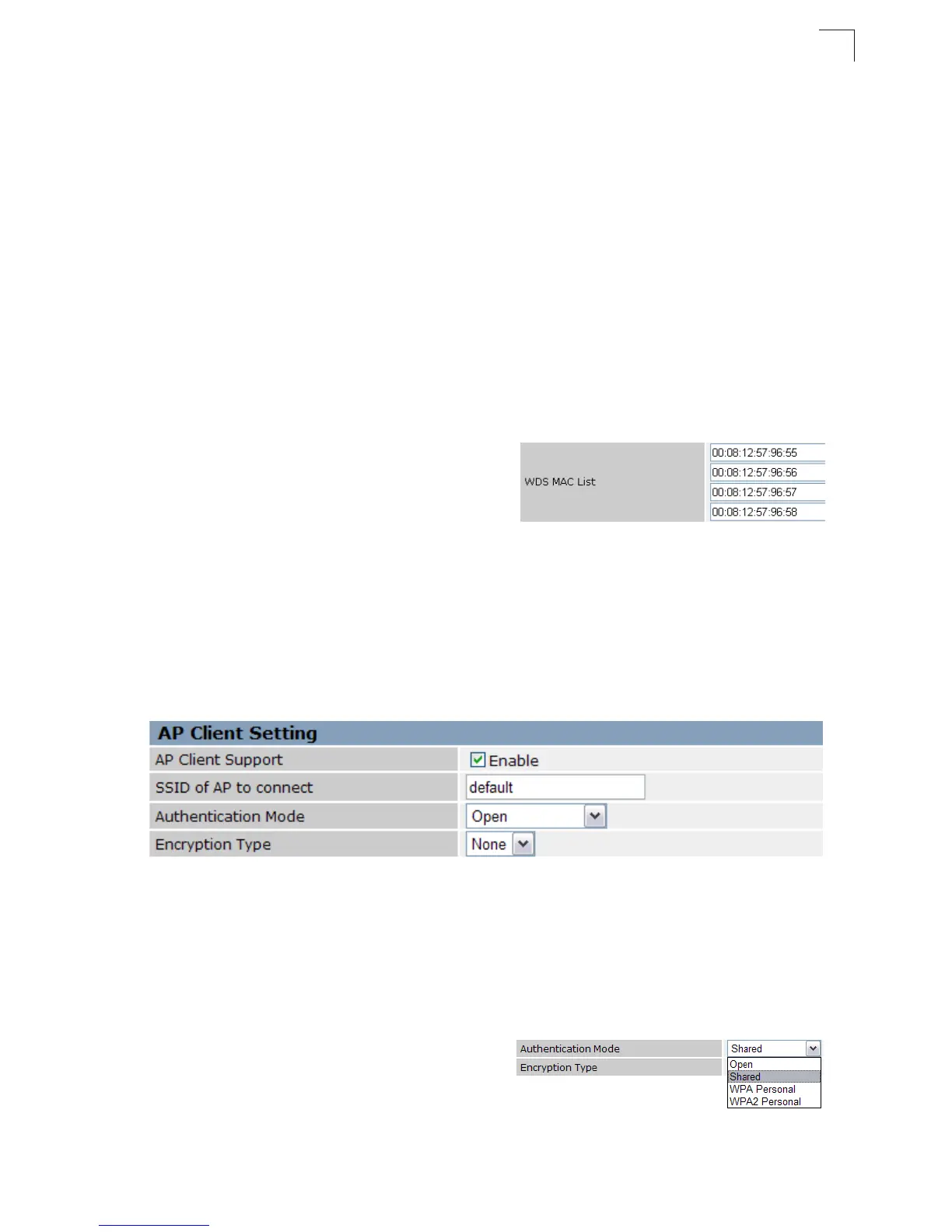
AP Client Settings
Wireless Access Point Client feature is a wireless client connection that connects the
AP/Router to a remote Wi-Fi network.
Figure 5-43. AP Client Settings
AP Client Support — Enable or disable this function. (Default: Disable)
SSID of AP to connect — The name of the target Wi-Fi network.
Security Settings — The security settings determine the authentication mode and
the encryption type used to connect to the target network.
• Authentication Mode – Selects the
authentication method used by the target
Wi-Fi network.
(WLAN1/WLAN2 Defaults: Open)


 To Next Page
 Loading...