Sirius 800 www.snellgroup.com Nucleus Advanced Functions and Upgrades
Issue 1 Rev 1 Page 134 © 2014 Snell Limited
10.3.2 Update Using Pbak Deploy
Pbak Deploy is a tool that is part of the Workbench installation. It makes it possible to transfer
RTB files to the removable Compact Flash disk on the controller card. The Dat and On Time
tools are used by other Snell products but are not relevant to the Sirius 800.
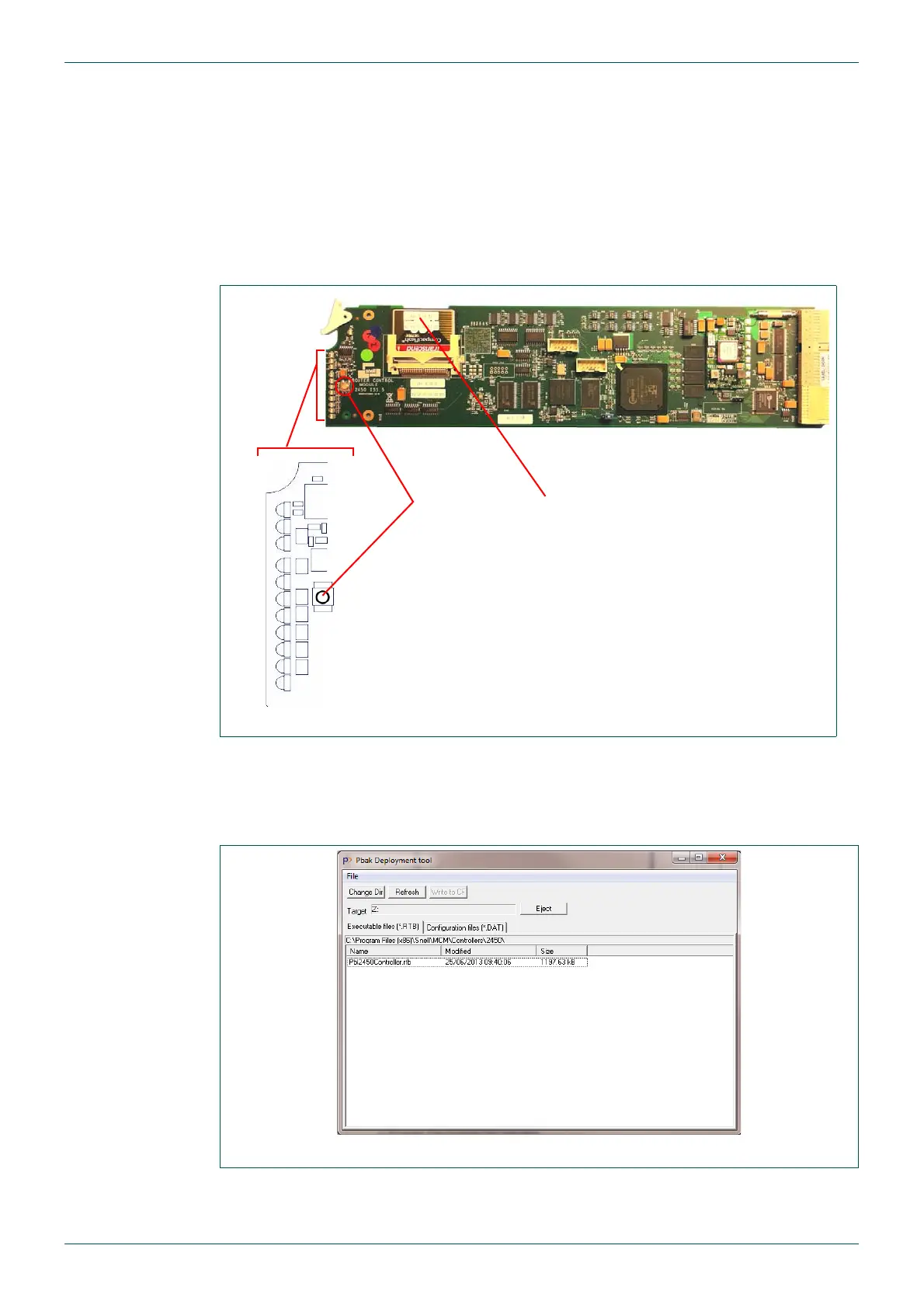
1. Remove the Idle Nucleus controller, see Fig 79.
LED D4: Idle = Purple, Active = Blue
LED D16: Idle = Flashing Red, Active = Flashing Green
2. Remove the Compact Flash card and insert it into the card reader.
3. Start Pbak Deploy Tool, from the Windows Start menu browse to:
Start | All Programs | Snell | MCM | Utilities | Pbak Deploy Tool
4. Select File | Configuration.
Fig 79. Nucleus 2450 Controller Compact Flash Card, LED D4 and D16
Fig 80. Pbak Deploy Tool
D4
D16
Compact Flash Card
Reset button


 To Next Page