Sirius 800 www.snellgroup.com Crosspoint Faults and Replacement
Issue 1 Rev 1 Page 68 © 2014 Snell Limited
7.3 Audio Crosspoint Matrix Status Screens
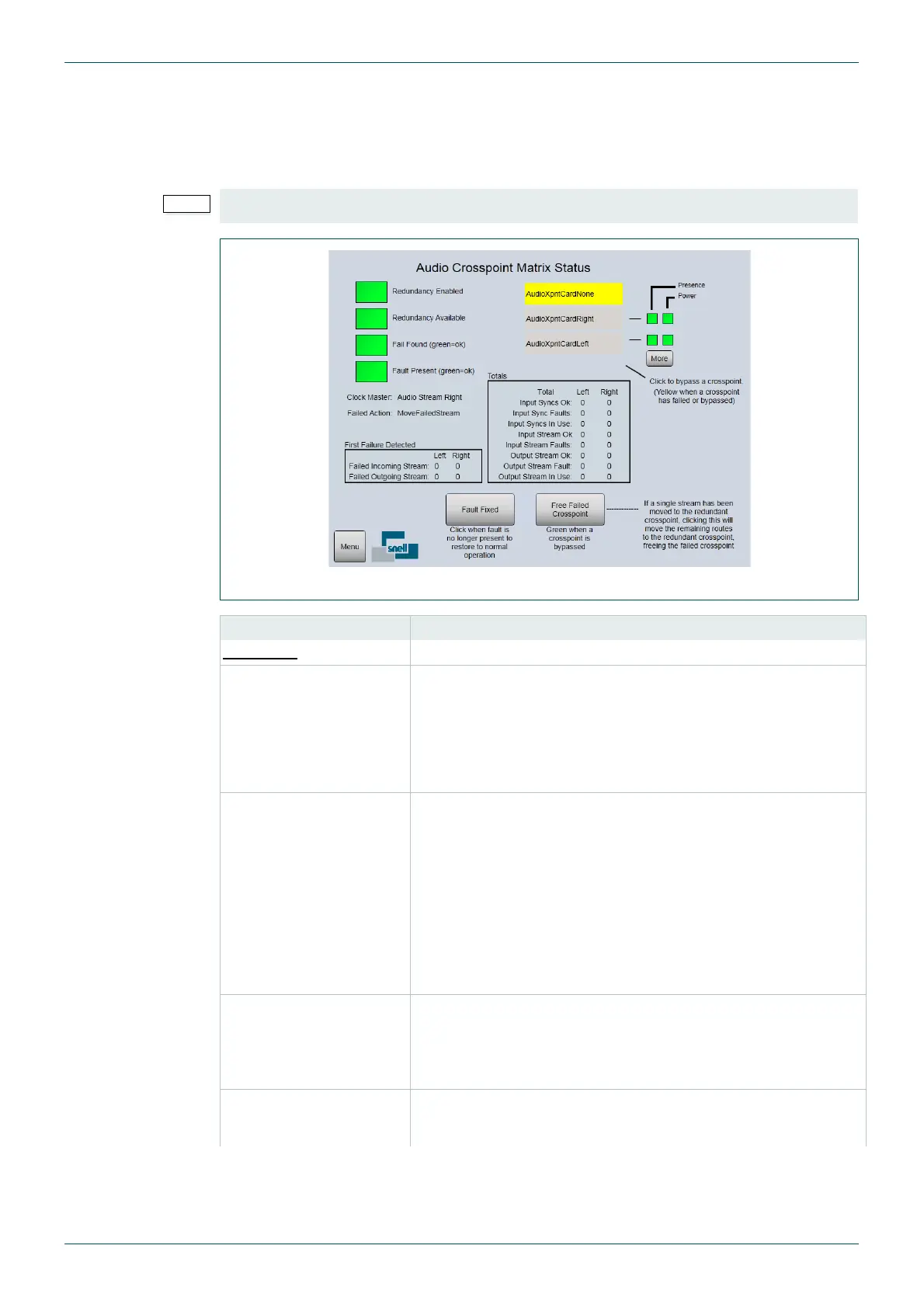
The Main Audio Crosspoint Matrix Status screen displays the status of the main and
redundant audio crosspoint modules. The screen is also used to switch between audio
crosspoint modules if an audio crosspoint module needs to be replaced.
• For information on replacing a failed crosspoint card see section 7.4.1.
Fig 35. Sirius 800 Audio Crosspoint Matrix Status and Crosspoint Switching
Screen Item Description
Indicators
Redundancy Enabled Green = Redundant crosspoint checking enabled.
Red = Redundant crosspoint checking is not enabled.
The audio crosspoint redundancy algorithm is enabled by default.
For details on disabling the audio crosspoint redundancy
algorithm see section 7.5.
Redundancy Available Green = The crosspoint modules are configured for the matrix.
1 main and 1 redundant
Red = The crosspoint modules are not configured for the matrix
and therefore there is no crosspoint redundancy.
Note: If the Sirius 800 is configured for redundancy and, when
powered up, one or more crosspoint modules are missing or
faulty the indications displayed will be:
Redundancy Available displays Green
Fail Found displays Red
Fail Found
(green = ok)
Green = A failure has not occurred in the crosspoint matrix.
Red = A failure has occurred in the crosspoint matrix. This may
be a failure that has now cleared, check the Fault Present status
to see if the fault is still present in the crosspoint matrix.
Fault Present
(green = ok)
Green = The crosspoint matrix is currently working correctly.
Red = There is currently a fault present in the crosspoint matrix.
Table 17. Audio Crosspoint Matrix Status Screen



 To Next Page