23
v1.02
Admin and Installation Guide M900 Configuring
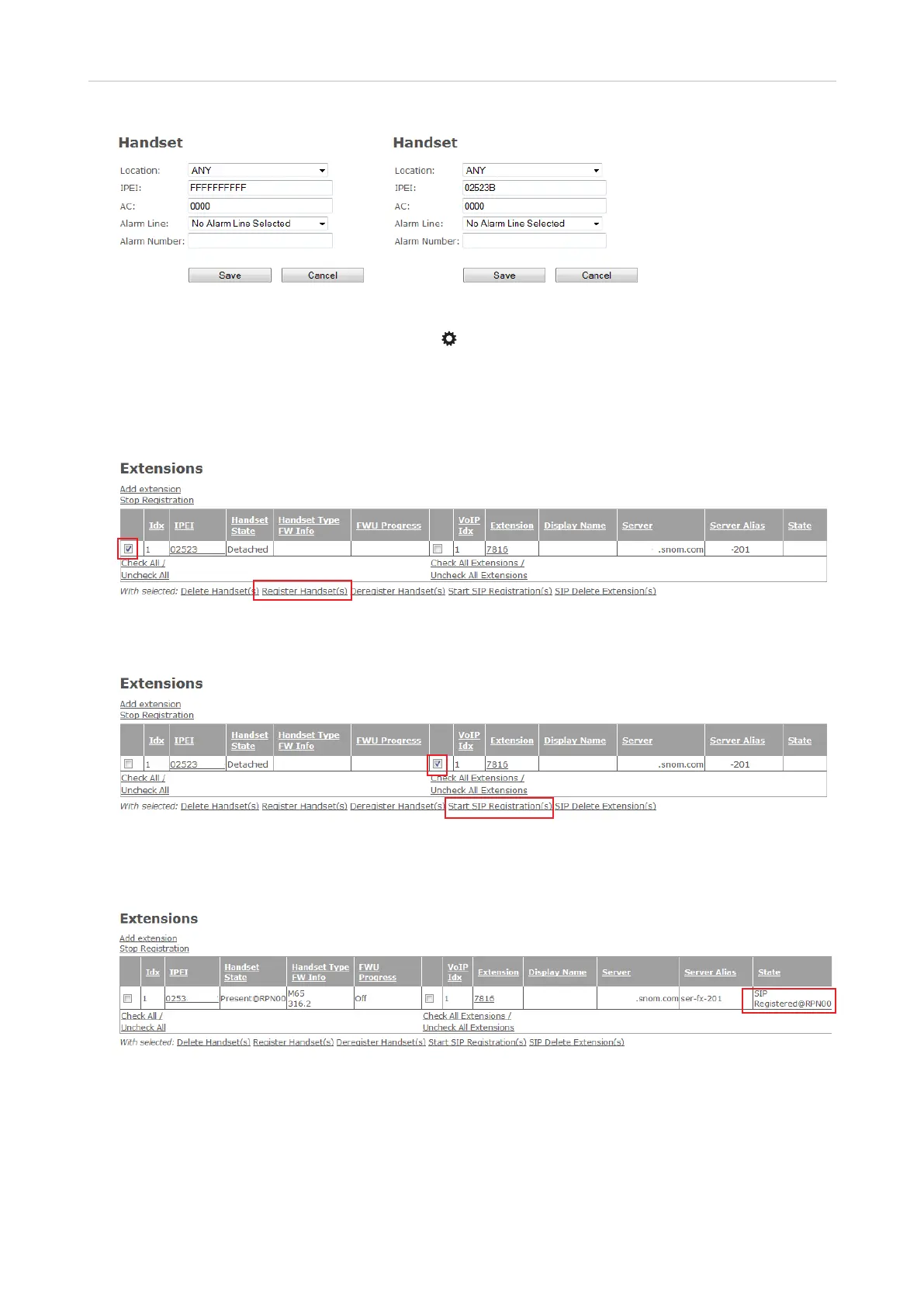
Fig. 4 Fig. 5
Note: To find the IPEI, open the Settings menu of the handset, select Status, and scroll
down to the IPEI at the end of the handset status. The IPEI consists of a string of 10 decimals
and capital letters. Do not enter the colons grouping the characters of the string into twos.
3. Click on Save. In the table on the Extensions page, the IPEI has been added under the IPEI header.
4. Check the box to the left of the Idx and click on Register Handset(s).
Fig. 6
5. Check the box to the left of the VoIP Idx and click on Start SIP Registration(s).
Fig. 7
The handset has been registered to use the extension. Note: To be able to use the handset, you
also need to select Register in the Connectivity menu of the handset itself.
Fig. 8
6. Set up another extension (see "Setting up Extensions" on page 29, step 2) and repeat steps 1 - 5
for every handset.



 To Next Page