58
v1.02
Admin and Installation Guide M900 Description of Settings
Country/time settings
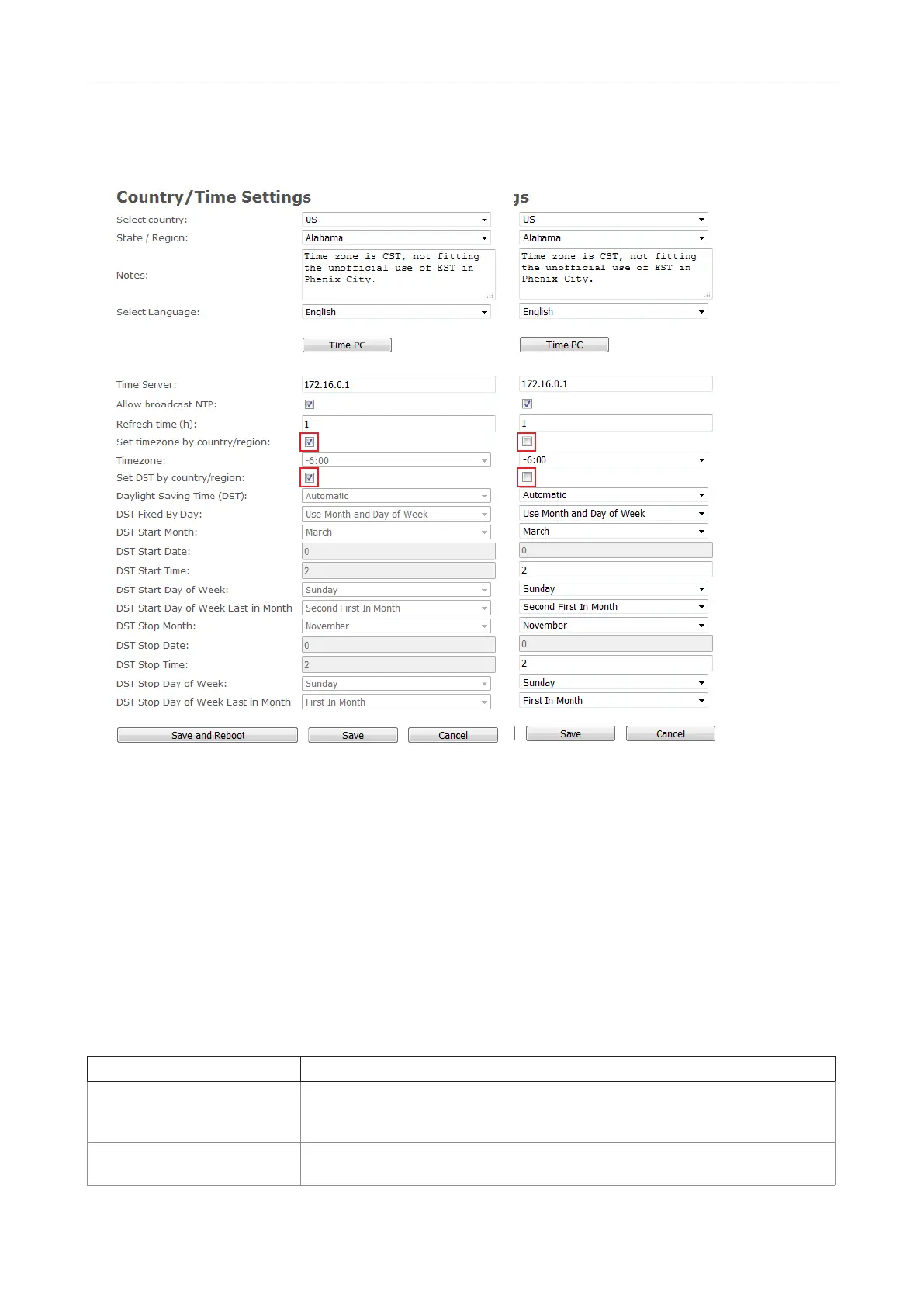
Fig. 1 Fig. 2
Country/region, language, and automatic time and DST settings
The Country/time settings page contains drop-down menus for the selection of your country, a state
or region within that country, if applicable, and the language to be used on the web interface of the
base station.
In the default setting, the time zone and daylight saving time (DST) are set automatically so that the
time and DST of the selected country and, if applicable, the selected region of the country will be used
on the base station and the handsets. The automatic settings (Fig. 1) can be disabled by unchecking
the checkboxes for the settings Set timezone by country/region and Set DST by country/region; the
manual settings are enabled simultaneously (Fig. 2).
Setting Description
Select country The country setting controls the inband tones used by the base station (dial
tone, ringing tone (colloquially called ringback tone, Freiton), busy, call
waiting, redial tones). Select a country from the drop-down menu.
State/region This drop-down menu is available when the selected country has more than
one timezone. Select a state or region from the drop-down menu.



 To Next Page