24
v1.02
Admin and Installation Guide M900 Configuring
Registering handsets - method 2
For this method, you need to have all handsets within reach. Set up all extensions as described in
"Setting up extensions" on page 21, then perform the following steps for each handset.
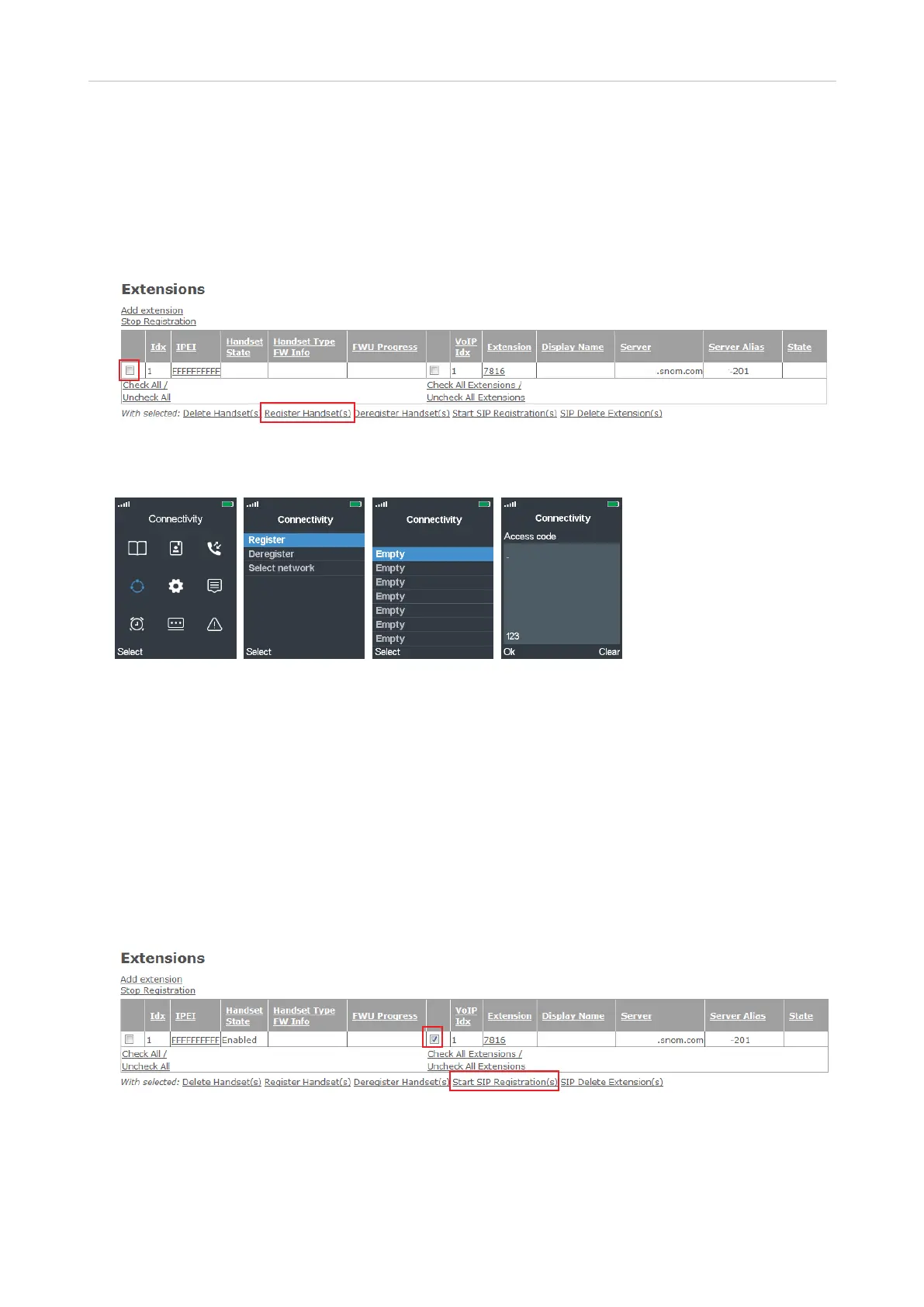
1. In the table on the Extensions page, check the box to the left of the Idx and then click on
Register Handset(s).
Fig. 9
2. On the handset, select the Connectivity menu (Fig. 11).
Fig. 10 Fig. 11 Fig. 12 Fig. 13
3. Select Register (Fig. 11).
4. M65, M70, M80, M85, M90: Select the first field with the word Empty in it (Fig. 12). The M25 only
supports one registration and doesn't show this screen.
Note: Fields that do not say "Empty", i.e., that have no text or a dierent text, already contain
a registration; if you select one of those, you will be asked whether you want to overwrite the
current registration.
5. Enter the access code and press the OK key.
6. In the table on the Extensions page, check the box to the left of the VoIP Idx and click on Start SIP
Registration(s).
Fig. 14
The handsets IPEI is added to the table, indicating that the handset is registered to use the
extension, and the State column shows the SIP registration (Fig. 15).



 To Next Page