45
v1.02
Admin and Installation Guide M900 Description of Settings
Setting Description
Forwarding Unconditional Number On/o. All incoming calls for this extension will be forwarded to the
number entered in the text field. Note: This setting (both the number and
the enabled/disabled status) can be changed from the handset registered
to the extension.
Defaults: Empty number field, status disabled
Forwarding No Answer Number On/o. Incoming calls for this extension will be forwarded to the number
entered in the text field if not picked up after the number of seconds
entered in the adjacent field. Note: This setting (both the number and the
enabled/disabled status) can be changed from the handset registered to
the extension.
Defaults: Empty number field, status disable
Forwarding on Busy Number On/o. Incoming calls for this extension will be forwarded to the number
entered in the text field when the line is busy. Note: This setting (both
the number and the enabled/disabled status) can be changed from the
handset registered to the extension.
Defaults: Empty number field, status disable
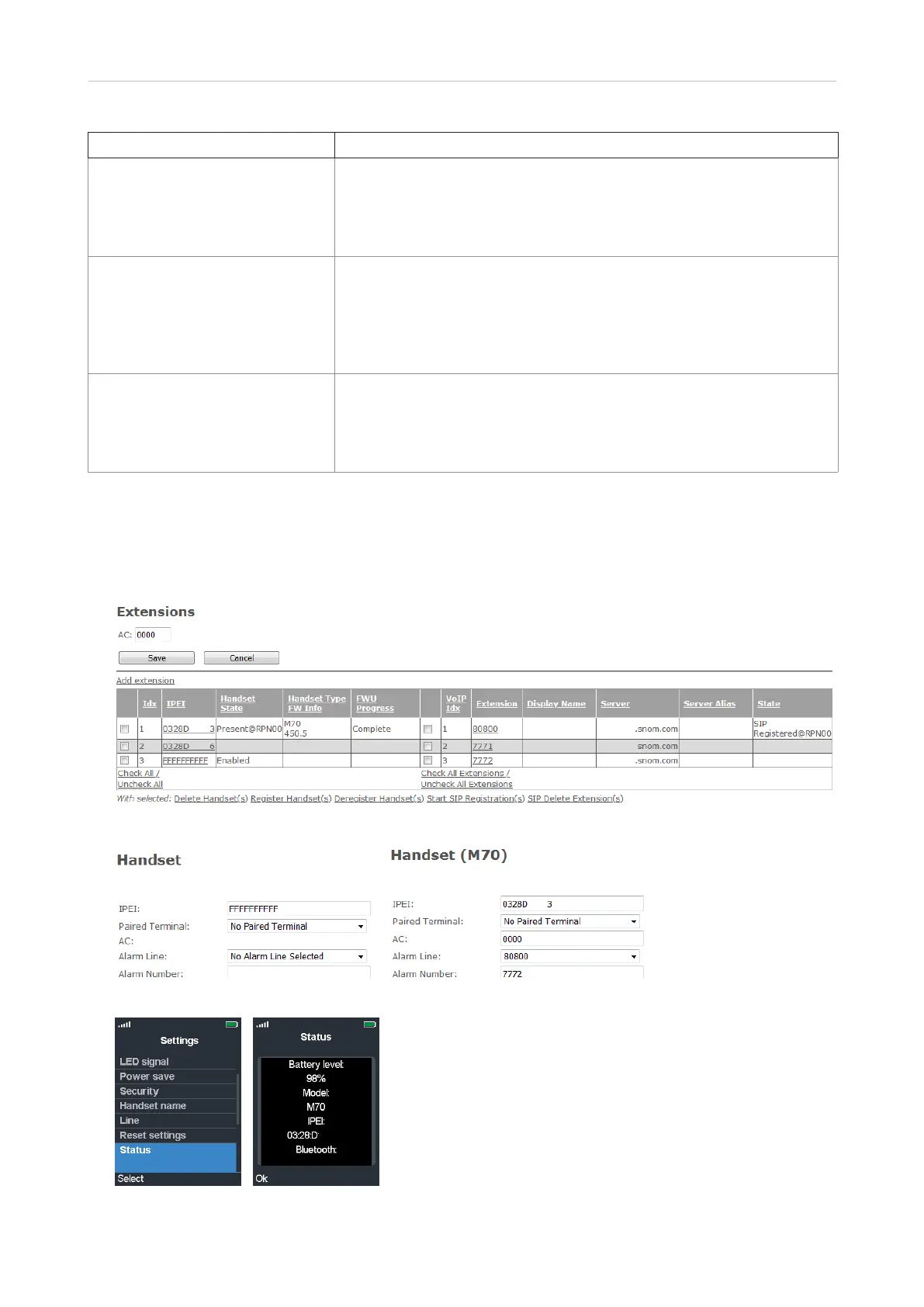
Handset settings
Click on the place holder
FFFF
or the IPEI to open the respective subpage (Fig 5 and 6). If you click on
the IPEI of a registered handset, the handset model (Mxx) is added to the title of the page (Fig. 6).
Fig. 4
Fig. 5 Fig. 6
Fig. 7 Fig. 8



 To Next Page