64
v1.02
Admin and Installation Guide M900 Description of Settings
Central directory
The central directory is accessible from all handsets registered at the same base station or in the
same multicell installation. The central directory can be a phone list downloaded to the base station
or an external source like the company LDAP register.
Note: You can use only one or the other, not both simultaneously.
See "Local central directory" on page 31 for information on how to prepare files and how to
download them onto the base station. See "LDAP" on page 35 for an LDAP example.
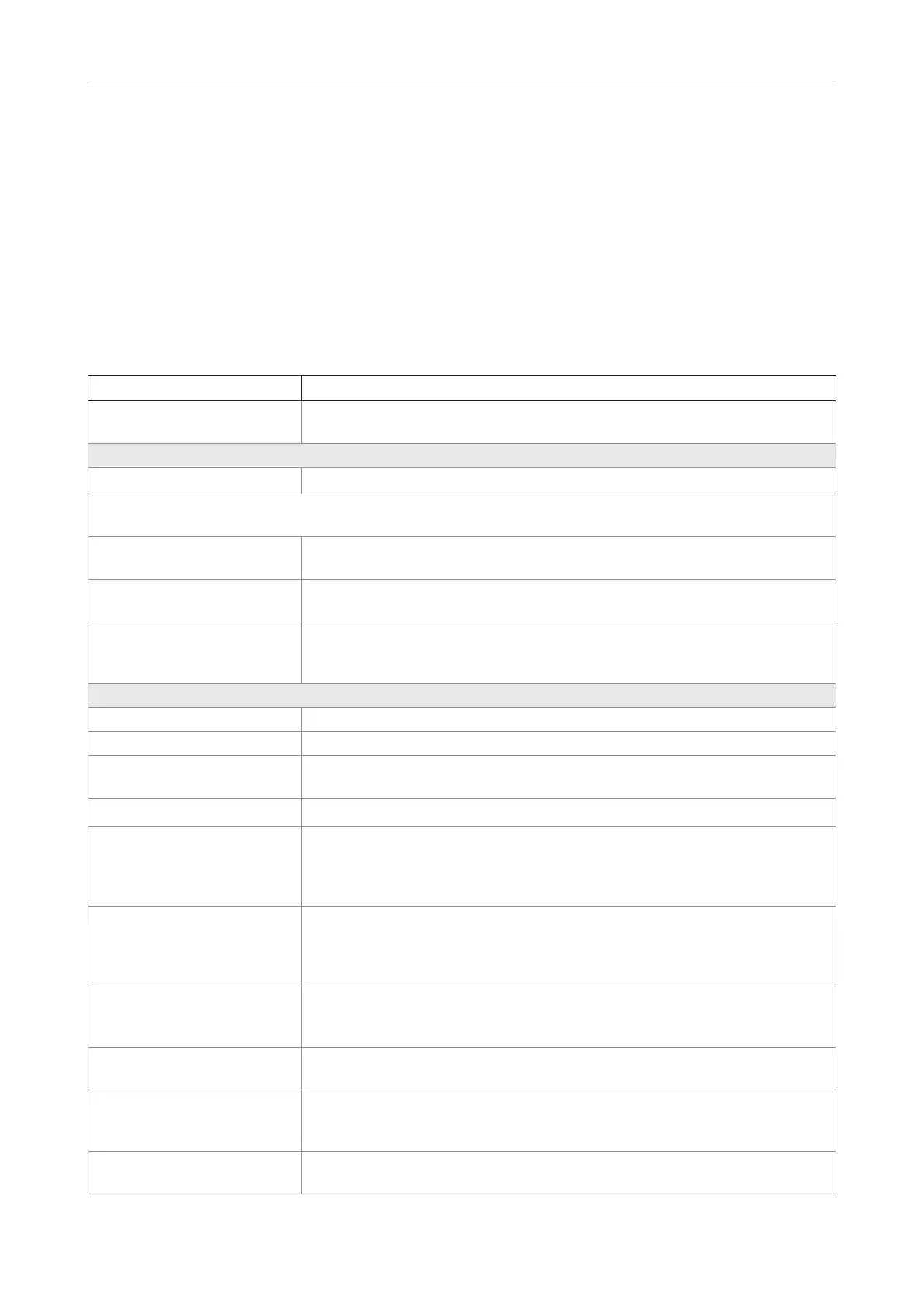
Setting Description
Location Select Local or LDAP Server from the drop-down menu.
Default: Local
If setting is Central Directory (local setting selected):
Location Setting Local is selected.
Note: The parameters Server, Filename, and Phonebook reload interval are used only if the directory file is
located on a server. Enter the data and click on Save.
Server Enter the IP address and path to the file of the phone list to be downloaded.
Default: Empty
Filename Enter the file name of the phone list to be downloaded.
Default: Empty
Phonebook reload interval (s) Enter the reload interval in seconds. To avoid overloading the base station, we
recommend to set longer intervals or to turn o automatic reloading.
Default: 0 (phone list will not be reloaded automatically)
If setting is LDAP Central Directory:
Central directory location Setting LDAP server is selected.
Server IP address or URL of the LDAP server
TLS security When this setting is enabled the system uses encrypted TCP; when it is
disabled it uses UDP.
Port Server port for LDAP
Sbase This setting specifies the LDAP search base (the distinguished name of the
search base object) which corresponds to the location in the directory from
which the LDAP search is requested to begin. The criteria depend on the
configuration of the LDAP server.
LDAP filter LDAP name filter is the search criteria for name look-ups. The format of the
search filter is compliant to the standard string representations of LDAP
search filters (RFC 2254).
Default: Empty.
Bind Specifies the bind "username" for LDAP servers when the handset connects
to the server. If the server allows anonymous binds, you can leave the setting
blank.
Password Specifies the bind "password" for LDAP servers. If the server allows
anonymous binds, you can leave the setting blank.
Virtual List If your LDAP server does not support server-side result pagination and
sorting (VLV extension), select "disabled" from the drop-down list.
Default: Enabled.
SIP extension part of user
login
TBA



 To Next Page