25
v1.02
Admin and Installation Guide M900 Configuring
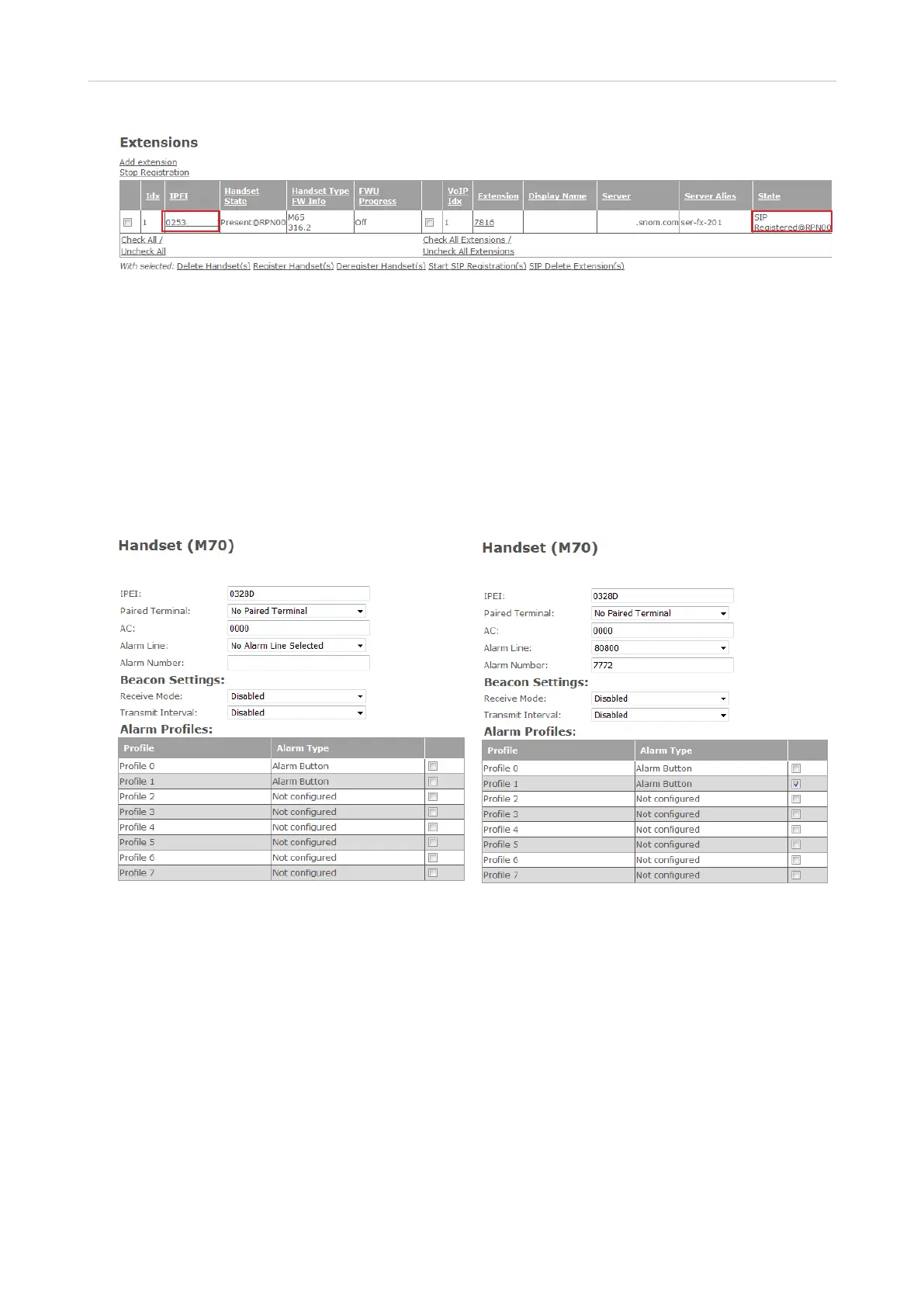
Fig. 15
7. Repeat steps 1 - 6 for all extensions.
Selecting emergency alarm setting
Emergency alarm settings: See "Emergency alarm" on page 30.
The majority of the features of the emergency alarm are available on handsets with a dedicated
alarm key (the red key at the top of the handset), i.e., M70, M80, M85, and M90. For the M65 an alarm
number can be specified which the handset will dial when the OK-/Confirm key on the idle M65 is
pressed for three seconds (factory setting); the M25 does not have an emergency alarm.
Fig. 16 Fig. 17
1. Open the Extensions page and click on the IPEI of the handset (Fig. 15).
2. Select the handset's extension from the drop-down menu of Alarm line (Fig. 16).
3. Enter the phone number to be called in case of an emergency alarm in the text field of Alarm
number.
4. Select one of the configured profiles by clicking on its checkbox (Fig. 17).
5. Click on Save.



 To Next Page