27
v1.02
Admin and Installation Guide M900 Configuring
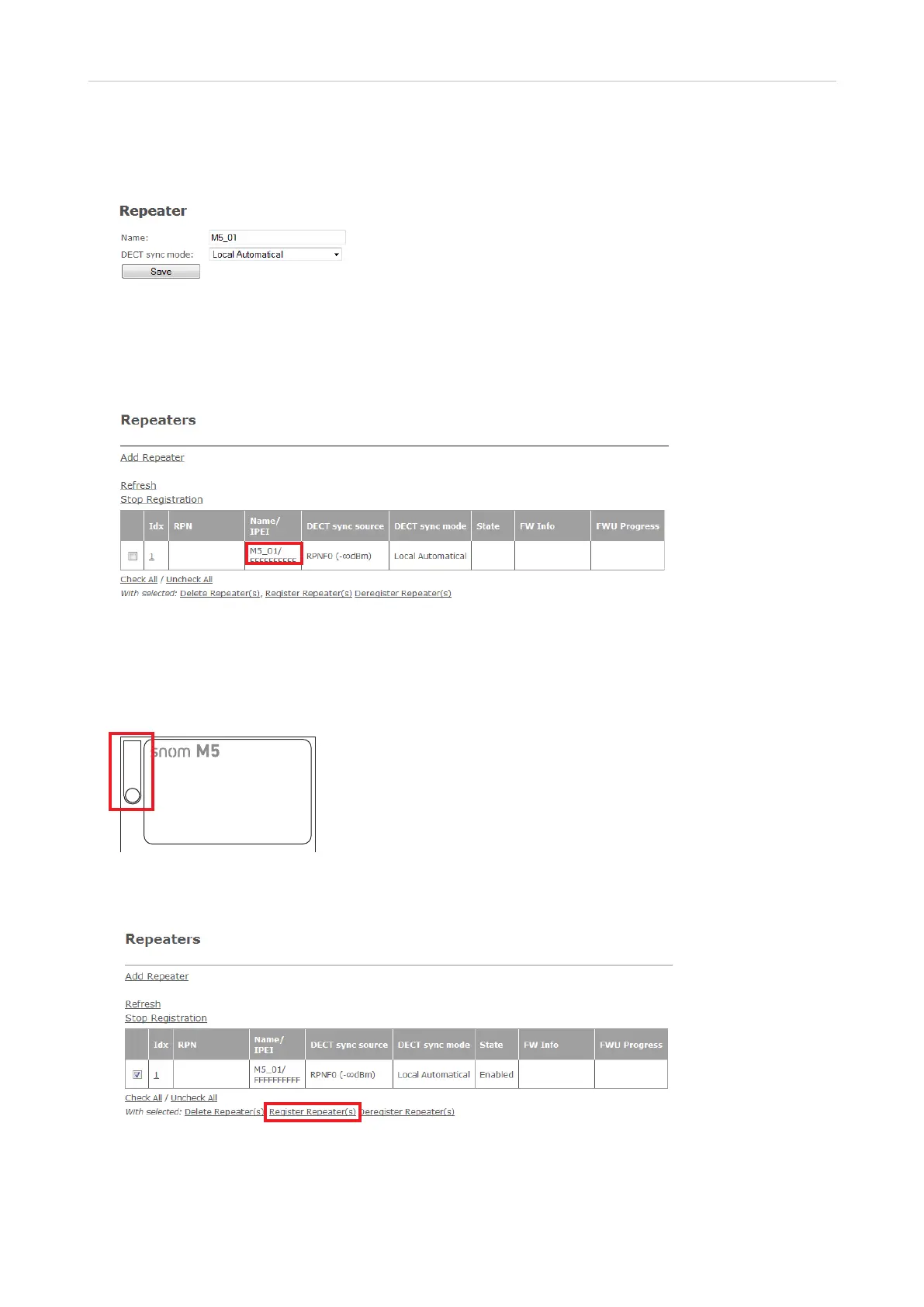
3. Enter a name for the repeater, for example a consecutive number or its location. This name will
be listed in the Name/IPEI column on the Repeater page (Fig. 3); if you do not enter a name, the
IPEI will be listed instead.
Fig. 2
4. Select Local Automatical from the DECT sync mode drop-down menu.
5. Click on Save.
Fig. 3
6. Connect the repeater to a power outlet.
7. Press the reset tab on the back of the repeater for approx. 2 seconds until the LED blinks red
briefly and then switches to double green flashes.
Fig. 4
8. On the Repeater page, check the box to the left of the Idx and then click on Register Repeater(s).
Fig. 5
Upon successful registration, the Repeater page will show the repeater's and the base station's RPNs,
the repeater's IPEI, and the state as "Enabled".
Reset tab



 To Next Page