Home
Sonicware
Samplers
SmplTrek
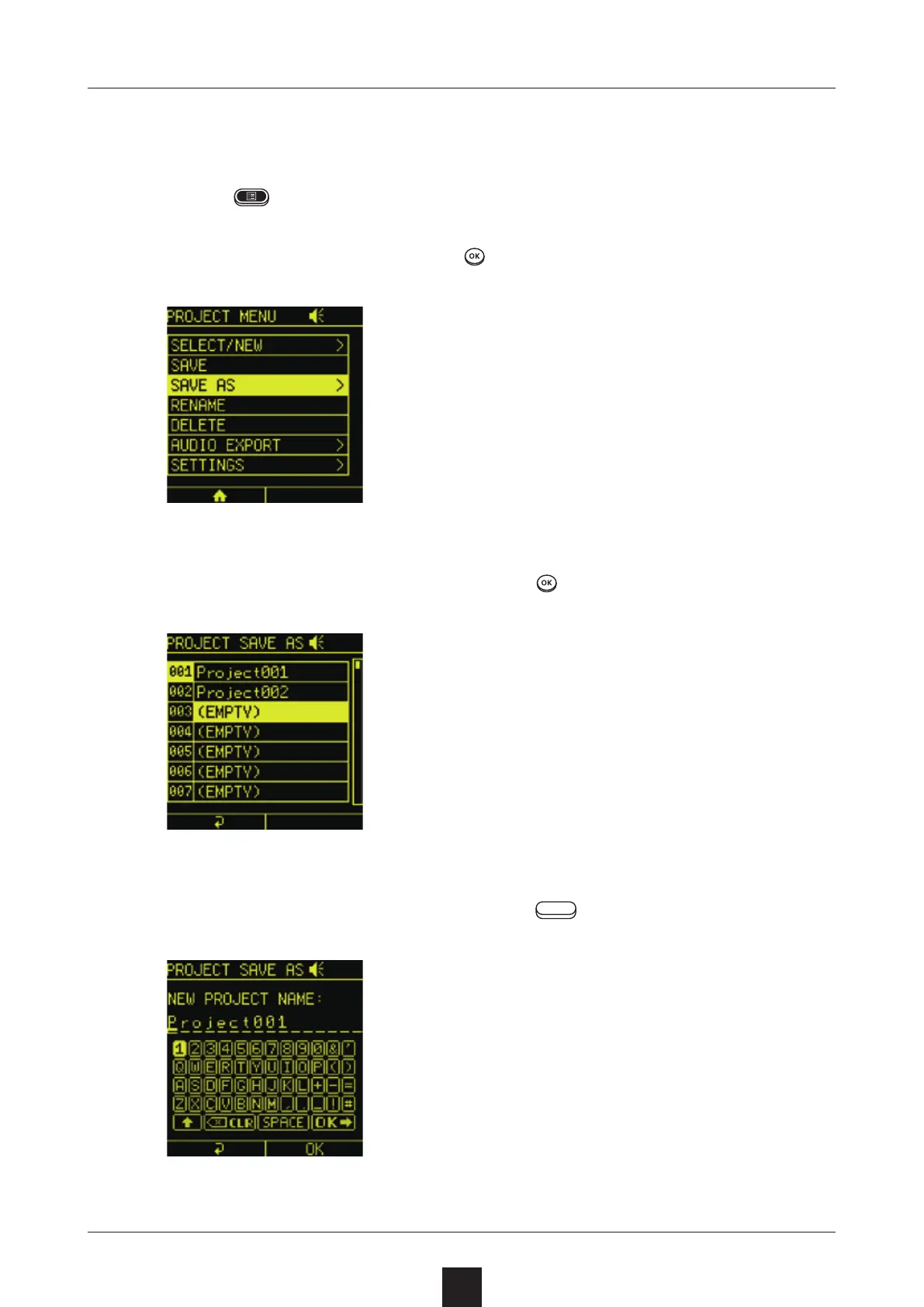
Page 136 (Project Menu - Copying Projects (SAVE AS))
Sonicware SmplTrek - Project Menu - Copying Projects (SAVE AS)
174 pages
Manual
Save Page as PDF
To Next Page
To Next Page
To Previous Page
To Previous Page
Loading...
136
Press
to open the PROJECT MENU Screen.
Select
, and press
.
Select an
slot, and press
.
Input the name, and press the right
utton.
135
137
Table of Contents
Main Page
Table of Contents
4
Core Function Overview
7
Names of Parts
8
Connection Example
9
Creating Songs with the Smpltrek
10
Basic Operations - General
11
Preparing a Power Supply
11
Starting up
11
Important Tips to Know before Use
12
Direction, OK and CLR Buttons
12
Control and VALUE Knobs
12
Relationship between Built-In Speaker and MIC
13
Turning LED Pad LAUNCH Mode On/Off
13
Relationship between Scene and Clip Lengths
14
Basic Operations - Home Screen
15
Basic Operations - Projects
17
Selecting Projects
17
Saving Projects
18
Naming and Saving Projects
19
Sampling
20
Selecting the Recording Source
20
Sampling the Source
21
Sampling in Time with a Metronome or Backing Track
23
Using the Tuner
24
Resampling
25
Sample Pool
26
Opening the Sample Pool
26
Sample Pool Basic Operations
27
Loading Samples
28
Folder Structure on Cards
29
Importing Loops from Pc/Mac Computers
30
Supported WAV Formats
30
Recommended Format
30
Scene Settings
31
Making Scene Settings
31
Copying Scenes
32
Clearing Scenes
33
Basic Track Operation
34
Track Types
34
Setting Track Types
35
Copying Entire Tracks
36
Clearing Entire Tracks
37
Setting the Length of the Current Clip
38
(Length/Note)
38
Copying Clips
39
Clearing Clips
40
LOOP Tracks
41
Overview
41
LOOP Track Editing Screen
42
Loading Samples (SELECT SAMPLE)
43
Recording in Real Time
47
Adjusting Sample Intervals (LOOP POS)
48
Looper Recording
49
SHOT Tracks
51
Overview
51
Switching between Sequence and Pad Per- Formance Modes
52
SHOT Track Editing Screen
53
Loading Samples (SELECT SAMPLE)
54
Adjusting Sample Intervals (POSITION)
57
Recording in Real Time
59
Step Recording
61
Recording Pad Performances (SHOT REC)
62
INST Tracks
63
Overview
63
Loading Samples (SELECT SAMPLE)
64
Setting Intervals Used and Loop Points for Samples
65
Setting Envelopes
66
Setting the Base Note
67
INST Track Editing Screen
68
Real-Time Recording
69
Step Recording
70
Setting the Keyboard Scale
71
Importing SMF Files
72
DRUM Tracks
73
Overview
73
Selecting Kits (SELECT KIT)
74
DRUM Track Editing Screen
75
Real-Time Recording
76
Step Recording
77
Setting MIDI Note Numbers for Individual Pads
78
Importing SMF Files
79
MIDI Tracks
80
Overview
80
MIDI Track Editing Screen
81
Real-Time Recording
82
Step Recording
83
Setting MIDI CC Numbers
84
Setting the Scale
85
Importing SMF Files
86
GLOBAL Tracks
87
Overview
87
GLOBAL Screen Basic Operations
88
Recording
89
Splitting Regions
91
Switching Take Assignments
92
Joining Regions
93
Adjusting Individual Region Levels
94
USB AUDIO Track
95
Overview
95
Connecting a Smartphone, PC or Mac to the Smpltrek by USB
96
Playing Audio from a Smartphone, PC or Mac
97
Sampling Audio from a Smartphone, PC or Mac
98
Hold/Gate
99
Clearing Settings
100
Ext Src
101
Overview
101
Setting the Input Source
102
Selecting Audio Files
103
Making Audio File Settings
104
Hold/Gate
105
Cross-Fading with the Project Level
106
Clearing Settings
107
Other Track and Clip Settings
108
Lofi (LOOP, SHOT)
108
Lofi (INST, GLOBAL)
109
Pitch (Shot)
110
Pitch (Inst)
111
Mixer
112
Basic Mixer Screen Operation (Level Meters)
112
Basic Mixer Screen Operation (PRM VALUE)
113
Making Specific EQ Settings
114
Effects
115
Insert Effects
115
Send Effects
117
Side-Chain Compression (SC COMP)
119
Master Effects
120
Editing Samples
122
Chopping (Automatic Slicing)
122
Chopping (Manual Slicing)
124
Trimming
126
Time Stretching
128
Normalizing
130
Mono Mixing
131
Renaming Samples
132
Copying Samples to Projects
133
Copying Samples to the Sample Pool
134
Deleting Samples
135
Project Menu
136
Copying Projects and Saving with New Names (SAVE AS)
136
Renaming Projects
137
Deleting Projects
138
Mixing down
139
Exporting Stem Files
140
Setting Project Parameters
141
Changing LED Pad Colors (TRACK COLOR)
142
Copying Tracks
143
Clearing Tracks (CLEAR)
144
Changing How Many Times Scenes Repeat
145
(Repeat)
145
Copying Scenes (COPY)
146
Clearing Scenes (CLEAR)
147
Drum Kits
148
Editing
148
Adjusting Individual Instruments on LED Pads (INST PRM)
149
Adjusting Drum Kit Levels and Lofi Settings (KIT PRM)
151
Adjusting Drum Kit LED Pad Colors (PAD COLOR)
152
Checking Drum Kit Sounds with Reverb
153
(Send Fx for Check)
153
Deleting Drum Kits (DELETE)
155
Renaming Drum Kits
156
Audio Interface
157
Connecting as an Audio Interface
157
Quantization
158
Setting Quantization
158
Clock Synchronization with External Devices
159
Connecting with Other Devices
159
Setting the Clock
160
MIDI
162
Setting Track MIDI Channels
162
Setting MIDI Channels for the Unit
163
Making Other MIDI Settings
164
System Settings
165
Pad Sensitivity Setting
165
Battery Setting
166
Automatic Power off Function
167
Resetting the Unit to the Factory Default State
168
Checking System Version Information
169
Card Functions
170
Card Reader Mode
170
Formatting
171
Firmware Updates
172
Updating the Firmware
172
Other manuals for Sonicware SmplTrek
Reference Manual
213 pages
Startup Guide
17 pages



 To Next Page