EasyManua.ls Logo

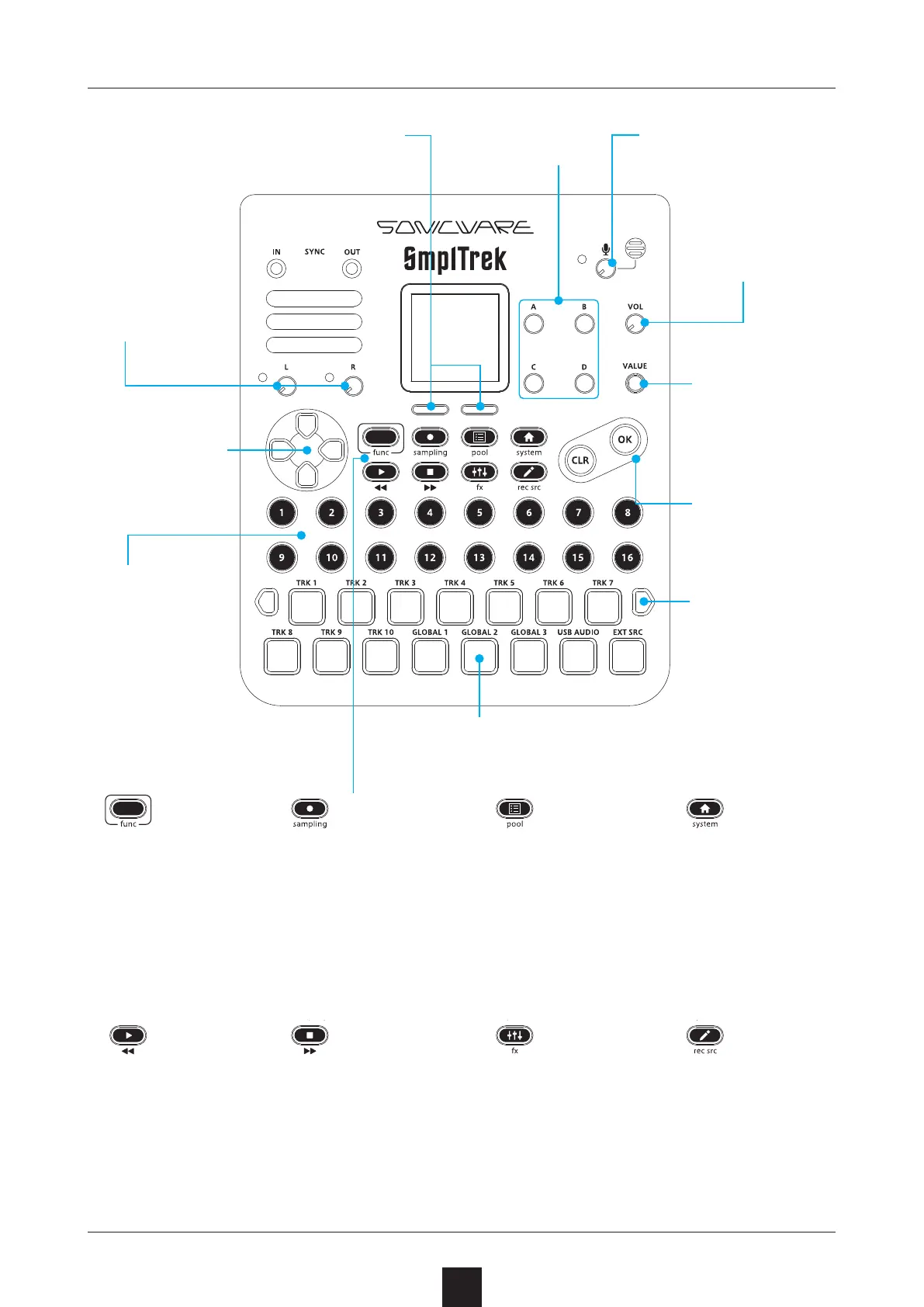
Sonicware SmplTrek - Names of Parts

Sonicware SmplTrek
174 pages
Print Icon
To Next Page IconTo Next Page
To Previous Page IconTo Previous Page
Loading...

8

Adjusts input gain of
built-in mic

Select items shown at
bottom of screen

Adjusts head-
phone/speaker
level

Adjust items A –
D on screen


Changes values
on screen


Move up, down,
left and right to
select items


Adjust gain of
INPUT L and R




Change octaves
when playing
LED pads

Play tracks and play notes as a
keyboard, for example

Press the func
button with other
buttons to switch
to submenus

Play projects

Move playback
position back
-
ward

Use for sample and
sequence recording

Open the SAM-
PLING Screen

Stop playback


Move playback
position forward

Open the PROJ-
ECT MENU

Open the POOL
Screen

Open the MIXER
Screen

Open the EF-
FECTS Screen

Open the Home
Screen

Open the SYS-
TEM MENU

Open track edit-
ing screens

Open the INPUT
SETTING Screen


Play scenes
and specify se
-
quence steps

Table of Contents

Other manuals for Sonicware SmplTrek