9
Chapter 1 Overview
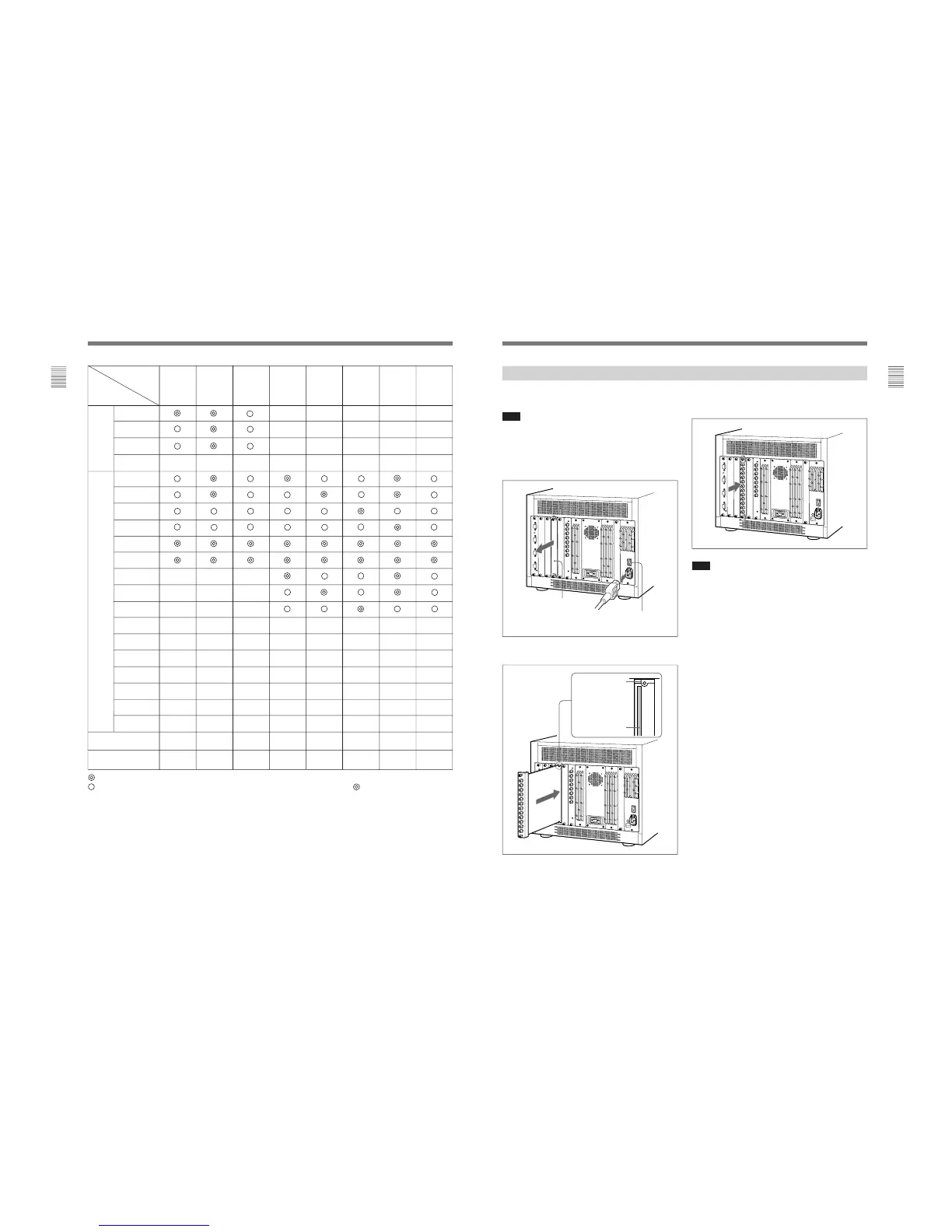
Each decoder adaptor can be installed in any input
option slot.
Note
Turn off the main power of the monitor and disconnect
the AC power cord before installing or removing
adaptors.
1
Remove the cover of an input option slot on the
rear panel of the monitor.
2
Insert the adaptor under the positioning mark on
the top of the slot (on the left of the screw hole).
Installing a Decoder Adaptor
3
Push the adaptor in until it is firmly seated in the
connector inside the monitor, then tighten the two
screws to secure the adaptor.
Note
Install the BKM-20D/21D/41HD/42HD Decoder
Adaptor after all other installations have been
completed. If you insert another decoder adaptor or an
analog input output connectors board or put a cover
plate in the input option slot to the right of the BKM-
20D/21D/41HD/42HD previously installed, the springs
on the side of the BKM-20D/21D/41HD/42HD may be
damaged or detached. To avoid this, remove the
BKM-20D/21D/41HD/42HD temporarily while
carrying out the other installations, then reinstall it last
of all.
Cover of an input
option slot
Positioning mark
Insert the
adaptor here.
Make sure the MAIN POWER switch
is turned OFF, and disconnect the AC
power cord.








 To Next Page