20
Chapter 1 Overview
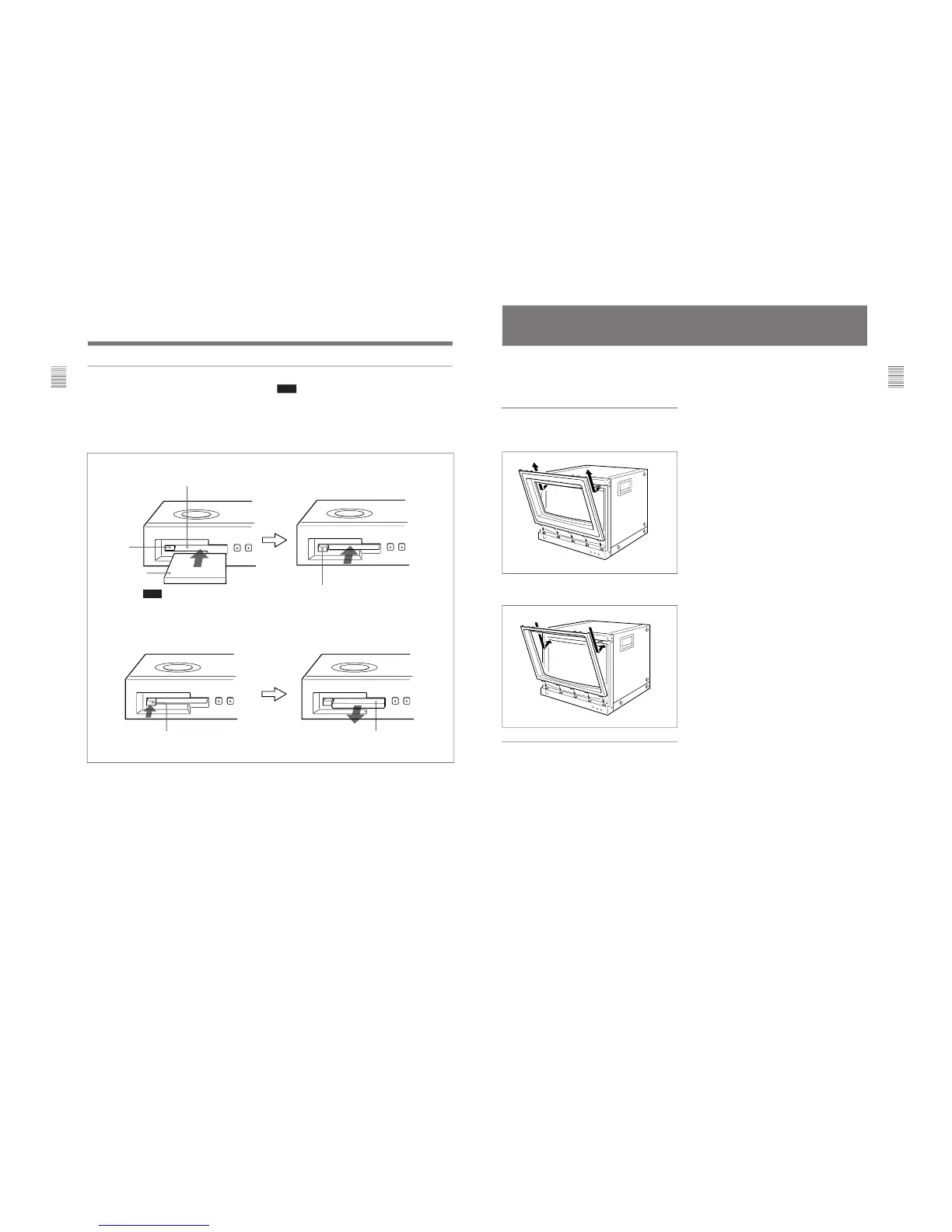
To insert the BKM-12Y Monitor Memory Card
EJECT button
Monitor memory card insertion slot
Note
Be careful not to let your hands touch
the connectors on the front edge of
the monitor memory card.
Push the monitor memory
card in until the EJECT
button comes out.
To eject the BKM-12Y Monitor Memory Card
EJECT button
Press the EJECT button to eject
the monitor memory card.
Take out the
monitor memory
card.
Inserting/ejecting the BKM-12Y Memory Monitor Card
Proceed as illustrated to insert and eject an optional
BKM-12Y Monitor Memory Card.
For information about operations on monitor memory card
data, see “ [D] Monitor Memory Card Data Operations —
MEMORY CARD menu” on page 57.
Note
Do not eject the monitor memory card while data is
being saved or loaded.
Location and Function of Parts
Monitor memory card
21
Chapter 1 Overview
Installation of the 4:3 Mask
(BVM-D20F1U/D20F1E/D20F1A only)
When the BVM-D20F1U/D20F1E/D20F1A aspect
ratio is switched from 16:9 to 4:3, replace the 16:9
mask with the supplied 4:3 mask.
Installing the 4:3 mask
1
Remove the 16:9 mask by pulling the top side out
and then lifting up from the bottom side.
2
Install the 4:3 mask (supplied) by inserting the
bottom side and then pressing the top side in.
Replacing the 16:9 mask
Remove the 4:3 mask and replace the 16:9 mask using
the same procedures as those for installing the 4:3
mask.








 To Next Page