2-5
BVM-D32E1WA/D32E1WE/D32E1WU
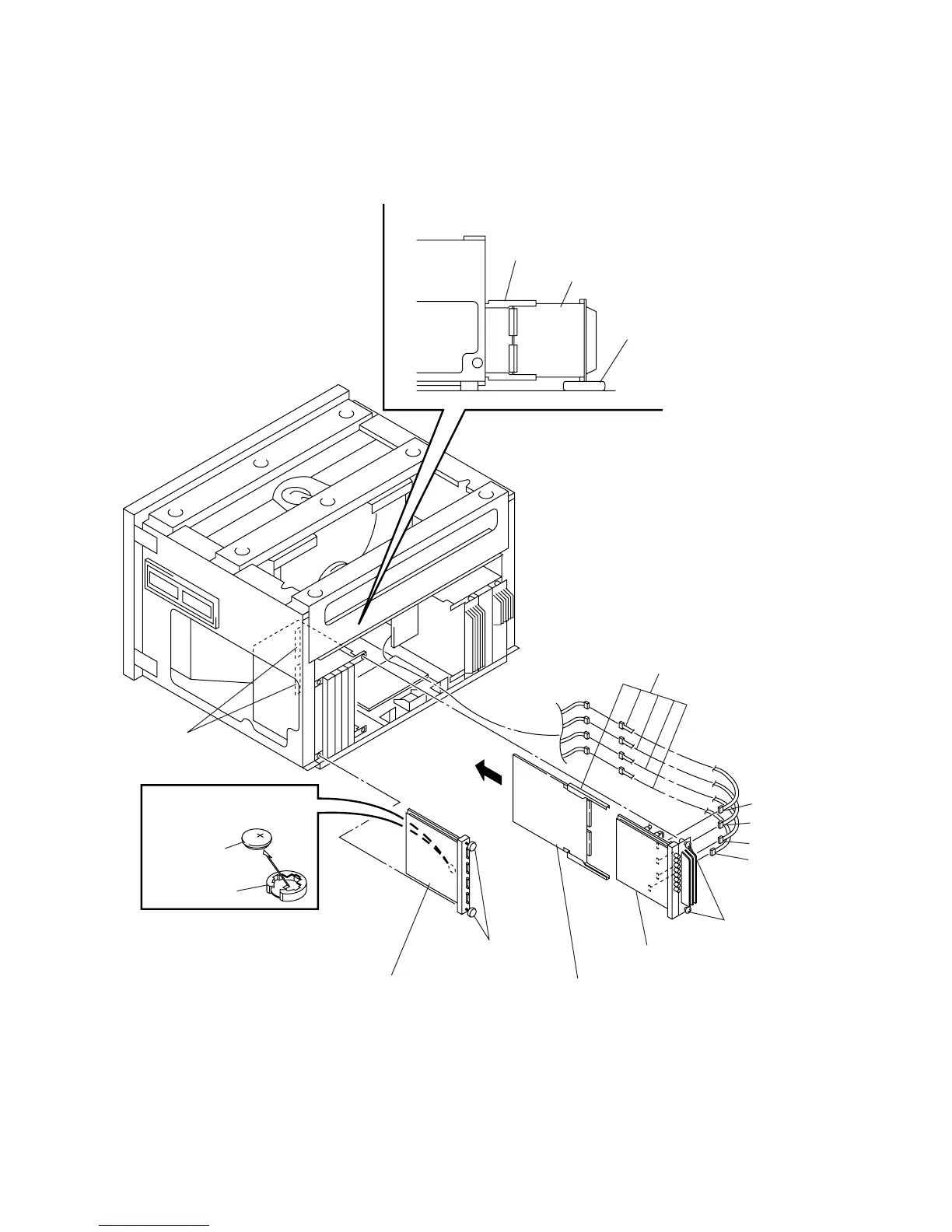
2-2-5. BC and BK Boards Removal and Check
* The BC board can be checked in the same way.
2 Remove the BK board.
1 Loosen the two screws.
(+B4 x 20)
4 Remove the BC board.
Slot
5 Z board (Extension board)
note) Insert the Z board into the slot
and insert the BK board into the
connect on the Z board.
note) Before checking each board, put the spacer
under the attached board to fix the board.
Z board (Extension board)
Spacer
BC or BK boards.
Remove the battery in the
direction of arrow.
Battery holder
Battery removal
Extension board/cable kit
(Part No. : A-1394-806-B)
3 Loosen the two screws.
(Stopper screw)
note) Replace the lithium battery of
the BC board within five minutes.
CN5 (Red 4P)
CN6 (White 4P)
CN7 (Black 4P)
CN8 (White 3P)
Battery, Lithium
CR2025 Type








 To Next Page