6-32
DCR-PC350/PC350E
15. Auto White Balance Adjustment
Adjust to the proper auto white balance output data.
If it is not correct, auto white balance and color reproducibility will
be poor.
Subject Clear chart (All white frame)
(1.0m (PTB-450) or 0.4m (PTB-1450)
from the front of the lens) (Note3)
Filter Filter C14 for color temperature
correction
Adjustment Page F 14 (Note2)
Adjustment Address 32 to 35, 44 to 47 F4 to FF
Note1: This adjustment should be carried out upon completion of “Auto
White Balance Standard Data Input”.
Note2: When reading or writing the 14 page data, select page: 0, address:
10, and set data: 01, then select 4 page. The 14 page can be chosen
by this data setting.
After reading or writing, reset the data of page: 0, address: 10 to
“00”.
Note3: Perform “12. Picture Frame Setting (All White Frame)” before
this adjustment.
Switch setting:
1) POWER....................................................... CAMERA-TAPE
2) NIGHT SHOT..................................................................OFF
3) FOCUS.................................................................. MANUAL
4) DIGITAL ZOOM (CAMERA SET menu) ......................OFF
5) STEADY SHOT (CAMERA SET menu) ........................OFF
Adjusting method:
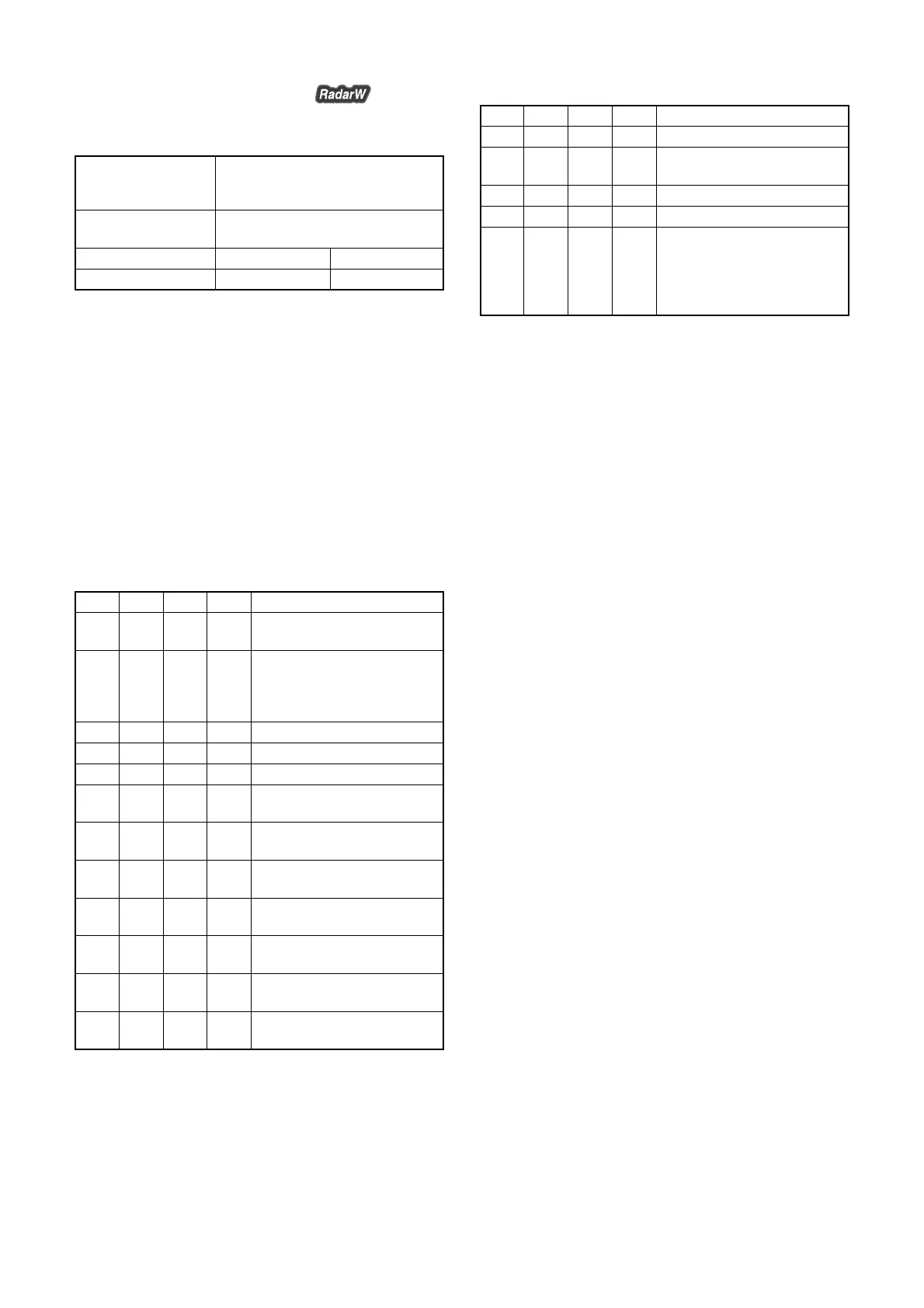
Order Page
Address
Data Procedure
1
Place the C14 filter for color
temperature correction on the lens.
2 Check that the picture frame is
“All white frame”. If not,
perform “12. Picture Frame
Setting (All White Frame)”.
3 0 01 01 Set the data.
4 Wait for more than 2 sec.
5 0 10 00 Set the data.
6 F 44 2D Set the data, and press PAUSE
button.
7 F 45 20 Set the data, and press PAUSE
button.
8 F 46 5A Set the data, and press PAUSE
button.
9 F 47 80 Set the data, and press PAUSE
button.
10 6 01 47 Set the data, and press PAUSE
button.
11 6 01 45 Set the data, and press PAUSE
button.
12 6 02 Check that the data changes to
“01”. (Note4)
Note4: The adjustment data will be automatically input to page: F, address:
32 to 35, 44 to 47 and to page: 14, address: F4 to FF
Processing after Completing Adjustments:
Order Page
Address
Data Procedure
1 0 10 00 Set the data.
2 6 01 00 Set the data, and press PAUSE
button.
3 0 01 00 Set the data.
4 Remove the C14 filter.
5 If finish the camera system
adjustments, perform “How to
release the picture frame setting”
of “12. Picture Frame Setting
(All White Frame)”.














 To Next Page