6-33
DCR-PC350/PC350E
16. Color Reproduction Adjustment
Adjust the color separation matrix coefficient so that proper color
reproduction is produced.
Subject Color bar chart
(Color reproduction adjustment frame)
(1.0m (PTB-450) or 0.4m (PTB-1450)
from the front of the lens)
Adjustment Page 14 (Note1)
Adjustment Address A0 to A7
Note1: When reading or writing the 14 page data, select page: 0, address:
10, and set data: 01, then select 4 page. The 14 page can be chosen
by this data setting.
After reading or writing, reset the data of page: 0, address: 10 to
“00”.
Switch setting:
1) POWER....................................................... CAMERA-TAPE
2) NIGHT SHOT..................................................................OFF
3) FOCUS.................................................................. MANUAL
4) DIGITAL ZOOM (CAMERA SET menu) ......................OFF
5) STEADY SHOT (CAMERA SET menu) ........................OFF
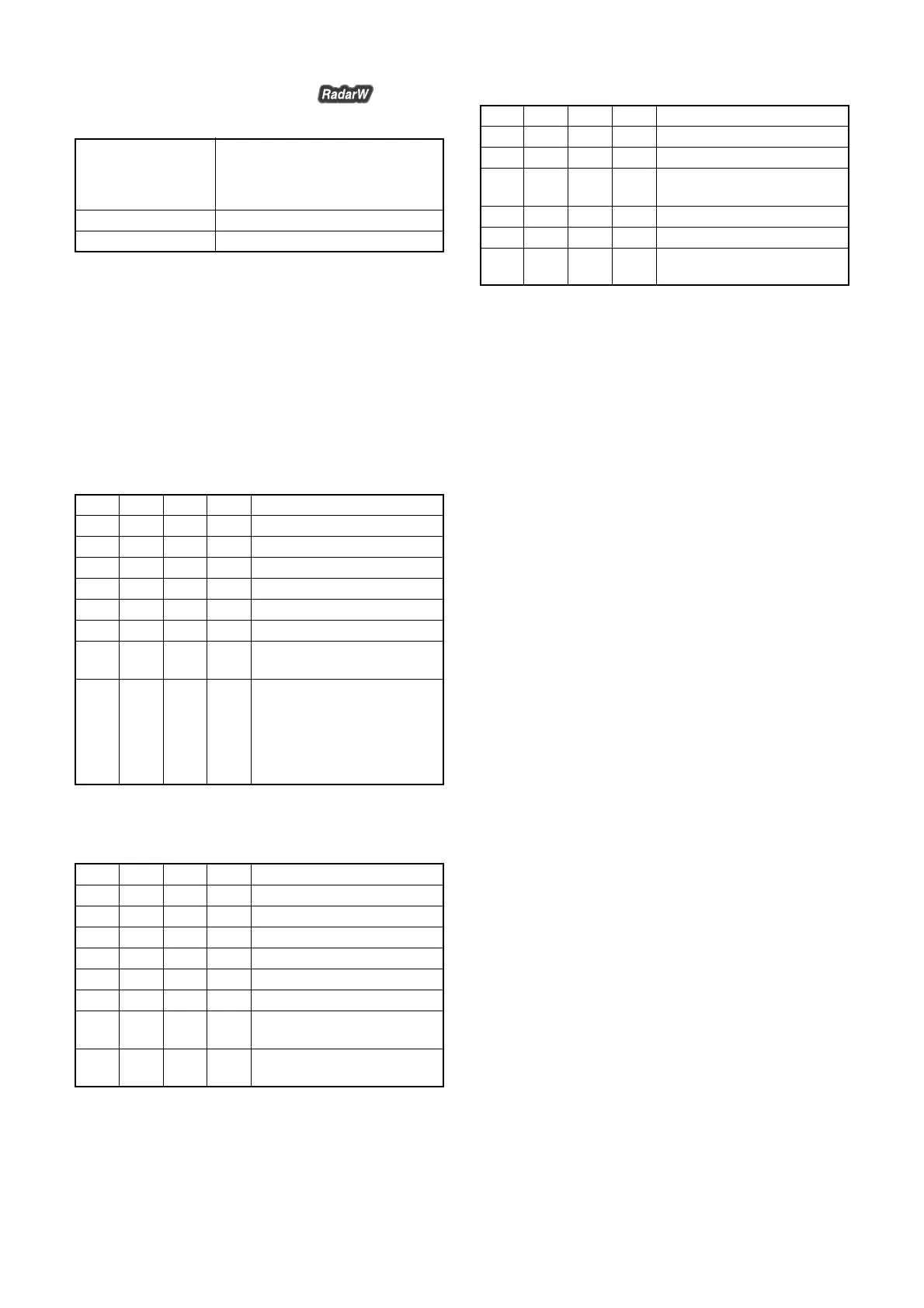
Picture frame setting:
Order Page
Address
Data Procedure
1 0 10 00 Set the data.
2 6 1F 10 Set the data.
3 6 90 XL Set the data. (Note2)
4 6 91 XH Set the data. (Note2)
5 6 92 YL Set the data. (Note2)
6 6 93 YH Set the data. (Note2)
7 6 01 79 Set the data, and press PAUSE
button.
8 Check that the picture frame
becomes “Color reproduction
adjustment frame”.
(Refer to “9. Picture Frame
Setting (Color Reproduction
Adjustment Frame)”.)
Note2: XL, XH, YL and YH are the data read in the “9. Picture Frame
Setting (Color Reproduction Adjustment Frame)”.
Adjusting method:
Order Page
Address
Data Procedure
1 0 01 01 Set the data.
2 0 10 00 Set the data.
3 6 1F 10 Set the data.
4 6 C9 10 Set the data.
5 6 9E 00 Set the data.
6 6 9D 31 Set the data.
7 6 01 61 Set the data, and press PAUSE
button.
8 6 02 Check that the data is “01”.
(Note3)
Note3: The adjustment data will be automatically input to page: 14,
address: A0 to A7
Processing after Completing Adjustments:
Order Page
Address
Data Procedure
1 0 01 00 Set the data.
2 0 10 00 Set the data.
3 6 01 00 Set the data, and press PAUSE
button.
4 6 9D 00 Set the data.
5 6 C9 00 Set the data.
6 Perform “Color Reproduction
Check”.














 To Next Page