— 19 —
DV MECHANICAL ADJUSTMENT MANUAL VII
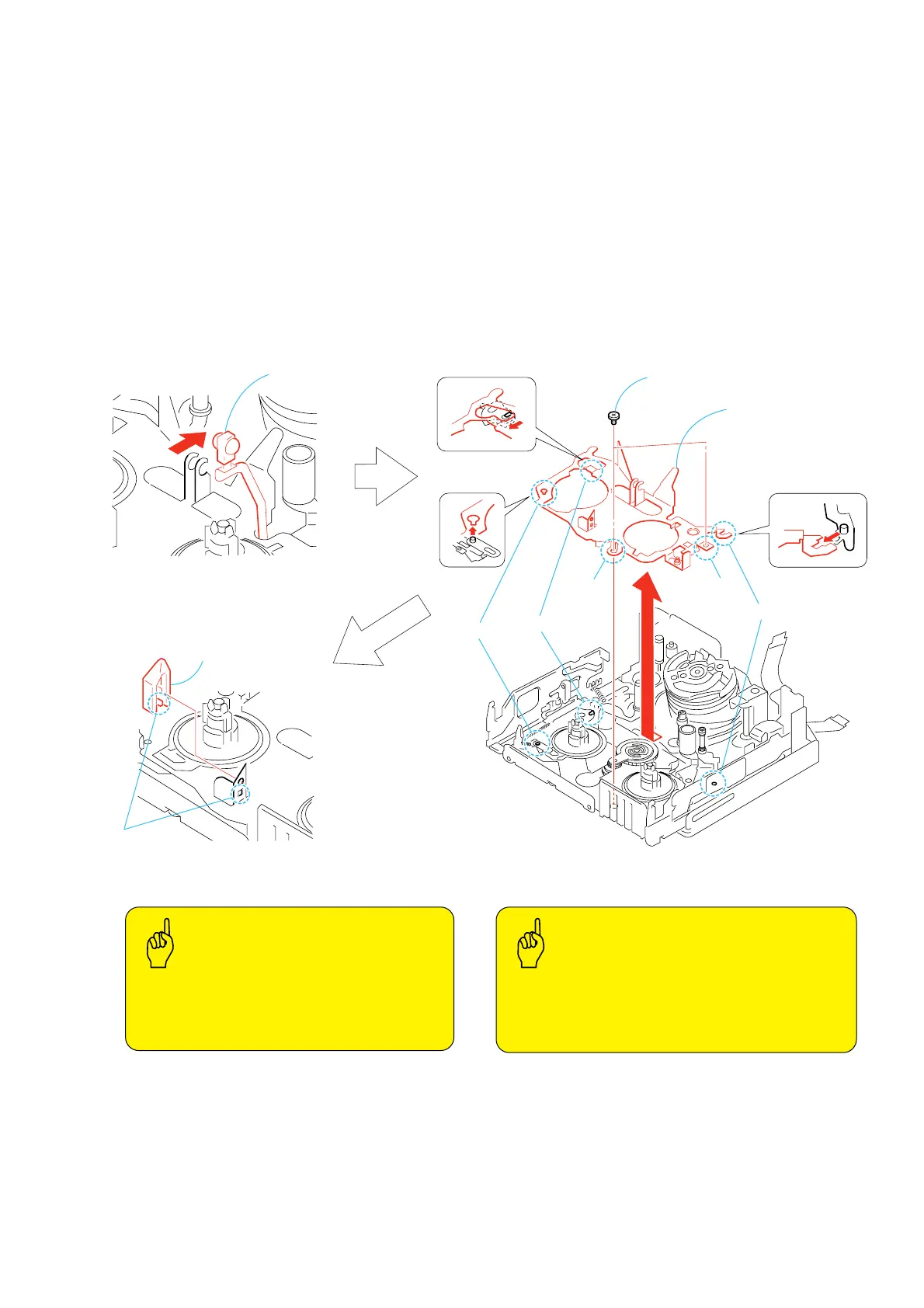
3-8. Retainer Plate
1. Removal procedure
1) Remove LED 1 from the retainer plate.
2) Remove the two screws (special head screw M1.4 × 2.0) 2.
3) Release the three claws B, C and D, and remove the retainer
plate 3 in the direction of the arrow mark E.
4) Release the claw A and remove the reel lock release 4.
2. Attachment procedure
1) Install the reel lock release 4.
2) Place the retainer plate 3 on top of the LS chassis block assy
and engage the three claws in the order starting from D, C
and B.
3) Install the two screws (special head screw M1.4 × 2.0) 2 in
the order starting from F then G.
Tightening torque: 0.059 ± 0.01N•m (0.6 ± 0.1kgf•cm)
4) Install LED 1 to the retainer plate.
1
LED
4
Reel lock release
3
Retainer plate
Claw
C
Claw
A
Claw
D
F
G
E
Claw
B
2
Two screws
(M1.4
×
2.0)
REEL LOCK RELEASE
•
The reel lock release should not be re-used.
•
The retainer plate must not have any deformation.
•
The reel lock release should be fully installed.
(Should not be left in the half-installed state.)
RETAINER PLATE
•
All claws must be fully engaged.
(Caution : No claws should be left disengaged.)
•
The flexible board should not be pinched by anything.
•
The retainer plate must not touch with the MIC terminal.
Key Points
in Re-assembling
Key Points
in Re-assembling





 To Next Page