111
English
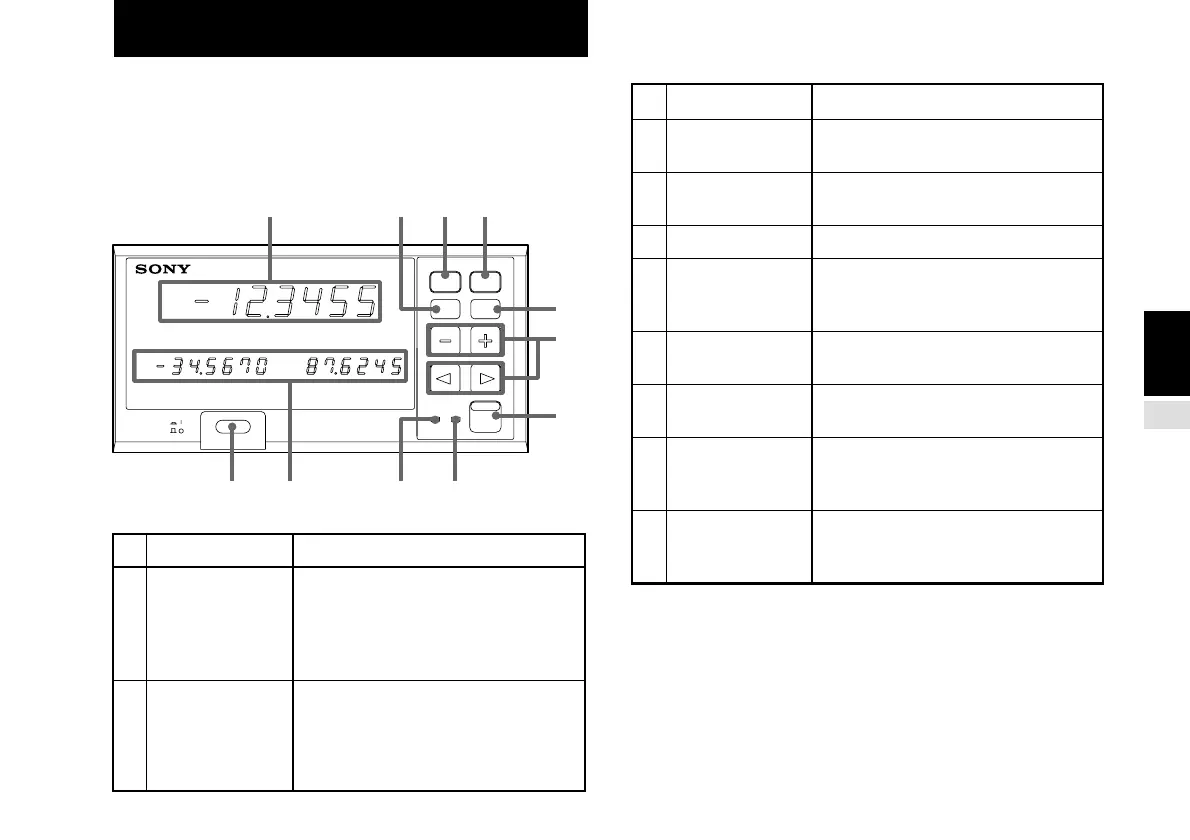
This section gives the name of each part of the LY51 display
unit and briefly describes the function. See the respective
section for a detailed description of each function.
[Front panel]
No. Function Description
1 Main display
2 Sub-display
3 POWER switch
4 RESET key
5 REF (zero point)
key
6 F (function) key
7 PRINT key
8 Data set keys
9 MODE/ENTER
key
10 REF (zero point
mode display)
indicator
11 PEAK (peak
mode display)
indicator
Turns the power on and off.
Resets the current value. Interrupts
the various setting modes.
Used for various operations related to
the zero point.
Selects the various setting items.
Used when the RS-232C unit LZ51-C
(option) is connected (data output key
to the RS-232C).
Used to input the various setting
items.
Switches the mode and enters the
various setting items.
Lights and flashes when you press
the zero point key and perform
operations related to the zero point.
Lights when peak values (maximum,
minimum and peak-to-peak values)
are displayed on the main display.
3.
NAME AND FUNCTION OF EACH PART
POWER
LY51
RESET
REF
F
MODE
REF
PEAK
ENTER
PRINT
1
3 2 10 11
645
7
8
9
Displays the current value. Can also
be switched to display the maximum,
minimum and peak-to-peak values
and other data (selected by the initial
settings).
Displays the comparator judgement
results and the maximum, minimum,
and current values. Also displays the
item when performing the various
settings.



 To Next Page