113
English
SIGNAL IN 1
100 - 230V
50 / 60Hz
30VA
I/O 1
EXT.I/O
I/O 2
I/O 3
LY51
Serial No.
Sony Presicion Technology inc.
MADE IN JAPAN
SIGNAL IN 2
Before operating the display unit, please read this section
thoroughly for proper use of the unit.
Also, make sure that you install and set the display unit
correctly in accordance with this manual.
4-1. Connection of Cables ........................................... 113
4-2. Installing the Display Unit ..................................... 115
4-3. Connection of Expansion Units ............................ 116
4-4. I/O Connector ....................................................... 117
4-5. Checking the Initial Settings ................................. 122
4-6. Initial Settings (Be sure to perform these
preparatory operations before use.) ..................... 123
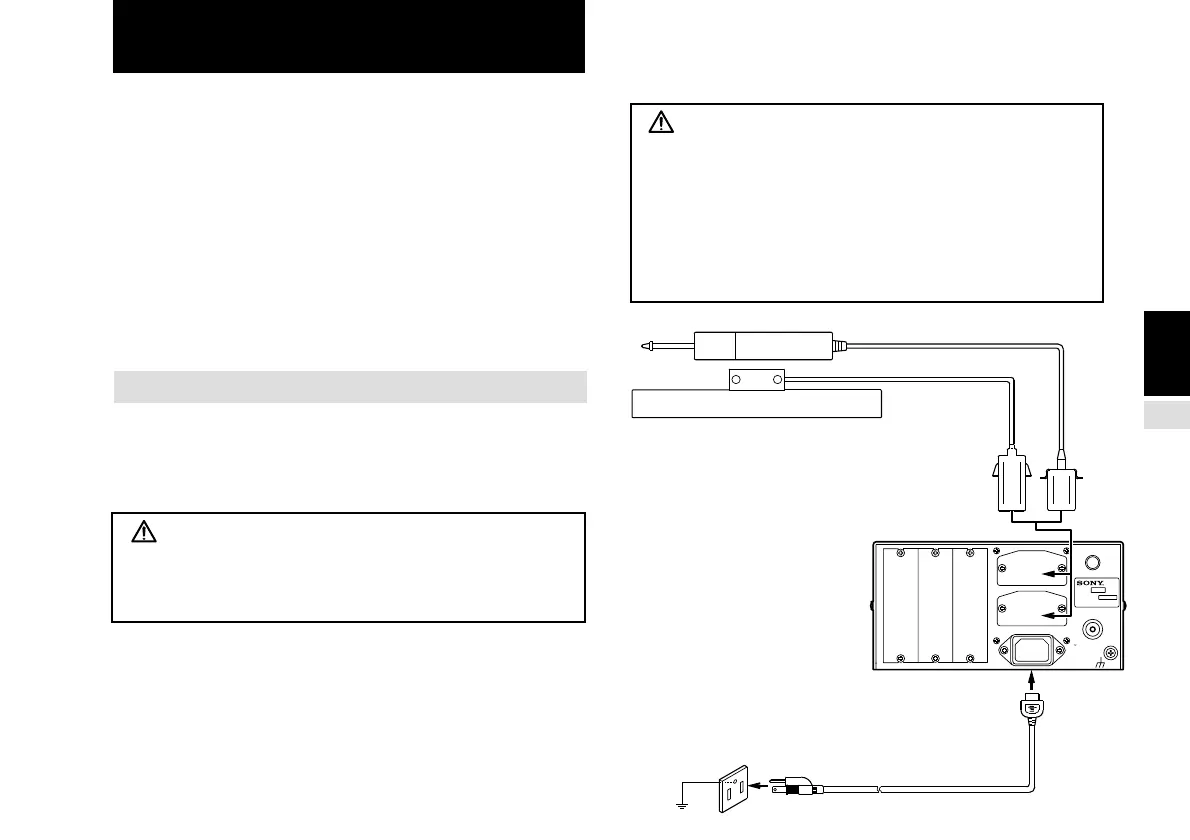
4-1. Connection of Cables
Fasten connecting cables to stationary members to prevent
accidental disconnections.
Be sure to turn off the power of the display unit before
connecting or disconnecting the scale unit.
Warning!
The POWER cord contains a safety ground. Make sure
to connect this ground. Failure to do so may result in
electric shock or fire.
Caution!
The LY51 display unit has an insulated frame GND and
circuit GND, but the connected scale unit may not be
insulated. In these cases, applying a voltage other than
0 V to the frame GND may damage the display and scale
units. Consult your service agent or the Service Division
of Sony Precision Technology concerning the scale unit
GND when applying a voltage other than 0 V to the frame.
4. INSTALLATION AND CONNECTION
(Before operation)
Earth
Make sure to ground the
POWER cord firmly.



 To Next Page