114
English
Precautions for connecting the scale
• These are precautions for connecting the scale to the
display unit.
• Since a precision connector is used for this unit, please be
careful connect to the display unit in a gentle way following
the order described below.
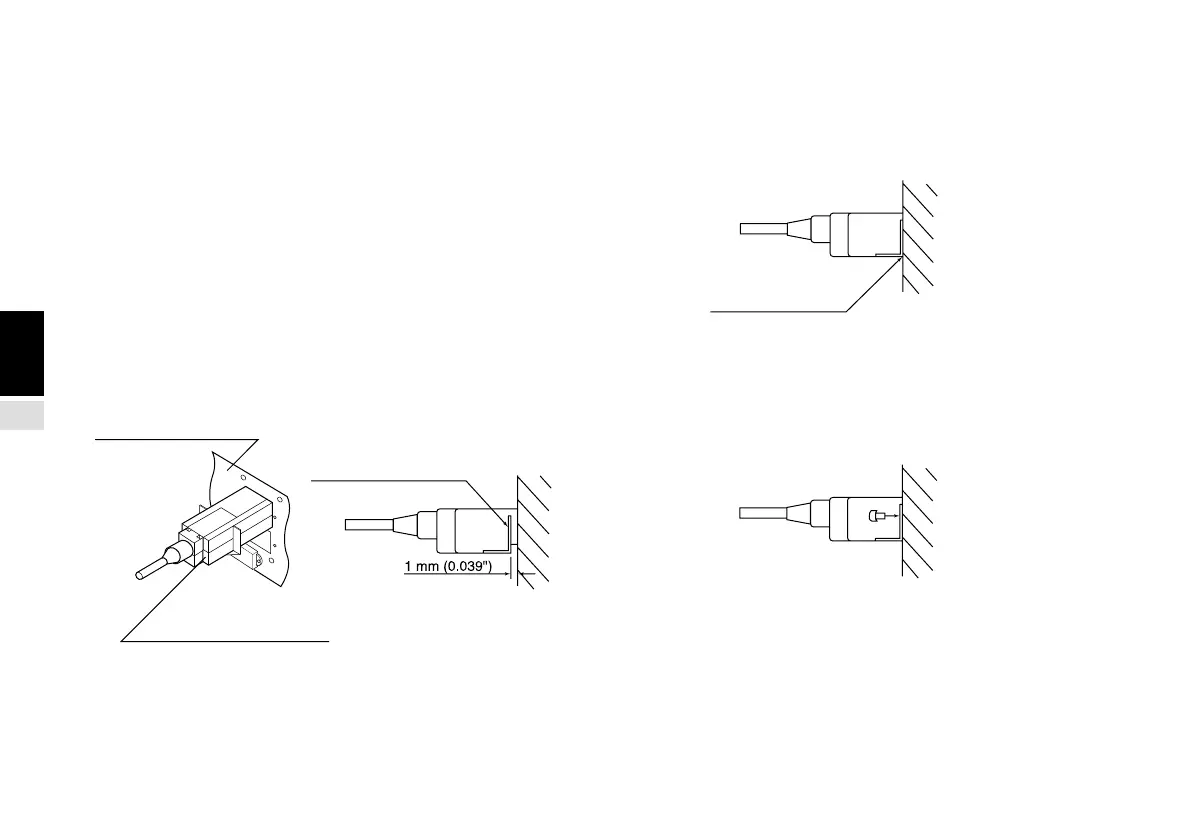
Procedure of connecting the cable
1.Insert the adapter of the cable getly to the joint of the unit.
(There is approximately 1 mm/0.039" clearance between
the mounting plate and the backside of the display unit.)
2.Push the connector (approximately 1 mm/0.039") until the
mounting plate touches the back-side panel of the display.
3.Fix the mounting plate using the screws of the removed
cover plate. (Be sure to fix the mounting plate using the
same screws. Using a different type of screw may cause
noise or other problems resulting in misoperation.)
4.Turn on the power of the display unit and make sure if if
operates normally.
Back-side panel
Adaptor mounting plate
Adaptor
Touch tightly



 To Next Page