149
English
4-6-7. Display resolution
You cannot select a display resolution value higher than the resolution of the input scale unit signal. (Axes without scale unit
input need not be set. The resolution of axes set to “None” by item 4-6-6. are also “None” for this item.) See the “Collective code
input table (1)” on P.137 for the display resolutions which can be displayed.
(Continued from 4-6-1 (2).) (P.133)
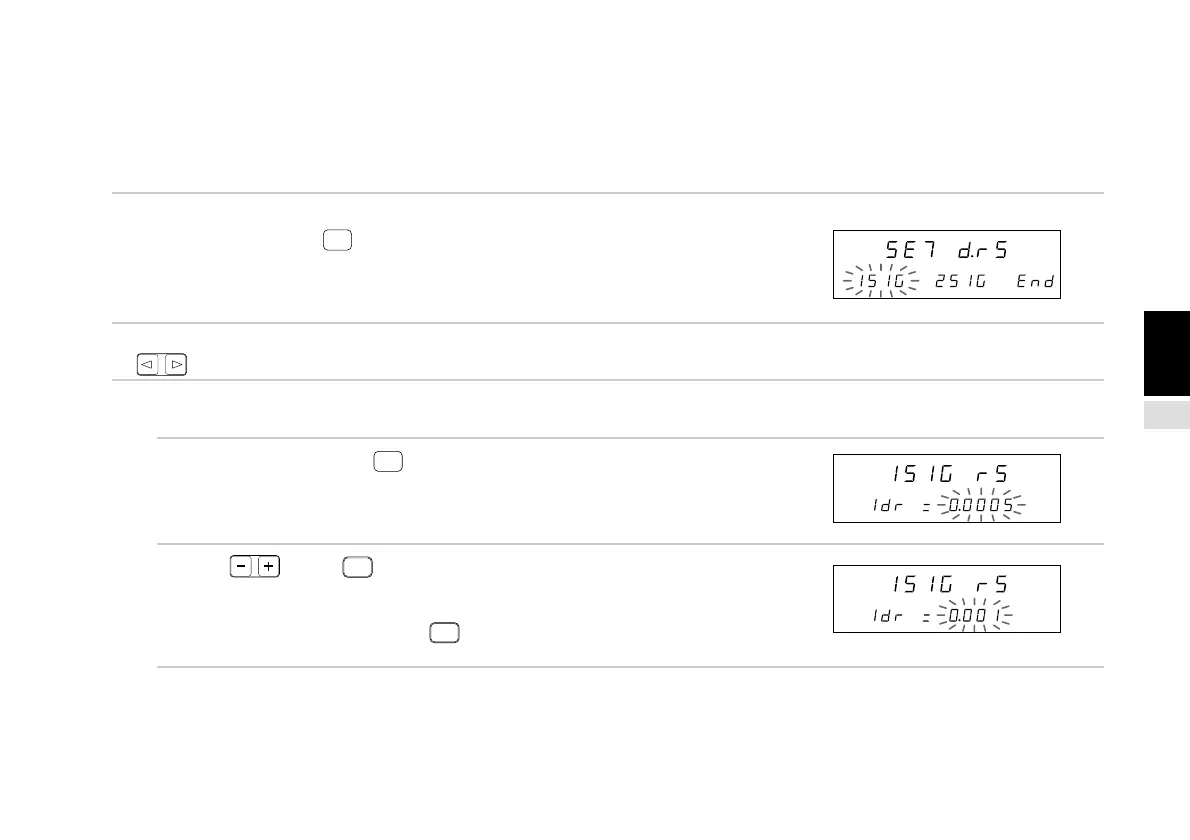
1. Select “d.rS” and press
ENTER
.
The 1st and 2nd axis display resolution can be set.
The selected item flashes.
2. Select the desired item with the cursor movement keys
.
(1) 1st axis (2nd axis) display resolution setting
3. Select “1SIG” and press
ENTER
.
(Select “2SIG” for the 2nd axis.)
The 1st axis display resolution can be set.
4. Press . (Press
REF
.)
The resolution changes.
After all of the “+” resolutions have appeared, the “–”
resolutions appear. (Pressing
REF
twice changes
the display resolution to inches.)
Main display
Sub-display
Main display
Sub-display
Main display
Sub-display



 To Next Page