148
English
(1) 1st axis (2nd axis) input resolution setting (Continued from P.147.)
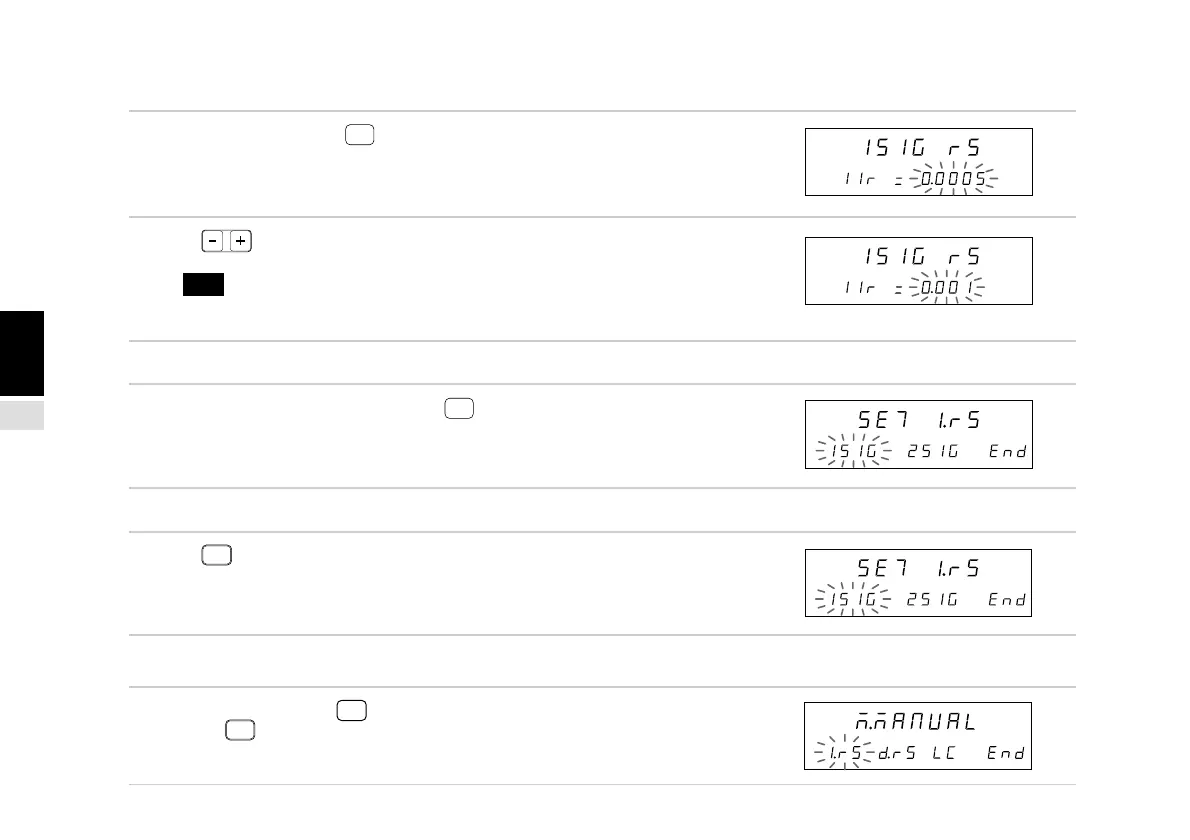
3. Select “1SIG” and press
ENTER
.
(Select “2SIG” for the 2nd axis.)
The 1st axis input resolution can be set.
4. Press .
The resolution changes.
Note The speed at which the display flashes
becomes faster if the resolution is changed for
an automatically set scale unit.
• To enter the settings
5. Set the required resolution and press
ENTER
.
The 1st axis resolution is set.
• To interrupt the settings
5. Press
RESET
.
Interrupts the input scale resolution setting.
(Previous setting contents remain.)
(2) End settings (Continued from P.147.)
3. Select “End” and press
ENTER
or press
RESET
.
Ends the input scale resolution setting.
Main display
Sub-display
Main display
Sub-display
Main display
Sub-display
Main display
Sub-display
Main display
Sub-display



 To Next Page