180
English
7-3-5. Operation for each axis
When there are two input scale axes, the LY51 performs presetting and resetting operation for the addition/subtraction results.
Preset operation Reset operation
1st axis + 2nd axis: 1st axis = preset value, 2nd axis = reset, 1st and 2nd axes both reset
1st axis – 2nd axis: 1st axis = preset value, 2nd axis = reset, 1st and 2nd axes both reset
2nd axis – 1st axis: 1st axis = reset, 2nd axis = preset value, 1st and 2nd axes both reset
1st and 2nd axes independent: 1st axis = preset, 2nd axis = unchanged, 1st and 2nd axes both reset
Therefore, use this function to perform operations separately for each axis. (This operation cannot be selected for the 1st axis
only or 2nd axis only input settings.)
(Continued from 7-3-1.) (P.177)
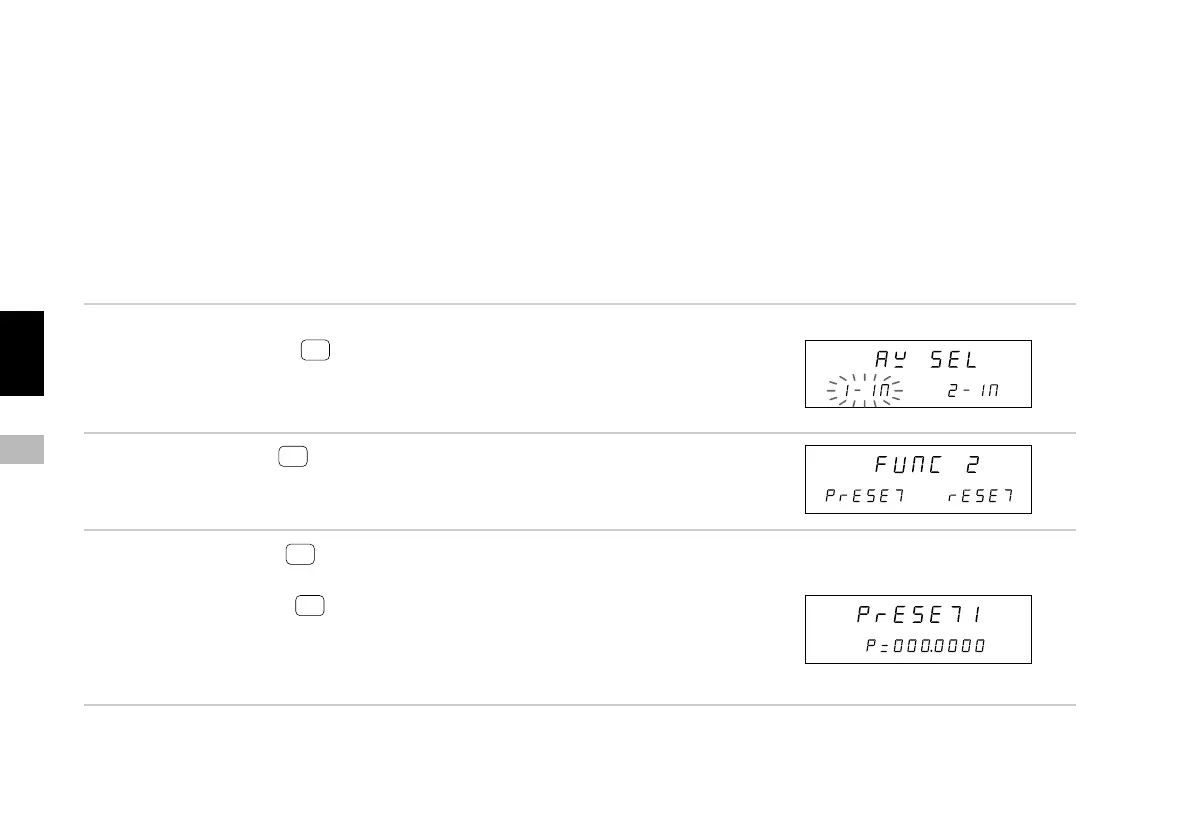
1. Select “AXIS” and press
ENTER
.
Select operation for the 1st axis or the 2nd axis.
2. Select axis and press
ENTER
.
Select preset or reset.
3. Select reset and press
ENTER
.
The value of only the selected axis is reset.
Select preset and press
ENTER
.
Resetting operation is performed for only the selected axis.
Hereafter, operation is the same as in “7-3-2. Presetting
operation”. Peak value calculation is also restarted when
this operation is performed.
Main display
Sub-display
Main display
Sub-display
Main display
Sub-display



 To Next Page