141
English
Deutsch
4-6-4. Input axis and addition/subtraction axis settings
This sets whether a 1 or 2-axis scale unit is connected. It also performs the addition/subtraction axis setting in the case of 2-axis
input.
The peak hold value is calculated using the axes selected here as the current value.
(Continued from 4-6-1 (2).) (P.133)
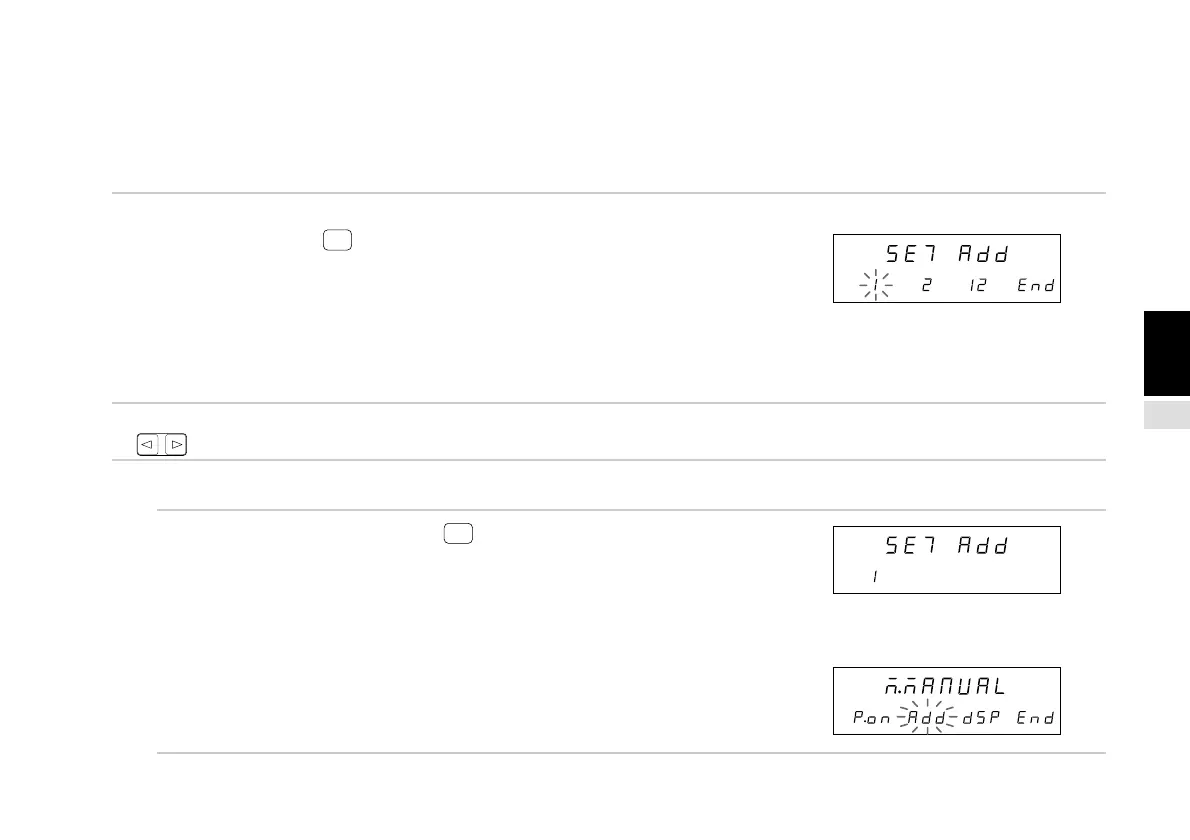
1. Select “Add” and press
ENTER
.
Selects whether the input axis is the 1st or 2nd axis only or
both the 1st and 2nd axes.
The selected item flashes.
“1” : 1st axis only input
“2” : 2nd axis only input
“12” : 1st and 2nd axes input
The initial value is 1st and 2nd axis input (12).
2. Select the desired item with the cursor movement keys
.
• To enter the settings
3. Select the desired item and press
ENTER
.
Enters the input axis and addition subtraction axis
settings.
(In this case, 1st axis only input (1) is selected.)
The setting contents light steadily for approximately
2 seconds for confirmation.
However, if “12” (1st and 2nd axes input) is selected,
the setting is not entered and operation shifts to the
addition/subtraction axis setting. (See the procedures
below.)
(Lights)
↓
(After approx. 2 sec.)
Main display
Sub-display
Main display
Sub-display
Main display
Sub-display



 To Next Page