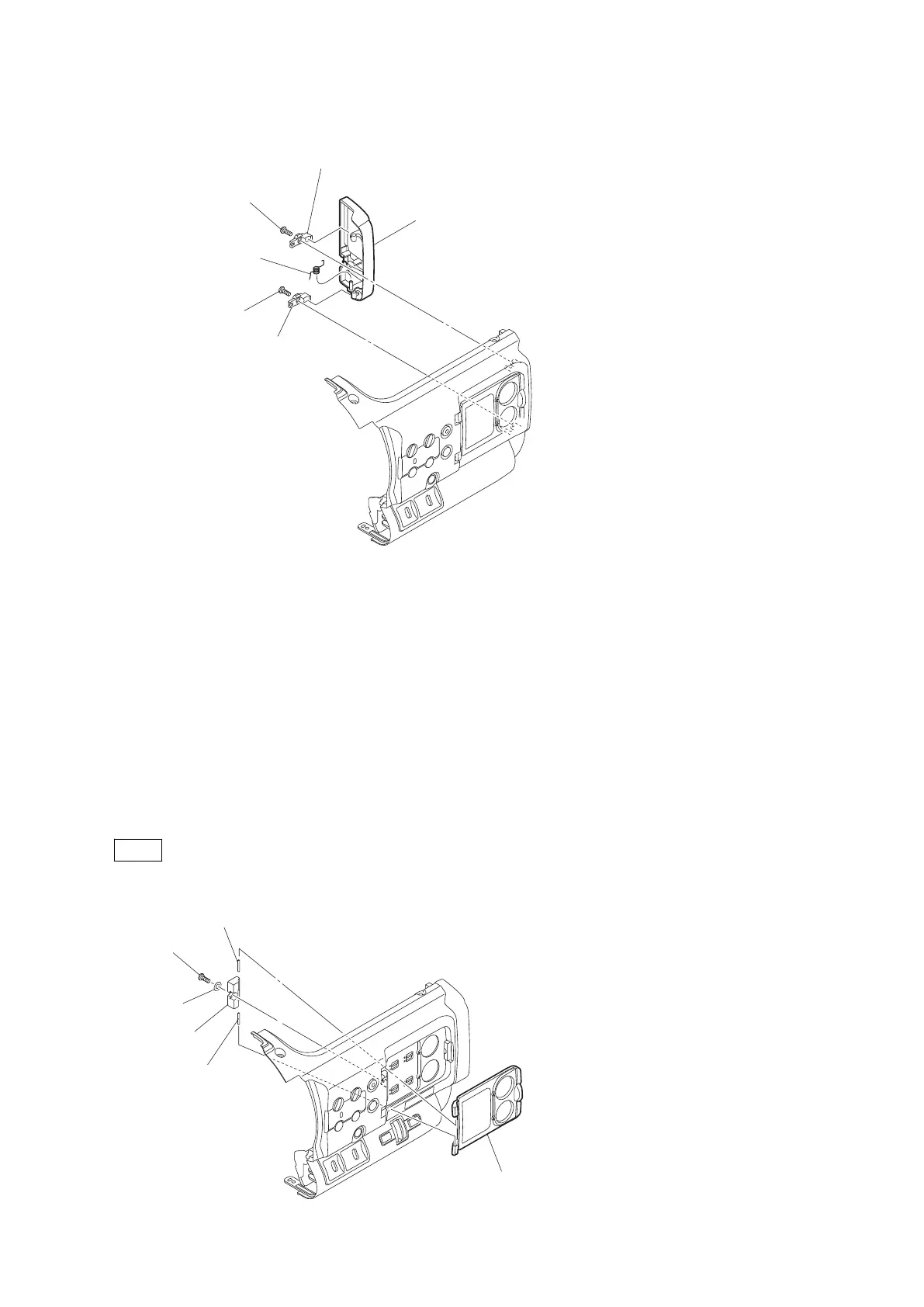
2. Remove the helical torsion coil spring to detach the SxS lid assembly.
SxS lid assembly
Tapping screw (2 x 5)
Tapping screw (2 x 5)
Helical torsion coil spring
Lid shaft retainer
Lid shaft retainer
3. Install the removed parts by reversing steps of removal.
2-4-4. AU Cover Sub Assembly
Preparation
1. Remove the battery lid. (Refer to “2-2. Lithium Battery”.)
2. Remove the bottom cover. (Refer to “2-3. Bottom Cover and Tripod Washer”.)
3. Remove the inside panel assembly. (Refer to “2-4-1. Inside Panel Assembly”.)
Procedure
1. Remove the tapping screw (2 x 5) and the washer to detach the AU shaft retainer.
2. Remove the two parallel pins to detach the AU cover sub assembly.
Note
The parallel pins are press-fit. Use a tool to remove them.
AU cover sub assembly
Tapping screw
(2 x 5)
Parallel pin
Parallel pin
PMW-200/PMW-EX280
2-7



 To Next Page