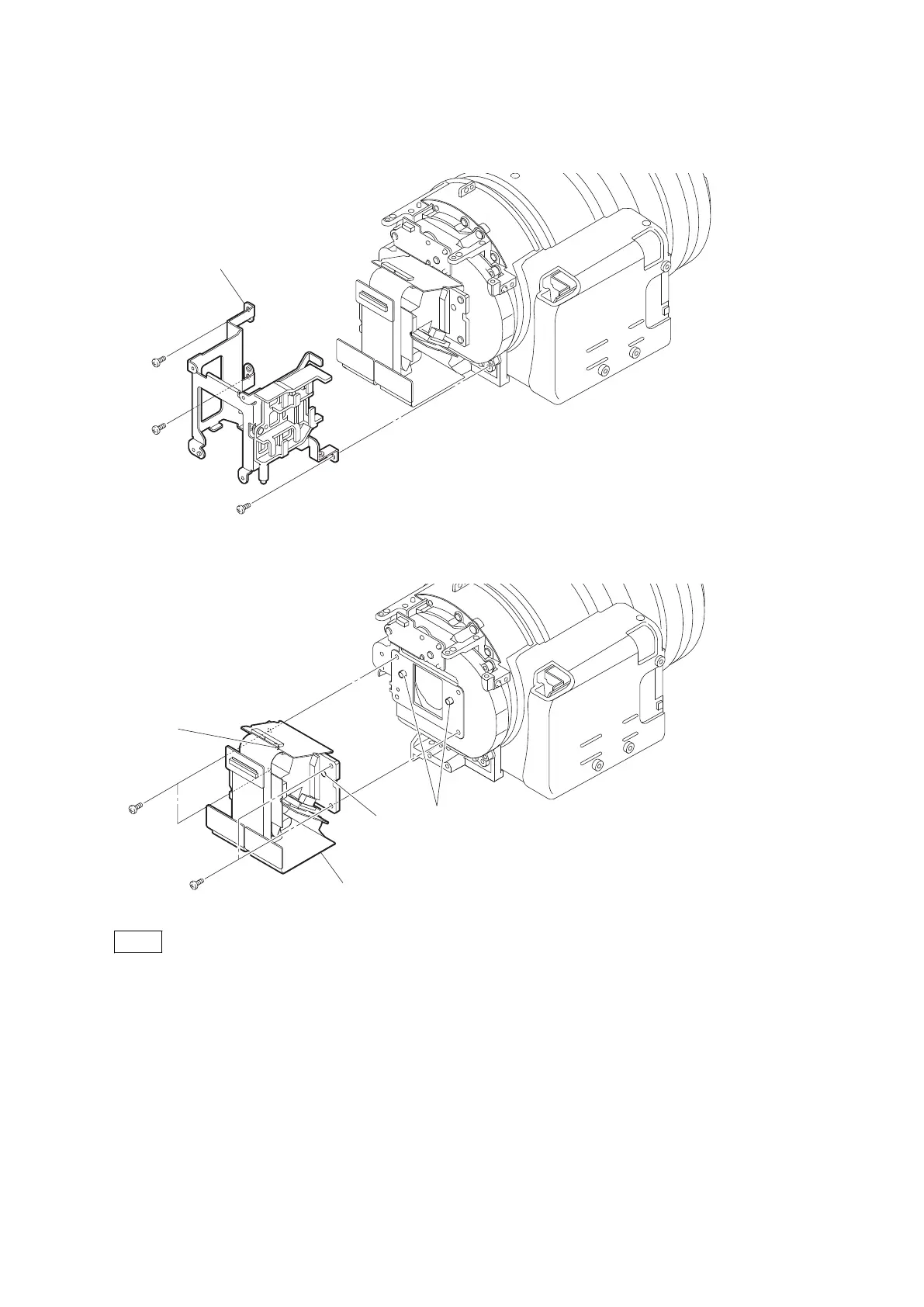
Procedure
1. Remove the three screws to detach the CHB bracket.
P2 x 4
P2 x 4
CHB bracket
P2 x 4
2. Remove the four screws to detach the prism block unit.
P3.5 x 5
P3.5 x 5
Prism block unit
Bosses
Hole
Hole
Note
When installing the prism block unit, fit the two bosses with the two holes.
3. Install the removed parts by reversing steps of removal.
2-14-4. Optical ND Filter
Preparation
1. Remove the battery lid. (Refer to“2-2. Lithium Battery”.)
2. Remove the bottom cover. (Refer to “2-3. Bottom Cover and Tripod Washer”.)
3. Remove the inside panel assembly. (Refer to “2-4-1. Inside Panel Assembly”.)
4. Remove the outside panel assembly. (Refer to “2-5-1. Outside Panel Assembly”.)
5. Remove the top panel assembly. (Refer to “2-6. Top Panel Assembly”.)
PMW-200/PMW-EX280
2-42



 To Next Page