EasyManua.ls Logo

Sony SLV-286EE - Sub Plate Assy, Brake (L, R) Assy; BK Slide Plate, Rec Arm, Rec Switch Arm

Sony SLV-286EE
112 pages
Print Icon
To Next Page IconTo Next Page
To Previous Page IconTo Previous Page
Loading...
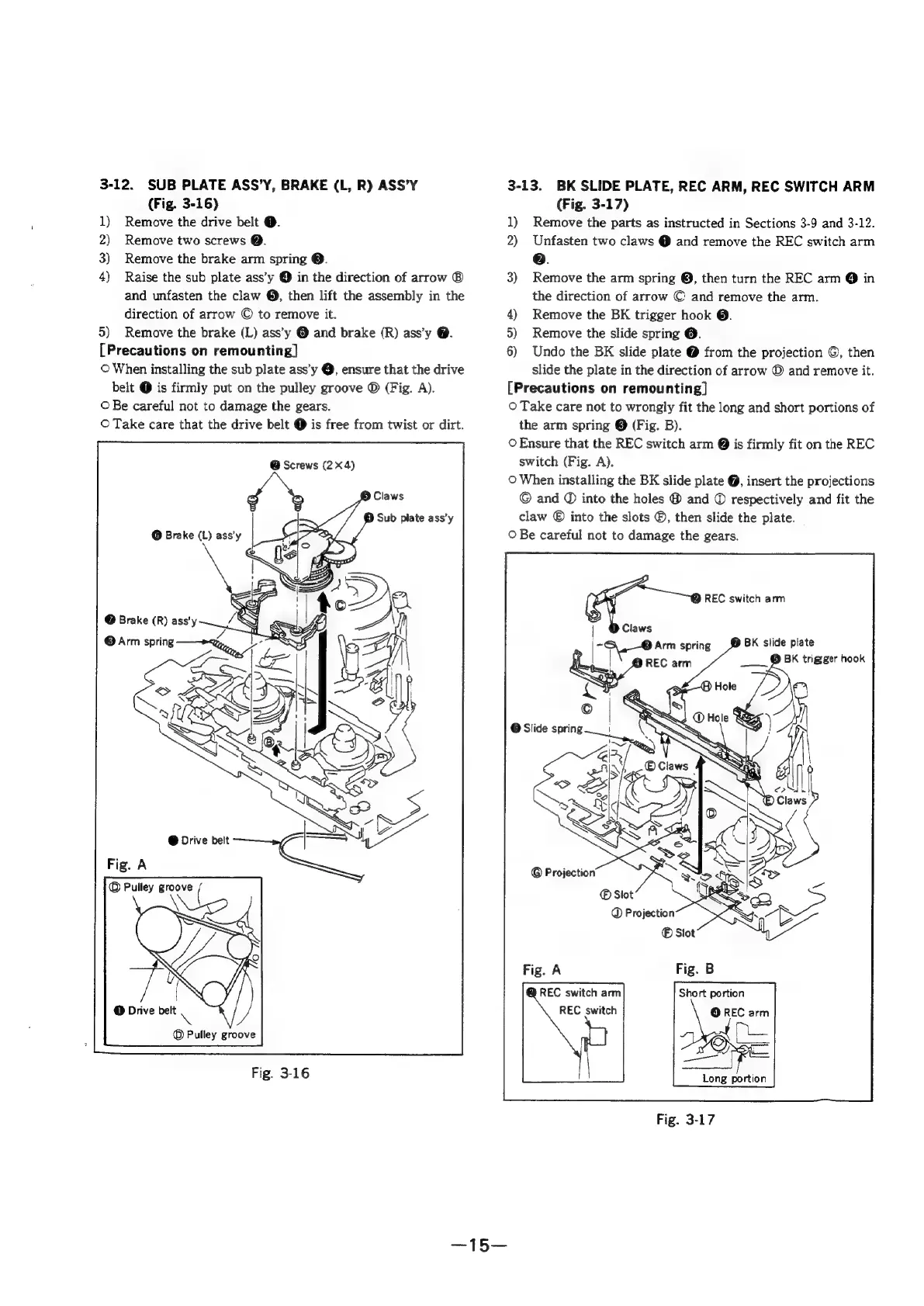
3-12.
SUB
PLATE
ASS’Y,
BRAKE
(L,
R)
ASS’Y
(Fig.
3-16)
1)
Remove
the
drive
belt
@.
2)
Remove
two
screws
@.
3)
Remove
the
brake
arm
spring
©.
4)
Raise
the
sub
plate
ass’y
@
in
the
direction
of
arrow
®
and
unfasten
the
claw
@,
then
lift
the
assembly
in
the
direction
of
arrow
©
to
remove
it.
5)
Remove
the
brake
(L)
ass’y
@
and
brake
(R)
ass’y
@.
[Precautions
on
remounting]
©
When
installing
the
sub
plate
ass’y
@,
ensure
that
the
drive
belt
@
is
firmly
put
on
the
pulley
groove
®
(Fig.
A).
©
Be
careful
not
to
damage
the
gears.
©
Take
care
that
the
drive
belt
@
is
free
from
twist
or
dirt.
@
Screws
(2X4)
@
Drive
belt
NE
©
Pulley
groove
Fig.
3-16
3-13.
BK
SLIDE
PLATE,
REC
ARM,
REC
SWITCH
ARM
(Fig.
3-17)
1)
Remove
the
parts
as
instructed
in
Sections
3-9
and
3-12.
2)
Unfasten
two
claws
@
and
remove
the
REC
switch
arm
e.
3)
Remove
the
arm
spring
@,
then
turn
the
REC
arm
@
in
the
direction
of
arrow
©
and
remove
the
arm.
4)
Remove
the
BK
trigger
hook
@.
5)
Remove
the
slide
spring
@.
6)
Undo
the
BK
slide
plate
@
from
the
projection
©,
then
slide
the
plate
in
the
direction
of
arrow
©
and
remove
it.
[Precautions
on
remounting]
O
Take
care
not
to
wrongly
fit
the
long
and
short
portions
of
the
arm
spring
©
(Fig.
B).
©
Ensure
that
the
REC
switch
arm
@
is
firmly
fit
on
the
REC
switch
(Fig.
A).
O
When
installing
the
BK
slide
plate
@,
insert
the
projections
©
and
©
into
the
holes
@
and
©
respectively
and
fit
the
claw
©
into
the
slots
®,
then
slide
the
plate.
©
Be
careful
not
to
damage
the
gears.
(i
REC
switch
arm
|
Claws
=
Arm
spring
BK
slide
plate
|
REC
arm
____
@
BK
trigger
hook
©
@
Slide
spring
i
‘1
REC
switch
arm
REC
switch
Short
portion
ae
arm
—_—_—
Long
portion

Table of Contents

Related product manuals