EasyManua.ls Logo

Sony SLV-286EE - Adjustment; Tape Path Adjustment; Tension Arm Position Adjustment; ACE Head Tilt Adjustment

Sony SLV-286EE
112 pages
Print Icon
To Next Page IconTo Next Page
To Previous Page IconTo Previous Page
Loading...
4.
ADJUSTMENT
4-1.
TAPE
PATH
ADJUSTMENT
The
“Tape
path”
refers
to
the
route
of
the
tape
from
the
supply
reel
disk
to
the
take-up
reel
disc
via
the
video
heads.
Each
component
part
of
the
tape
transport
system,
particular-
ly
the
surface
of
parts
which
make
direct
contact
with
the
tape
must
always
be
kept
clean,
free
of
dust,
oil,
scratches
and
so
forth.
The
tape
path
system
is
factory
preadjusted.
When
parts
of
the
tape
transport
system
are
replaced,
be
sure
to
make
the
required
adjustments
as
precisely
as
possible
in
order
to
ensure
stable
tape
transport.
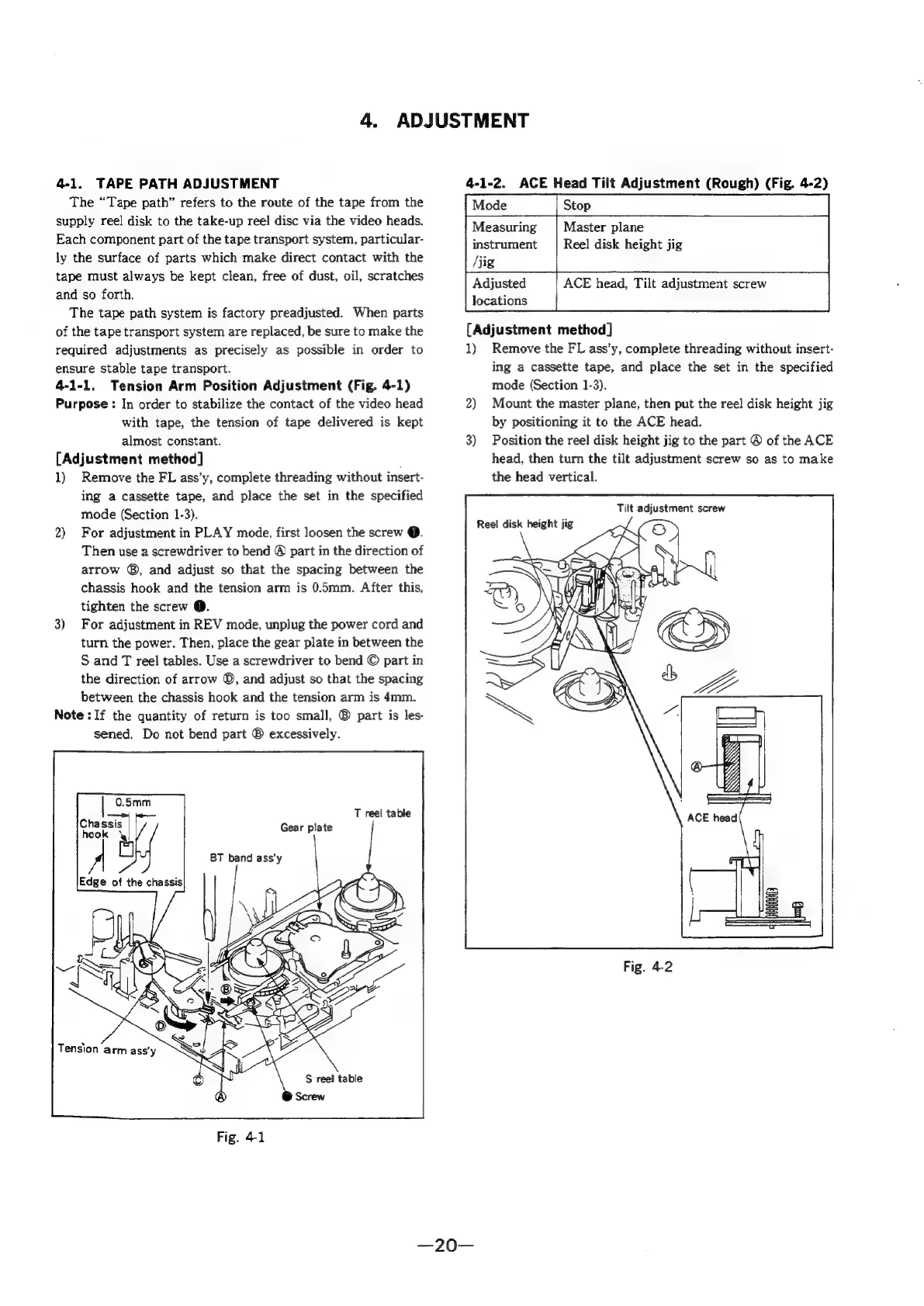
4-1-1.
Tension
Arm
Position
Adjustment
(Fig.
4-1)
Purpose
:
In
order
to
stabilize
the
contact
of
the
video
head
with
tape,
the
tension
of
tape
delivered
is
kept
almost
constant.
[Adjustment
method]
1)
Remove
the
FL
ass’y,
complete
threading
without
insert-
ing
a
cassette
tape,
and
place
the
set
in
the
specified
mode
(Section
1-3).
2)
For
adjustment
in
PLAY
mode,
first
loosen
the
screw
@.
Then
use
a
screwdriver
to
bend
©
part
in
the
direction
of
arrow
®,
and
adjust
so
that
the
spacing
between
the
chassis
hook
and
the
tension
arm
is
0.5mm.
After
this,
tighten
the
screw
@.
3)
For
adjustment
in
REV
mode,
unplug
the
power
cord
and
turn
the
power.
Then,
place
the
gear
plate
in
between
the
S
and
T
reel
tables.
Use
a
screwdriver
to
bend
©
part
in
the
direction
of
arrow
©,
and
adjust
so
that
the
spacing
between
the
chassis
hook
and
the
tension
arm
is
4mm.
Note
:
If
the
quantity
of
return
is
too
small,
®
part
is
les-
sened.
Do
not
bend
part
®
excessively.
T
reel
table
Gear
plate
S
reel
table
4-1-2.
ACE
Head
Tilt
Adjustment
(Rough)
(Fig.
4-2)
Master
plane
Reel
disk
height
jig
Measuring
instrument
/jig
Adjusted
locations
ACE
head,
Tilt
adjustment
screw
[Adjustment
method]
1)
Remove
the
FL
ass’y,
complete
threading
without
insert-
ing
a
cassette
tape,
and
place
the
set
in
the
specified
mode
(Section
1-3).
2)
Mount
the
master
plane,
then
put
the
reel
disk
height
jig
by
positioning
it
to
the
ACE
head.
3)
Position
the
reel
disk
height
jig
to
the
part
©
of
the
ACE
head,
then
turn
the
tilt
adjustment
screw
so as
to
make
the
head
vertical.
Tilt
adjustment
screw
Reel
disk
height
jig
Fig.
4-2

Table of Contents

Related product manuals