EasyManua.ls Logo

Sony SLV-286EE - Loading Pully, Loading Gear

Sony SLV-286EE
112 pages
Print Icon
To Next Page IconTo Next Page
To Previous Page IconTo Previous Page
Loading...
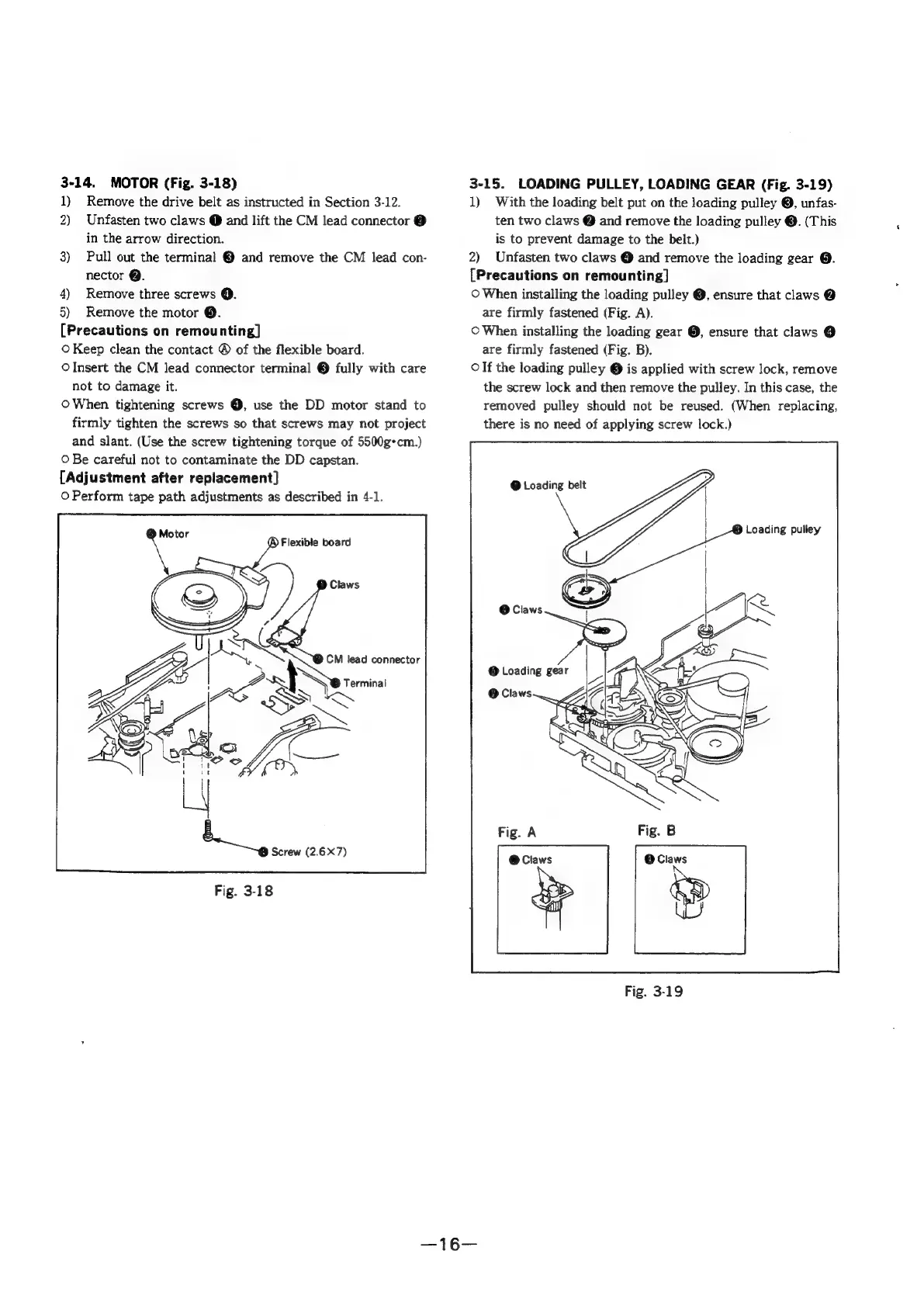
3-14.
MOTOR
(Fig.
3-18)
1)
Remove
the
drive
belt
as
instructed
in
Section
3-12.
2)
Unfasten
two
claws
@
and
lift
the
CM
lead
connector
@
in
the
arrow
direction.
3)
Pull
out
the
terminal
©
and
remove
the
CM
lead
con-
nector
@.
4)
Remove
three
screws
©.
5)
Remove
the
motor
@.
[Precautions
on
remounting]
©
Keep
clean
the
contact
®
of
the
flexible
board.
OInsert
the
CM
lead
connector
terminal
@
fully
with
care
not
to
damage
it.
OWhen
tightening
screws
@,
use
the
DD
motor
stand
to
firmly
tighten
the
screws
so
that
screws
may
not
project
and
slant.
(Use
the
screw
tightening
torque
of
5500g*cm.)
O
Be
careful
not
to
contaminate
the
DD
capstan.
[Adjustment
after
replacement]
O
Perform
tape
path
adjustments
as
described
in
4-1.
@
Flexible
board
TSS
lead
connector
2
aah
Serie
~
L
Screw
(2.6X7)
Fig.
3-18
3-15.
LOADING
PULLEY,
LOADING
GEAR
(Fig.
3-19)
1)
With
the
loading
belt
put
on
the
loading
pulley
©,
unfas-
ten
two
claws
@
and
remove
the
loading
pulley
@.
(This
is
to
prevent
damage
to
the
belt.)
2)
Unfasten
two
claws
@
and
remove
the
loading
gear
@.
[Precautions
on
remounting]
©
When
installing
the
loading
pulley
@,
ensure
that
claws
@
are
firmly
fastened
(Fig.
A).
©
When
installing
the
loading
gear
@,
ensure
that
claws
@
are
firmly
fastened
(Fig.
B).
Olf
the
loading
pulley
@
is
applied
with
screw
lock,
remove
the
screw
lock
and
then
remove
the
pulley.
In
this
case,
the
removed
pulley
should
not
be
reused.
(When
replacing,
there
is
no
need
of
applying
screw
lock.)
@
Loading
belt
ag
een
iy
O
Claws
Fig.
3-19

Table of Contents

Related product manuals