EasyManua.ls Logo

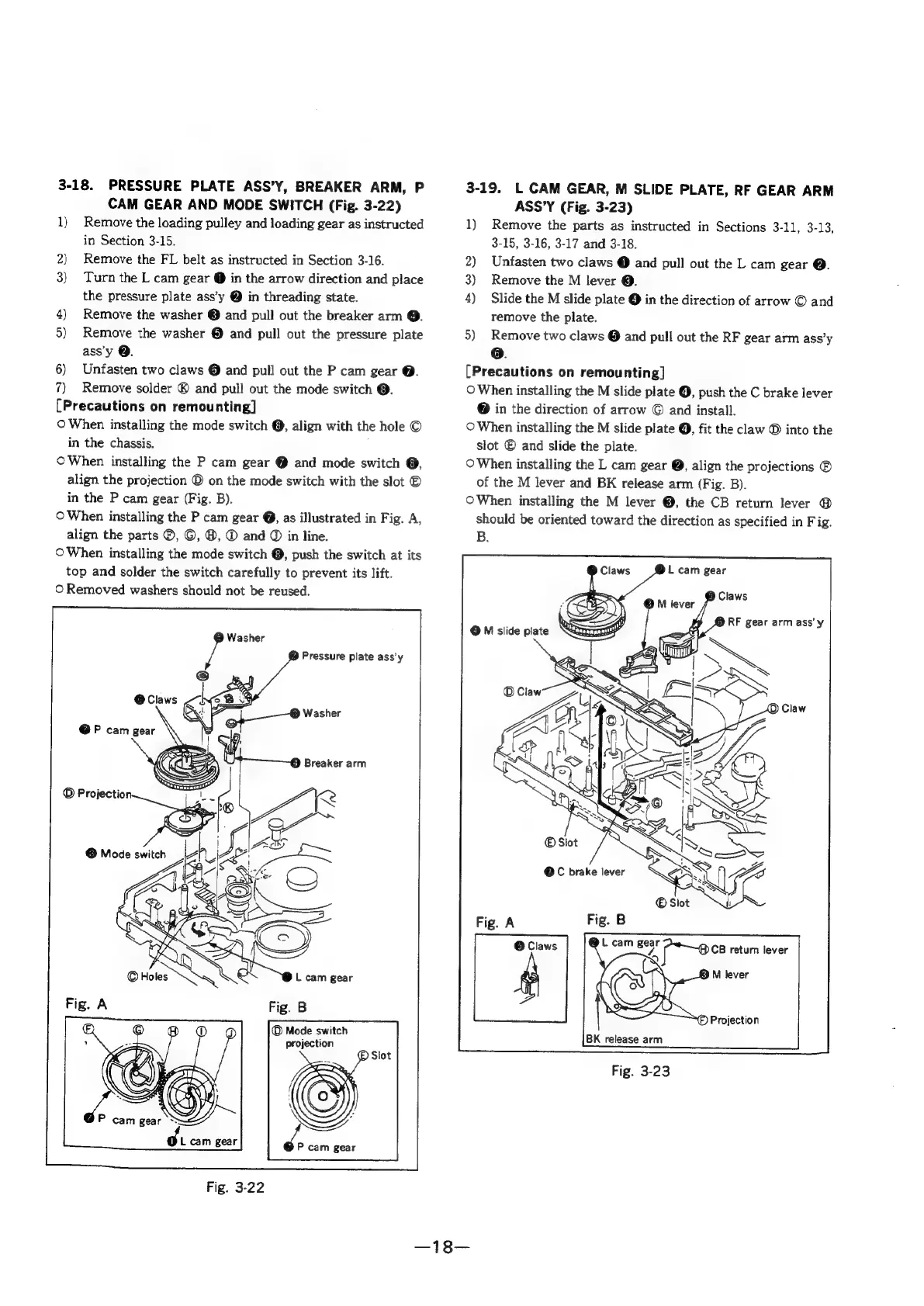
Sony SLV-286EE - Pressure Plate Assy, Breaker Arm, Pcam Gear and Mode Switch; L Cam Gear, M Slide Plate, RF Gear Arm Assy

Sony SLV-286EE
112 pages
Print Icon
To Next Page IconTo Next Page
To Previous Page IconTo Previous Page
Loading...
3-18.
PRESSURE
PLATE
ASS’Y,
BREAKER
ARM,
P
CAM
GEAR
AND
MODE
SWITCH
(Fig.
3-22)
1)
Remove
the
loading
pulley
and
loading
gear
as
instructed
in
Section
3-15.
2)
Remove
the
FL
belt
as
instructed
in
Section
3-16.
3)
Turn
the
L
cam
gear
@
in
the
arrow
direction
and
place
the
pressure
plate
ass’y
@
in
threading
state.
4)
Remove
the
washer
©
and
pull
out
the
breaker
arm
@.
5)
Remove
the
washer
®
and
pull
out
the
pressure
plate
ass'y
Q.
6)
Untasten
two
claws
©
and
pull
out
the
P
cam
gear
@.
7)
Remove
solder
®
and
pull
out
the
mode
switch
@.
[Precautions
on
remounting]
©
When
installing
the
mode
switch
©,
align
with
the
hole
©
in
the
chassis.
©
When
installing
the
P
cam
gear
@
and
mode
switch
@,
align
the
projection
©
on
the
mode
switch
with
the
slot
©
in
the
P
cam
gear
(Fig.
B).
©
When
installing
the
P
cam
gear
@,
as
illustrated
in
Fig.
A,
align
the
parts
®, ©,
@,
®
and
©
in
line.
©
When
installing
the
mode
switch
@,
push
the
switch
at
its
top
and
solder
the
switch
carefully
to
prevent
its
lift.
©
Removed
washers
should
not
be
reused.
©
Mode
switch
projection
3-19.
L
CAM
GEAR, M
SLIDE
PLATE,
RF
GEAR
ARM
ASS’Y
(Fig.
3-23)
1)
Remove
the
parts
as
instructed
in
Sections
3-11,
3-13,
3-15,
3-16,
3-17
and
3-18.
2)
Unfasten
two
claws
@
and
pull
out
the
L
cam
gear
@.
3)
Remove
the
M
lever
@.
4)
Slide
the
M
slide
plate
@
in
the
direction
of
arrow
©
and
remove
the
plate.
5)
Remove
two
claws
@
and
pull
out
the
RF
gear
arm
ass’y
o.
[Precautions
on
remounting]
©
When
installing
the
M
slide
plate
@,
push
the
C
brake
lever
@
in
the
direction
of
arrow
©
and
install.
©
When
installing
the
M
slide
plate
@,
fit
the
claw
D
into
the
slot
®
and
slide
the
plate.
©
When
installing
the
L
cam
gear
@,
align
the
projections
®
of
the
M
lever
and
BK
release
arm
(Fig.
B).
OWhen
installing
the
M
lever
@,
the
CB
return
lever
@
should
be
oriented
toward
the
direction
as
specified
in
Fig.
B.
DL
cam
gear
ieee
Claws
RF
gear
arm
ass'y

Table of Contents

Related product manuals